0 · Oracle on Azure — Adoption Scenarios
These are original revision notes for the Cloud Adoption Framework (CAF) view of running Oracle on Azure. They set the big picture before the rest of this module goes deep on Oracle Database@Azure: the two platform options, the landing-zone pattern that hosts them, and the design areas you plan for either way.
Core message
There are two ways to run Oracle on Azure, and they share one foundation. The first is Oracle on Azure Virtual Machines — a self-managed IaaS approach where you own the OS, database, HA/DR, and backup. The second is Oracle Database@Azure (OD@A) — a managed Exadata service where Oracle runs the hardware and infrastructure. Both run inside your own Azure virtual network, appear on your Azure bill, sit next to your apps, and use Microsoft Entra sign-in. Whichever you choose, you deploy it into an Azure landing zone and plan the same critical design areas — identity, network, security, management, and business continuity — ideally across multiple regions for resilience.
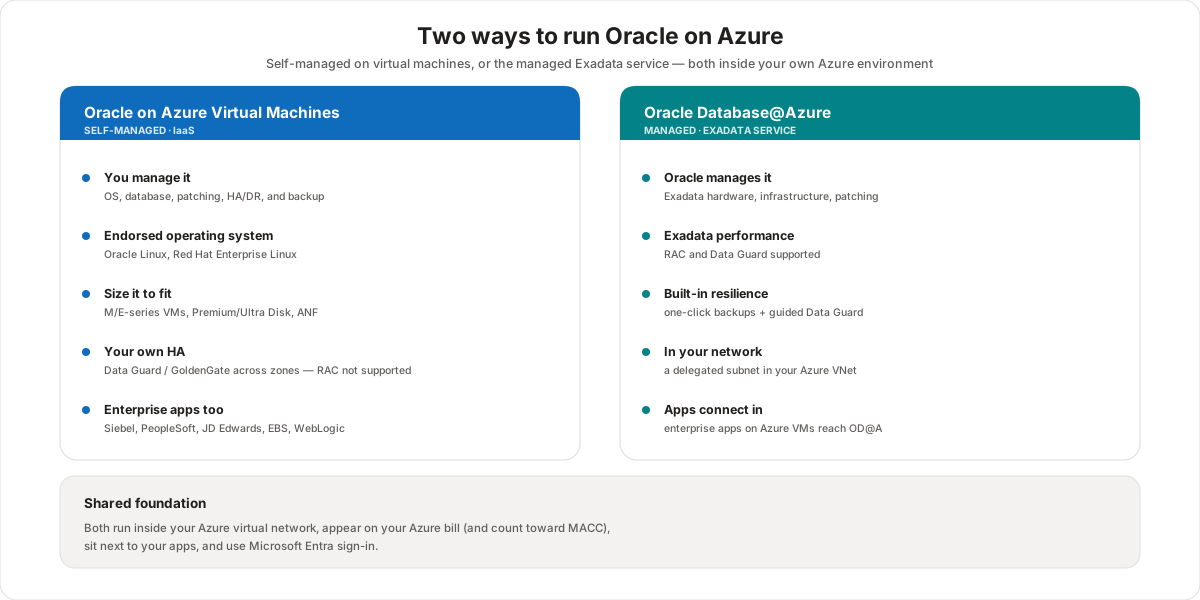
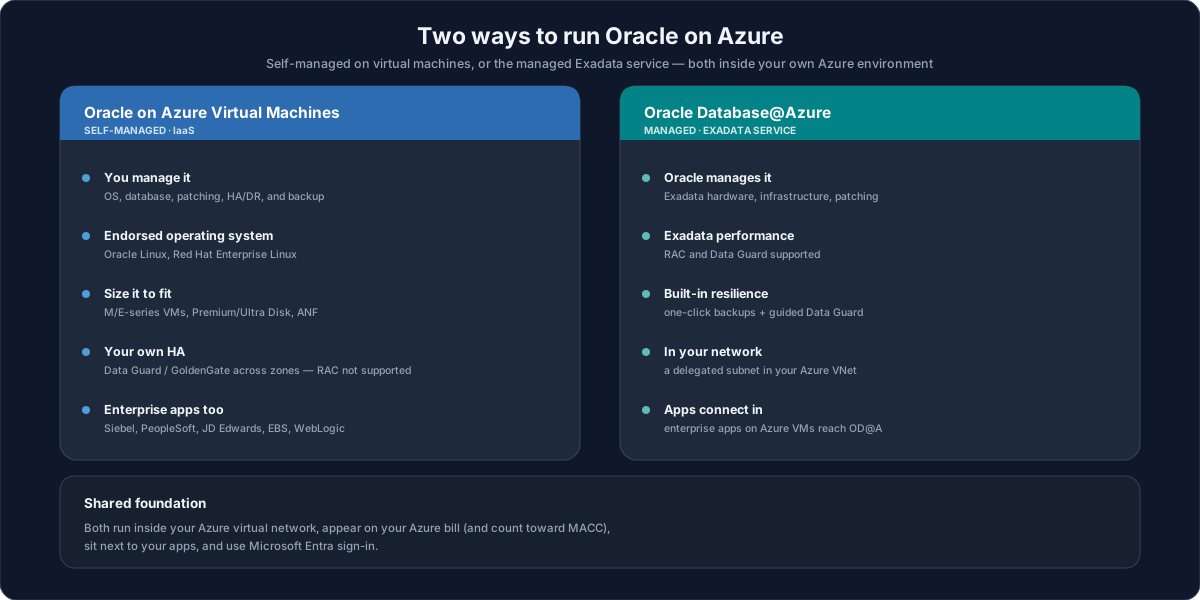
Two ways to run Oracle on Azure
Oracle on Azure Virtual Machines
You run Oracle on Azure VMs and manage it yourself — the classic lift-and-shift target. You choose an endorsed operating system (Oracle Linux, Red Hat Enterprise Linux, and others), size the VM and storage, and own the database lifecycle end to end.
- You manage everything — OS, database, patching, high availability, disaster recovery, and backup are your responsibility.
- Sizing — memory-optimized M/E-series VMs (often with constrained-core vCPUs to save on licensing), with Premium/Ultra Disk or Azure NetApp Files for the data.
- High availability — you build it with Oracle Data Guard or GoldenGate across availability zones (99.99% VM SLA) or regions. Oracle RAC is not supported on Azure VMs.
- Enterprise applications — the same VMs can host Siebel, PeopleSoft, JD Edwards, E-Business Suite, or custom WebLogic apps.
Oracle Database@Azure
You run Oracle's Exadata service that Oracle operates inside Azure datacenters. Oracle manages the hardware and infrastructure; you provision and use the databases from the Azure portal.
- Oracle manages the platform — Exadata hardware, infrastructure, and patching are handled for you.
- Exadata performance — and support for Oracle RAC and Data Guard.
- Built-in resilience — one-click automatic backups and guided Data Guard (see the module's HA/DR lesson).
- In your network — it connects through a delegated subnet in your Azure VNet, so apps on Azure VMs reach it with low latency.
Which to choose
Pick Oracle on Azure VMs when you want a direct lift-and-shift, full control of the OS and database, or a smaller footprint. Pick Oracle Database@Azure when you want Exadata-class performance, RAC, and a managed service where Oracle carries the infrastructure and much of the resilience. Many estates use both — apps and smaller databases on VMs, mission-critical Exadata workloads on OD@A.
Azure Arc for Oracle Database@Azure
OD@A can be integrated with Azure Arc-enabled servers to extend Azure management to the Oracle infrastructure. This brings unified governance, security monitoring through Microsoft Defender for Cloud, and policy compliance — while OCI continues to run the underlying service operations.
Landing zones and the multi-region pattern
Both platforms deploy into an Azure landing zone. The recommended reference architecture is multi-region: a shared platform landing zone (hub) provides identity, governance, connectivity, and security, and each region hosts an application landing zone with the app tier and the Oracle data platform. You then replicate between regions (Data Guard) for disaster recovery.
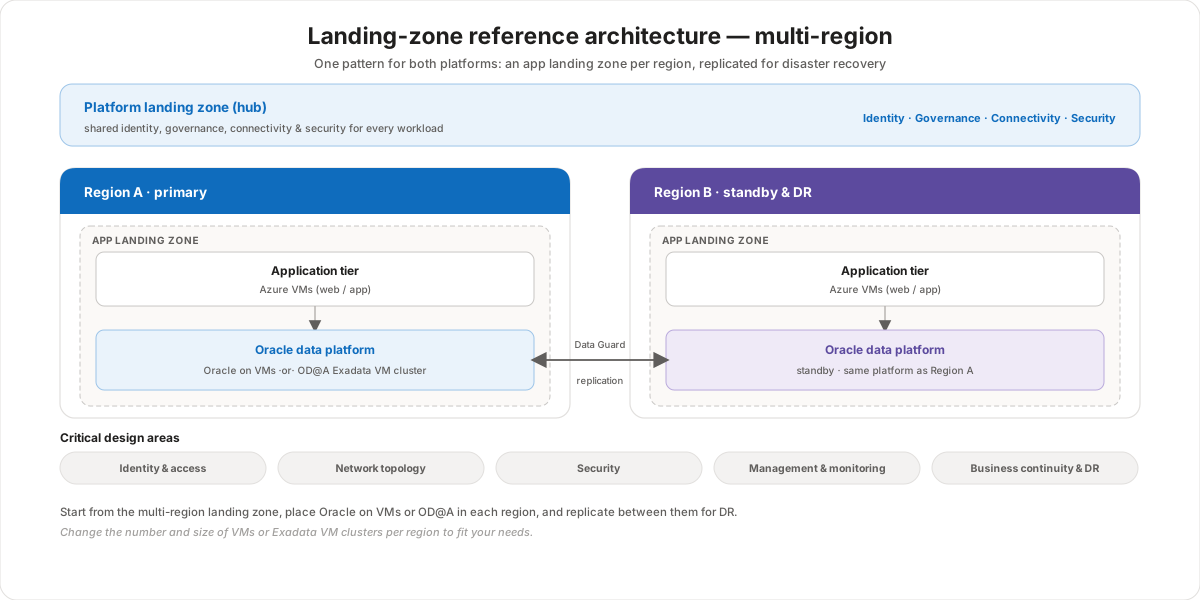
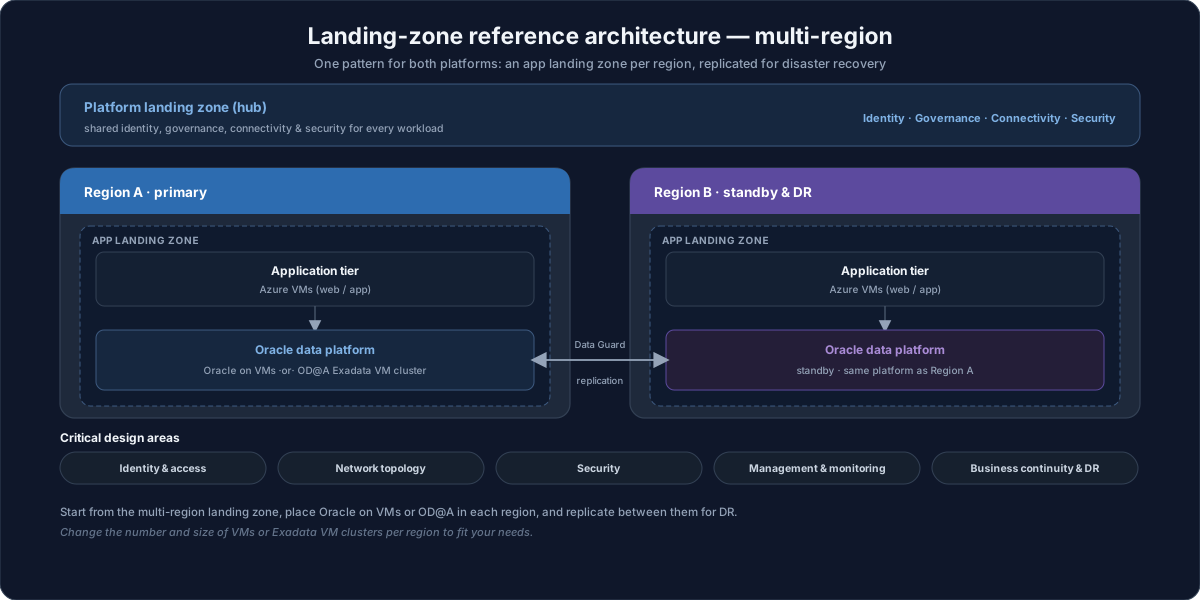
The same pattern serves both platforms — you just place Oracle on VMs or an OD@A Exadata VM cluster as the data platform in each region, and size the number of VMs or clusters to fit.
Critical design areas
Whichever platform you pick, you plan the same CAF design areas. For OD@A, this module already covers them in depth:
- Identity & access — Azure RBAC and Microsoft Entra ID, with optional federation to Oracle. See Identity and Identity federation.
- Network topology — the delegated subnet, VNet integration, and connectivity. See Networking.
- Security — network controls, encryption, and (for OD@A) Defender for Cloud via Azure Arc.
- Management & monitoring — Azure Monitor and Log Analytics alongside the OCI console. See Operations management.
- Business continuity & DR — automatic backups and Data Guard topologies. See High availability and disaster recovery.
When you're ready to move existing databases onto either platform, see Module 4 · Migrate to Oracle Database@Azure.
Customer value
- One decision, clearly framed — self-managed VMs for control and lift-and-shift, or the managed Exadata service for performance and less operational burden.
- A familiar operating model — both platforms live in your Azure VNet, on your Azure bill, and under Microsoft Entra sign-in, so governance and cost management stay unified.
- Resilience by design — the multi-region landing-zone pattern gives a repeatable HA/DR blueprint for either platform.
- Unified management — Azure Arc brings OD@A infrastructure into Defender for Cloud and Azure Policy for a single governance view.
Risks and considerations
- VMs mean you own resilience — on Azure VMs, HA/DR and backup are your responsibility; budget for Data Guard/GoldenGate design and licensing.
- RAC only on OD@A — if you need Oracle RAC, that points to Oracle Database@Azure, not Azure VMs.
- Region availability — OD@A is available in a limited, evolving set of regions; confirm before committing.
- Landing zone first — deploying without a landing zone leads to inconsistent identity, network, and governance; start from the reference architecture.
- Licensing — Data Guard needs Enterprise Edition and GoldenGate needs a license on either platform.
Terms to remember
- Oracle on Azure Virtual Machines — self-managed Oracle (and enterprise apps) on Azure IaaS; you own OS, DB, HA/DR, and backup.
- Oracle Database@Azure (OD@A) — Oracle's managed Exadata service running inside Azure datacenters, reached through a delegated subnet.
- Azure landing zone — the governed Azure environment (platform hub + application landing zones) you deploy workloads into.
- Critical design areas — the CAF planning dimensions: identity, network, security, management, and business continuity/DR.
- Azure Arc-enabled servers — extends Azure governance, Defender for Cloud, and Policy to the OD@A infrastructure.
"I open the Oracle-on-Azure conversation with two doors. Door one is Oracle on Azure VMs — a straight lift-and-shift where the customer keeps full control of the OS and database, and we build HA with Data Guard across zones. Door two is Oracle Database@Azure — the managed Exadata service where Oracle runs the hardware, we get RAC and one-click backups, and it drops into a delegated subnet right next to their apps. The thing I stress is that both live in their Azure — same VNet, same bill, same Entra sign-in — so it's not a separate island to govern. Then we drop whichever one they pick into a multi-region landing zone and plan the same five design areas: identity, network, security, management, and DR. One gotcha I always call out early: if they need RAC, that decides it — RAC is an OD@A capability, not something we run on Azure VMs."