12 · Operations Management
These are original revision notes for the operations management lesson. They describe how day-two work is split across the two clouds in our own words rather than reproducing the recording.
Core message
Once Oracle Database@Azure is running, the operational work is split across two planes, the same way provisioning was. The Azure portal owns the Azure-side resources — the Oracle Exadata Infrastructure and the Exadata VM cluster — where you run scale-up operations and apply infrastructure and software updates. The OCI Console owns the database system — where you patch and update released database ESUs, create or terminate databases, manage encryption keys, configure automatic backups and disaster recovery, and scale up the database resources. The same division shapes observability (Azure Monitor and Log Analytics for the Azure resources, OCI native services for the database) and billing (Microsoft Cost Management on the Azure side, OCI billing and cost management on the Oracle side).
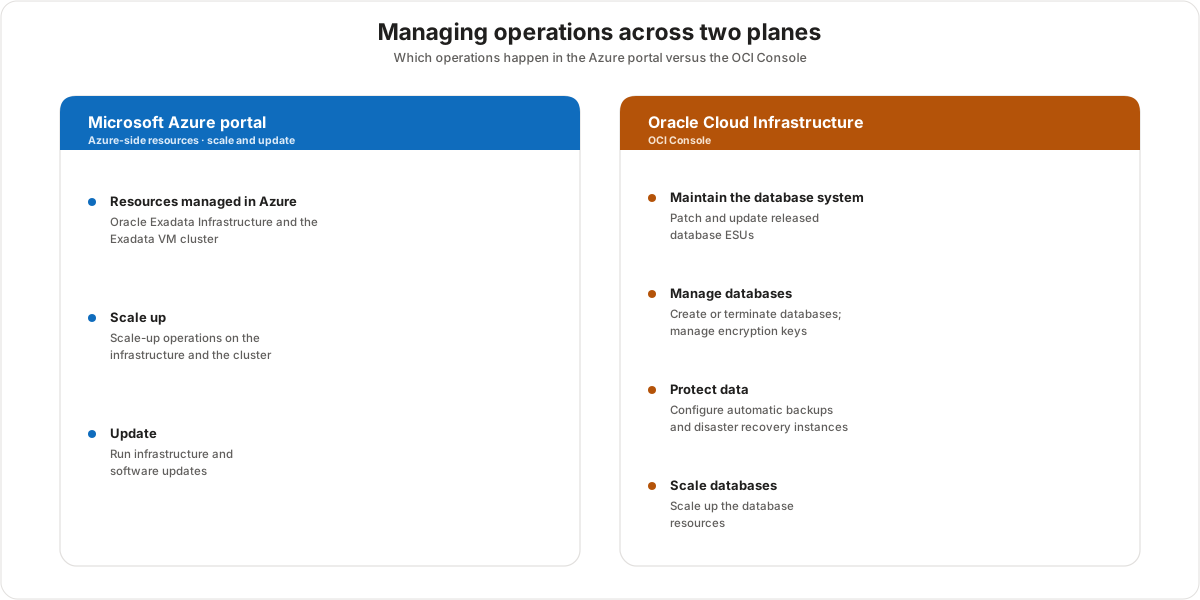
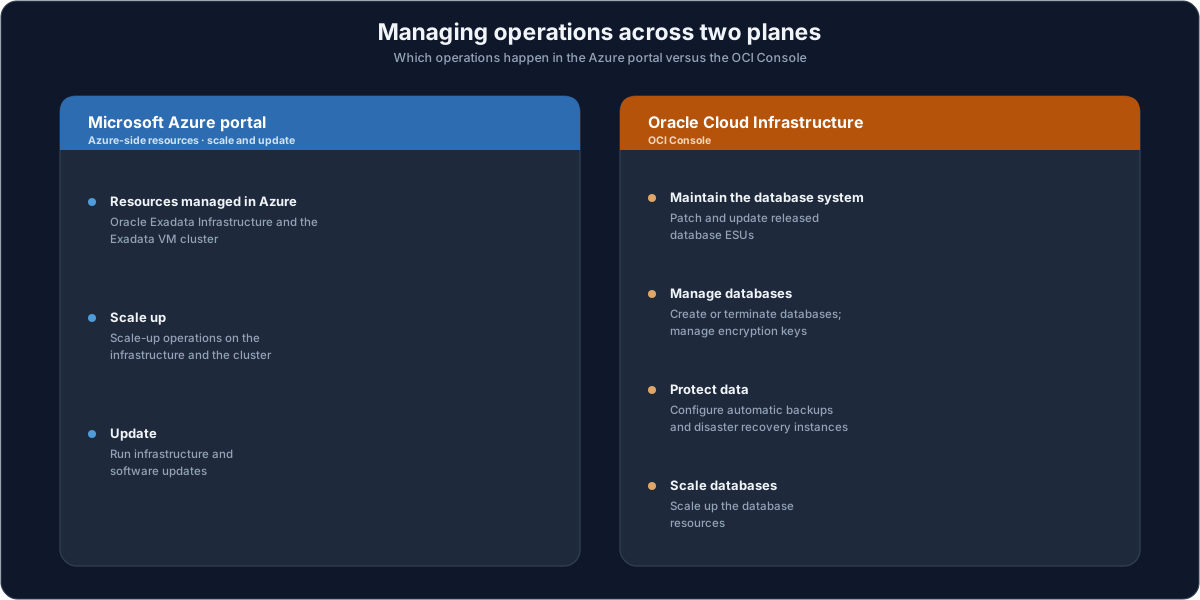
Managing operations across the two planes
The resources are managed across both environments, and which task lives where follows directly from which resource it touches.
- Azure-managed resources — the Oracle Exadata Infrastructure and the Oracle Exadata VM cluster. From the Azure portal you scale up the infrastructure and the cluster, and you run software and infrastructure updates of the Exadata infrastructure or the cluster VMs.
- OCI-managed work — the database system itself. In the OCI Console you perform maintenance on the database system, create or terminate databases, patch and update released database ESUs, manage database encryption keys, configure automatic database backups, configure disaster recovery instances, and scale up the database resources.
The short version: anything about the infrastructure or cluster is an Azure portal task; anything about a specific database is an OCI Console task.
Operational resources at a glance
The same split reads cleanly as a responsibility matrix across three areas — resource and lifecycle management, observability, and billing, costs, and usage.
| Area | Azure | OCI |
|---|---|---|
| Resource & lifecycle management | Exadata instance management — Infrastructure & VM cluster, scaling, and maintenance | Database management — DB CRUD, backups, keys, and database connection-string information |
| Observability | Infrastructure logs, metrics, and events, plus database logs and metrics | Database logs and metrics |
| Billing, costs & usage | Invoice cost management | Detailed usage reporting |
Observing your resources
Observability follows the same split, with one important addition: Oracle Database@Azure is natively integrated into Azure Monitor. Because the Exadata VM cluster is maintained in the Azure environment, you monitor its metrics and events from the Azure portal using Azure Monitor, and you analyze its logs with Azure Log Analytics. Thanks to that native integration, database metrics, logs, and events also surface in Azure Monitor alongside the cluster signals — and OCI continues to expose database logs and metrics, which remains the place for the database-system maintenance view.
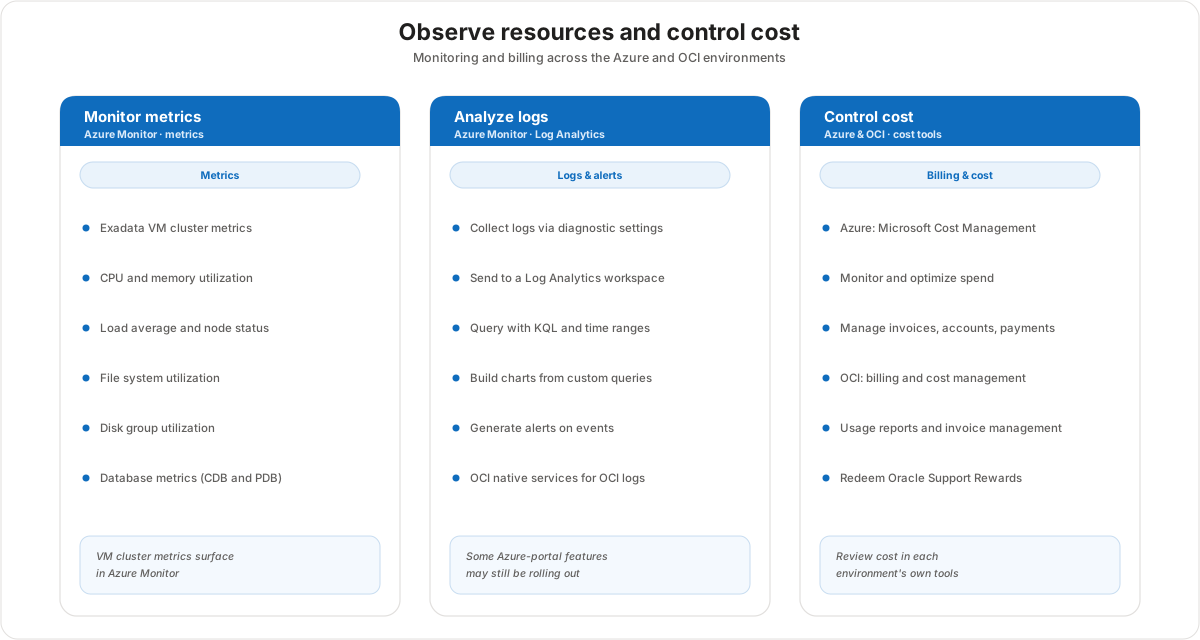
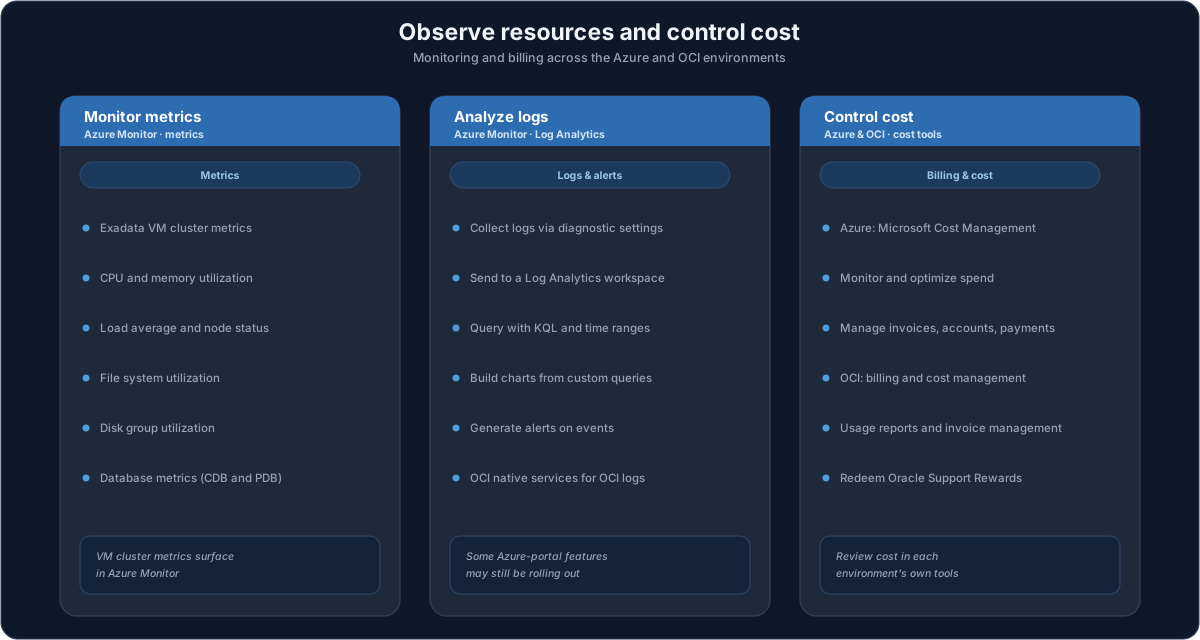
Monitoring metrics and logs
Because Oracle Database@Azure is natively integrated into Azure Monitor, you get one place to watch both the Exadata VM cluster and the databases running on it.
Exadata VM cluster metrics (the resources held in Azure) include:
- CPU utilization and memory utilization
- Load average and node status
- File system utilization and swap utilization
- ASM disk group utilization
Database metrics, logs, and events are monitored in the same portal for both container (CDB) and pluggable (PDB) databases — for example block changes, CPU utilization, execute count, user calls, current logons, parse count, and transaction count, plus storage signals such as storage allocated, storage used, and storage utilization by tablespace, alongside the usual DB time and wait time.
For logs, you collect through diagnostic settings, send them to a Log Analytics workspace, and query with KQL across selected time ranges. From there you build charts out of customized queries and generate alerts on events. On the OCI side, native OCI services still cover the database's own logs.
One caveat worth flagging to learners: some monitoring features may not yet be available in the Azure portal — they are still under development and evaluation. The direction of travel is that all events, metrics, and logs will eventually be available in the Azure portal, and the native Azure Monitor integration already covers the bulk of the VM-cluster and database signals today.
Billing and cost management
Cost is also reviewed in each environment's own tools.
- Azure — use Microsoft Cost Management to monitor and optimize cost and billing, and to manage invoices, accounts, and payments.
- OCI — use the billing and cost management tool to analyze cost, create usage reports, perform invoice management, view payment history, and redeem Oracle Support Rewards.
Customer value
- The operational model mirrors provisioning, so the platform team scales and updates the infrastructure and cluster in the Azure portal they already use — with the same APIs, SDKs, and Terraform.
- Azure Monitor and Log Analytics bring the Exadata VM cluster and its databases into the same observability stack as the rest of the Azure estate, so alerts and dashboards live alongside everything else.
- Database-specific operations stay in the OCI Console where the Oracle-native tooling lives, so no Oracle capability (ESU patching, key management, automatic backups, disaster recovery) is lost in the move to Azure.
- Cost is visible in both environments through each cloud's native tooling, and Oracle Support Rewards can be redeemed against OCI usage.
Risks and constraints to remember
- Operations are split, not unified. Infrastructure and cluster work is an Azure portal task; database maintenance is an OCI Console task. There is no single pane that does both today.
- Some Azure-portal monitoring features may still be rolling out. Certain database metrics, events, and logs are still being brought into the Azure portal — until then, use native OCI services for that part of observability.
- Know which signal lives where. Thanks to the native Azure Monitor integration, both Exadata VM cluster metrics and database metrics, logs, and events surface in Azure Monitor; OCI also exposes database logs and metrics and remains the place for the database-system maintenance view.
- Billing is reviewed per cloud. Microsoft Cost Management covers the Azure side; the OCI billing and cost management tool covers the Oracle side — including Oracle Support Rewards.
Terms to remember
- Azure Monitor — the Azure service that, through native integration, surfaces Exadata VM cluster metrics and events and database metrics, logs, and events from the Azure portal.
- Azure Log Analytics — the workspace that collects logs (via diagnostic settings) and lets you query them with KQL across time ranges, build charts, and generate alerts.
- Diagnostic settings — the configuration that routes resource logs to a Log Analytics workspace.
- ESU (database update) — the released database updates you patch and apply to the database system in OCI.
- Microsoft Cost Management — the Azure tool for monitoring and optimizing cost, and managing invoices, accounts, and payments.
- OCI billing and cost management — the Oracle tool for cost analysis, usage reports, invoice management, payment history, and Oracle Support Rewards.
- Oracle Support Rewards — credits earned on OCI usage that can be redeemed against Oracle support costs.
- CDB / PDB — the container and pluggable databases whose metrics and logs are monitored as part of database observability.
"Running Oracle Database@Azure day to day uses the same split you saw at provisioning. Anything about the infrastructure or the VM cluster — scaling it up, applying updates — you do in the Azure portal, and you watch it with Azure Monitor and Log Analytics, right alongside the rest of your Azure estate. Anything about a specific database — patching it, managing its keys, backups, disaster recovery — you do in the OCI Console, with Oracle's native tooling. Some of the database monitoring is still being brought into the Azure portal, so for now part of that lives in OCI. And cost is reviewed in each cloud's own tool: Microsoft Cost Management on the Azure side, OCI's billing tool on the Oracle side — where you can also redeem Oracle Support Rewards."