13 · High Availability and Disaster Recovery
These are original revision notes for the high availability and disaster recovery lesson. They describe how Oracle Database@Azure protects data — through automatic backups and Oracle Data Guard — in our own words rather than reproducing the recording.
Core message
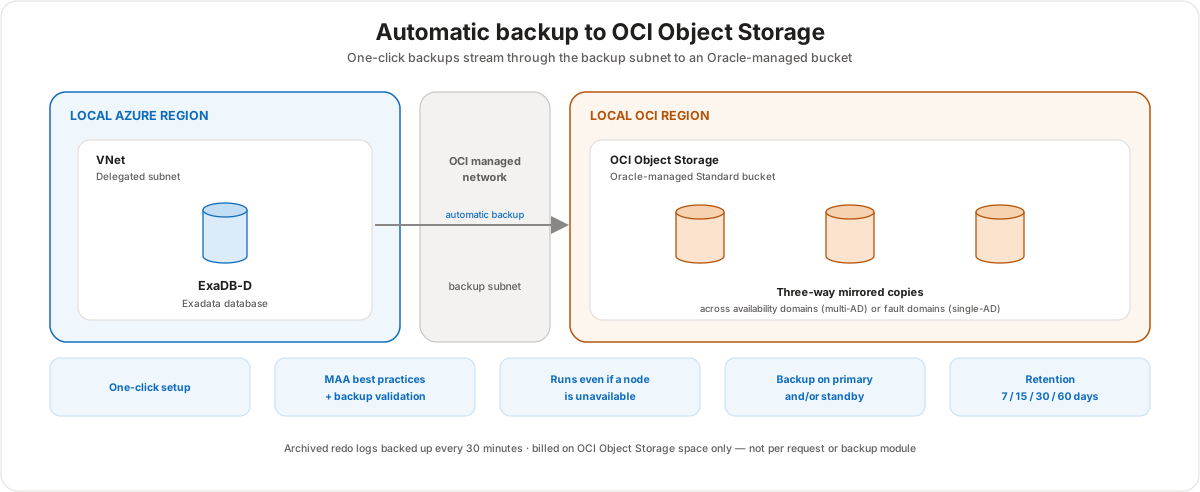
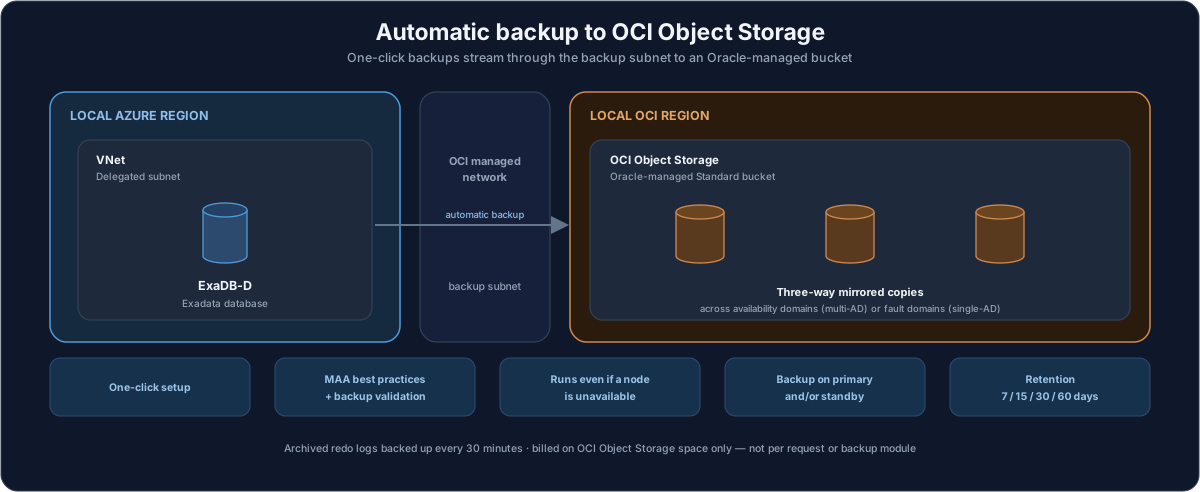
Resilience on Oracle Database@Azure comes from two layers that work together. The first is automatic backups: a one-click capability that streams three-way mirrored copies of the database into an Oracle-managed bucket in OCI Object Storage, with archived redo logs captured every 30 minutes. The second is disaster recovery with Oracle Data Guard: the same cloud tooling stands up a standby database in a second availability zone (local standby), a second region (remote standby), or even keeps an on-premises primary with a cloud standby (hybrid Data Guard). Both layers are automated and follow Oracle's Maximum Availability Architecture (MAA) practices, so most of the configuration is a guided form rather than a hand-built script.
Automatic backups
Automatic backups are enabled with one click through the cloud tooling, and the service handles the rest. A few characteristics matter for the exam and for real deployments:
- Backups land in an Oracle-managed Standard bucket in OCI Object Storage. You do not create or own the bucket — Oracle manages it.
- Each backup is three-way mirrored. In a region with multiple availability domains, the copies are spread across availability domains; in a single-availability-domain region, they are spread across fault domains.
- The backup runs even when a node is unavailable. On a multi-node Oracle RAC system, if one node is down for maintenance or has failed, the backup simply runs from another available node.
- In a Data Guard configuration you can take backups from the primary, the standby, or both.
- Archived redo logs are backed up every 30 minutes by a scheduled job, which is what makes point-in-time recovery possible between full backups.
- You restore the entire CDB to the last backup, to a point in time, or to a specific SCN. A single pluggable database (PDB) is restored separately using the
dbaasclicommand-line utility. - The flow follows built-in MAA best practices and includes backup validation, and backup traffic travels through the backup subnet.
- Billing is based on OCI Object Storage space only — not on the number of requests or the backup module.
Configuring automatic backups
In the OCI Console, automatic backups are a guided form on the database. The fields below are illustrative placeholders to show the shape of the configuration, not a recommended policy:
| Field | Example value |
|---|---|
| Enable automatic backups | On |
| Backup destination | Object Storage |
| Backup retention period | 30 days (choose 7, 15, 30, or 60) |
| Scheduled day for full backup | Sunday |
| Scheduled time for full backup (UTC) | 02:00 – 04:00 |
| Scheduled time for incremental (UTC) | 02:00 – 04:00 |
| Take the first backup immediately | On |
You pick the weekday for the full backup and a backup window for both the full and the incremental backups; the archive-log backup runs every 30 minutes independently. The default retention is 30 days.
Disaster recovery with Data Guard
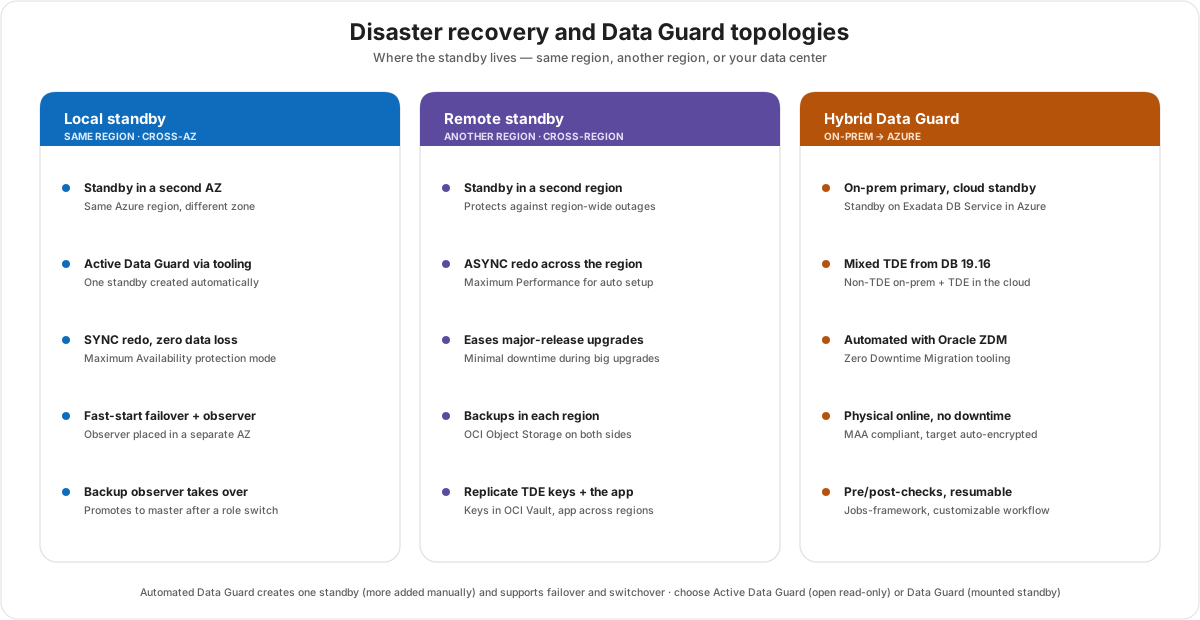
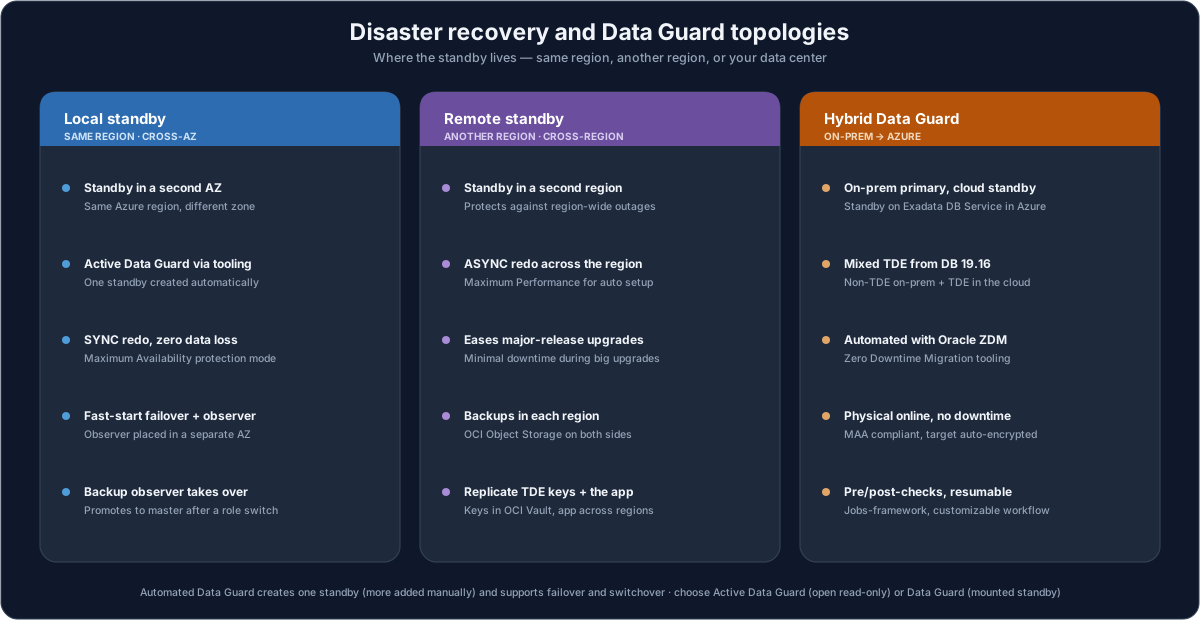
Oracle Data Guard and Active Data Guard provide disaster recovery and enhanced data protection with the goal of zero data loss and minimal recovery time. On Oracle Database@Azure the setup is fully automated through cloud tooling and incorporates MAA best practices by default. The automated flow creates a single standby; if you need multiple standbys, you add them manually following Oracle's documentation. Once configured, you run failover and switchover from the same tooling.
A few choices shape the topology:
- Local standby (cross-AZ, same region). You create an Exadata infrastructure and VM cluster in a second availability zone and enable Active Data Guard. For zero data loss, this is typically SYNC redo transport in Maximum Availability protection mode. Enable fast-start failover and install an observer — ideally in a separate availability zone — plus a backup observer in the second zone that becomes the master observer after a role switch. Keep automatic backups on both primary and standby, and store TDE/encryption keys in OCI Vault. The default single-zone deployment aligns with MAA silver; adding this cross-zone standby moves the architecture toward the MAA gold standard.
- Remote standby (cross-region). You create the Exadata infrastructure and VM cluster in a second region to protect against a region-wide disaster. The automated cross-region setup uses ASYNC redo in Maximum Performance mode. A remote standby also eases major-release upgrades with minimal downtime. Backups are stored in each region's OCI Object Storage, the TDE keys in OCI Vault must be replicated across regions, and you should replicate the application across regions for low latency and continuity.
- Active Data Guard vs Data Guard. Choose Active Data Guard to keep the standby open read-only — it adds automatic block repair, lets you offload read-only workloads, and allows occasional DML on the standby. Plain Data Guard keeps a mounted standby instead.
Hybrid Data Guard
Hybrid Data Guard protects an on-premises Oracle database by keeping its Active Data Guard standby on Exadata Database Service in Azure. From Oracle Database 19.16 onward, the configuration supports a mix of non-TDE (on-premises) and TDE-encrypted (cloud) databases, so you do not have to encrypt on-premises first.
Oracle recommends automating the setup with Oracle Zero Downtime Migration (ZDM). ZDM performs a physical online migration with no downtime, encrypts the target automatically, is MAA compliant, and is free. The workflow is resumable, runs extensive pre- and post-checks, and is customizable through a jobs framework. The on-premises primary connects to the Azure standby over ExpressRoute, with VNet peering tying the landing-zone networks together.
Customer value
- Backups are effortless and durable — one click, three-way mirrored, MAA-validated, with point-in-time and PDB-level restore.
- DR is a guided setup, not a project — automated Data Guard removes most of the manual standby build, including fast-start failover.
- You match protection to the risk — cross-AZ for zero data loss inside a region, cross-region for full-region disasters, hybrid for a cloud DR target without leaving on-premises.
- Existing investments carry forward — hybrid Data Guard reuses an on-premises primary, and mixed TDE removes an encryption blocker.
Risks and constraints to remember
- Restore granularity differs. A full CDB restore is point-and-click; a single PDB restore needs
dbaascli. - Cross-region keys are your responsibility to replicate. For a remote standby, the TDE keys in OCI Vault must exist in both regions, and the application must be replicated too — the database standby alone is not a complete DR plan.
- Automated setup builds one standby. Multiple standbys, far-sync, or symmetrical observer placement are manual add-ons.
- Protection mode is not free choice everywhere. Automated cross-region Data Guard uses Maximum Performance (ASYNC); zero-data-loss SYNC is a same-region pattern.
- Hybrid requires the right version and network. Mixed TDE needs Database 19.16+, and the hybrid link depends on ExpressRoute connectivity.
Terms to remember
- Automatic backup — managed, one-click backup to an Oracle-managed OCI Object Storage bucket, three-way mirrored, with archive-log backups every 30 minutes.
- Three-way mirrored — three backup copies spread across availability domains (multi-AD regions) or across fault domains (single-AD regions).
dbaascli— the command-line utility used to restore an individual PDB (full CDB restores are handled by the console).- Data Guard / Active Data Guard — Oracle's standby-database technology for DR; Active Data Guard keeps the standby open read-only for block repair and read offload.
- Local vs remote standby — a standby in a second availability zone (same region) versus a second region.
- Fast-start failover (FSFO) — automatic failover driven by an observer, with a backup observer that takes over as master after a role switch.
- MAA — Oracle Maximum Availability Architecture; the default single-zone deployment is silver, and adding Data Guard moves toward gold.
- OCI Vault — where the TDE encryption keys live; for cross-region DR the keys must be replicated to the standby region.
- Hybrid Data Guard — an on-premises primary with a standby on Exadata Database Service in Azure, automated with Oracle Zero Downtime Migration (ZDM).
"Think of resilience here as two switches. The first is automatic backups — one click, and Oracle keeps three mirrored copies of your database in its own object storage, with the redo logs captured every half hour so we can recover to almost any point in time. The second is Data Guard — the same tooling builds you a standby. If you want zero data loss inside a region, we put the standby in a second availability zone with synchronous replication and automatic failover. If you need to survive a whole region going down, we put it in a second region — just remember the encryption keys and the application have to be replicated there too, not only the database. And if you have an on-premises Oracle database you are not ready to move, hybrid Data Guard gives you a standby in Azure as your DR target, set up with Oracle's Zero Downtime Migration tool."