7 · Oracle Database@Azure networking
These are original revision notes for the networking video. They walk through the virtual-network design in our own words rather than reproducing the recording.
Core message
Oracle Database@Azure runs the Exadata hardware inside Oracle Cloud Infrastructure (OCI), but it plugs into your Azure virtual network (VNet) so that Azure applications reach the database over private addresses. Two subnets do the work: a client subnet for application and listener traffic, and a backup subnet for backups and Data Guard replication. Both subnets are delegated to the Oracle resource provider, which means Oracle — not you — manages the IP addresses inside them. The two things that trip people up are sizing the subnets (the client subnet needs far more addresses than people expect) and choosing a connectivity topology that keeps the application close to the database.
Network requirements
A deployment needs an Azure VNet with two delegated subnets:
- Client subnet — carries application connections, the SQL listeners, and the Single Client Access Name (SCAN) addresses. This is the busy subnet and the one that needs the most IP addresses.
- Backup subnet — carries backup traffic and Data Guard replication. It is lighter than the client subnet but still reserves a block of addresses.
Both subnets are delegated to Oracle.Database/networkAttachments, which hands IP-address management to the Oracle resource provider. Two address ranges are reserved for the Exadata X9M interconnect and cannot be used for the client or backup subnets:
100.106.0.0/16100.107.0.0/16
Avoid these ranges anywhere they would overlap the VNet address space. Note also that once a delegated subnet is created its mask cannot be changed — so size it for future growth up front.
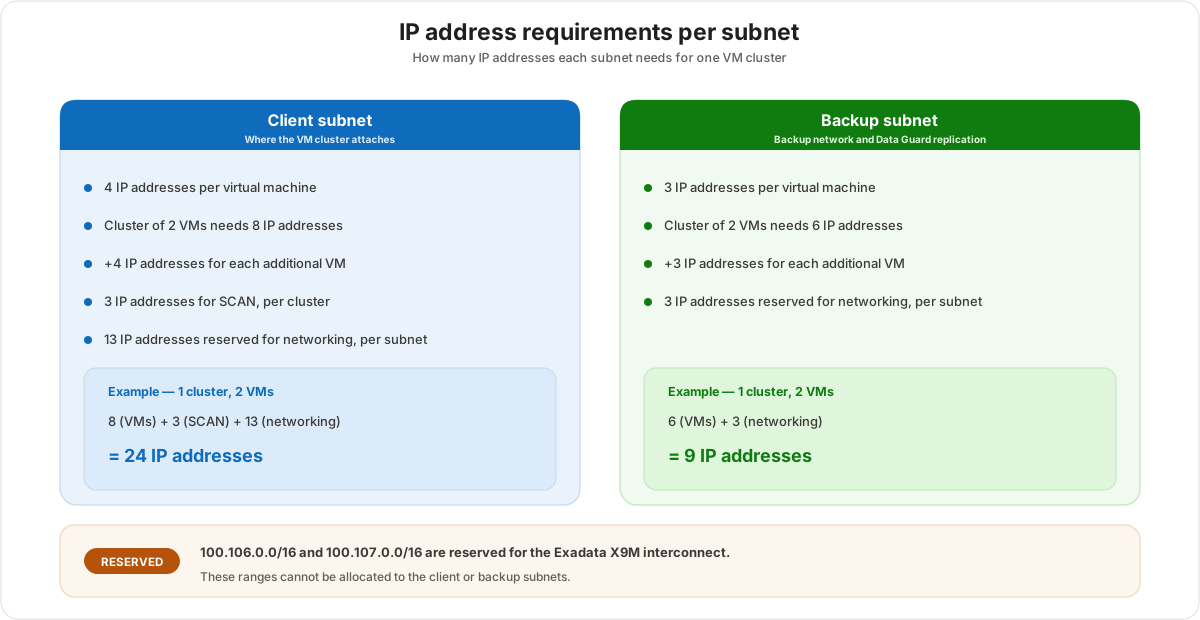
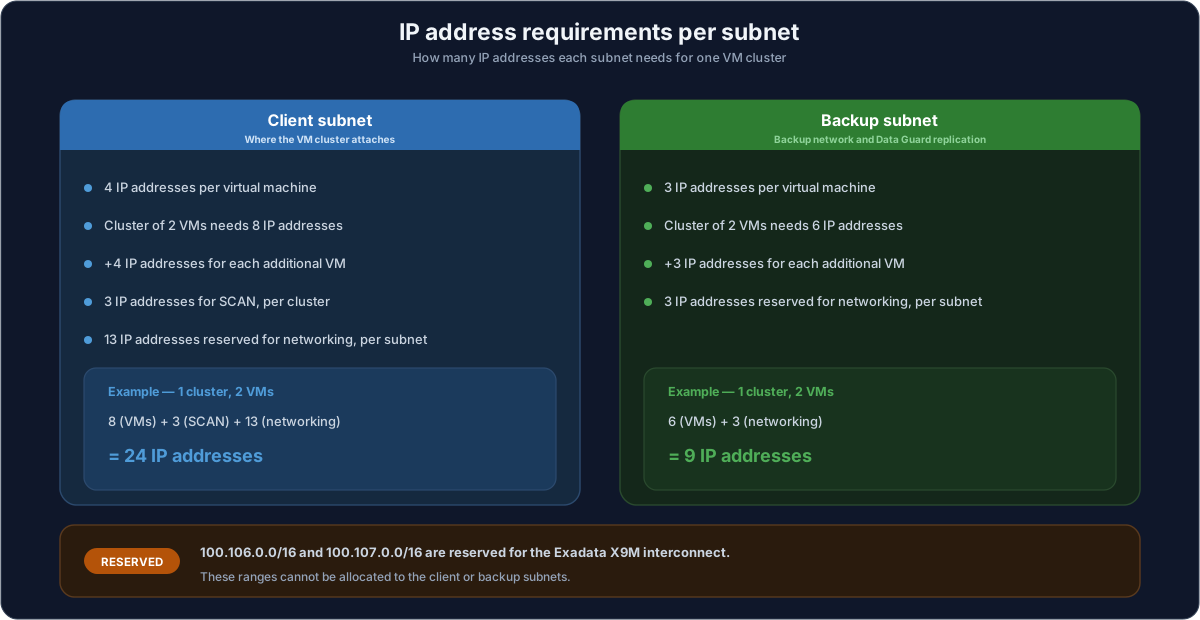
Client subnet IP addresses
The client subnet is sized from three things: the VMs in the cluster, the SCAN addresses, and a fixed networking reservation.
- 4 IP addresses per VM in the cluster.
- A 2-node cluster therefore needs 8 addresses for the VMs.
- Add 4 more addresses for every additional VM beyond the first two.
- 3 SCAN addresses per cluster (the Single Client Access Name the application connects to).
- 13 addresses reserved for networking in every client subnet.
Worked example for a standard 2-node cluster:
8 (VMs) + 3 (SCAN) + 13 (networking) = 24 IP addresses
Backup subnet IP addresses
The backup subnet follows the same shape but with smaller numbers and no SCAN block.
- 3 IP addresses per VM in the cluster.
- A 2-node cluster therefore needs 6 addresses for the VMs.
- Add 3 more addresses for every additional VM beyond the first two.
- 3 addresses reserved for networking in every backup subnet.
Worked example for a standard 2-node cluster:
6 (VMs) + 3 (networking) = 9 IP addresses
Usable IPs by subnet size
Because the masks are fixed at creation, it helps to read off how many usable addresses each subnet size gives. The client subnet reserves 13 networking addresses and the backup subnet reserves 3, so the usable count is the subnet's total addresses minus that reservation.
| Subnet size (CIDR) | Total addresses | Usable — client subnet | Usable — backup subnet |
|---|---|---|---|
| /28 | 16 | 3 | 13 |
| /27 | 32 | 19 | 29 |
| /26 | 64 | 51 | 61 |
| /25 | 128 | 115 | 125 |
| /24 | 256 | 243 | 253 |
| /23 | 512 | 499 | 509 |
| /22 | 1024 | 1011 | 1021 |
A /24 client subnet (243 usable) comfortably holds a 2-node cluster's 24 addresses with room to scale the cluster later; a /28 client subnet (only 3 usable) does not, which is the classic sizing mistake.
Subnet delegation
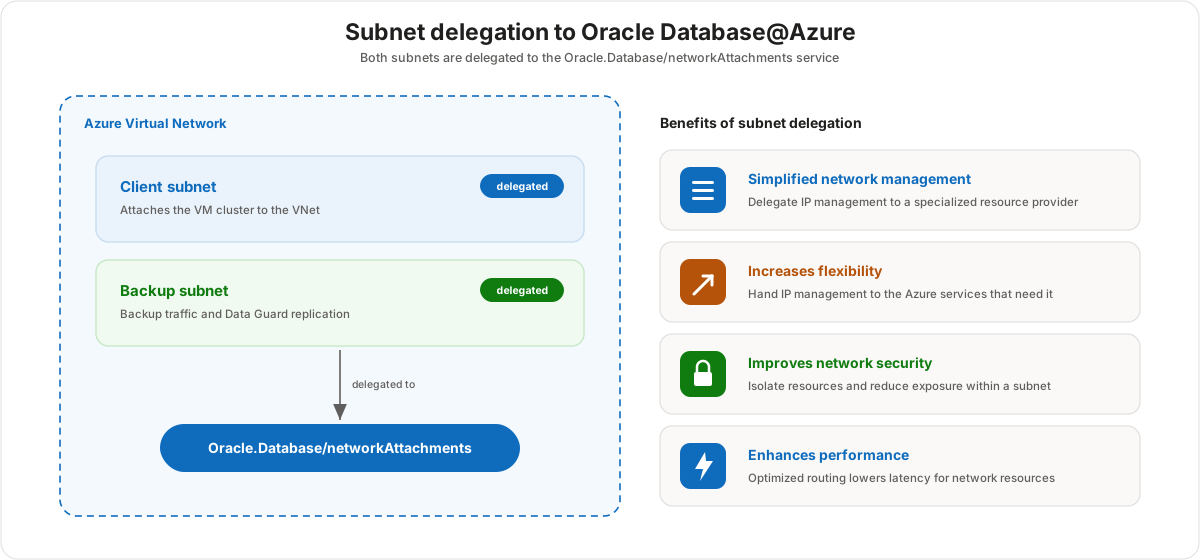
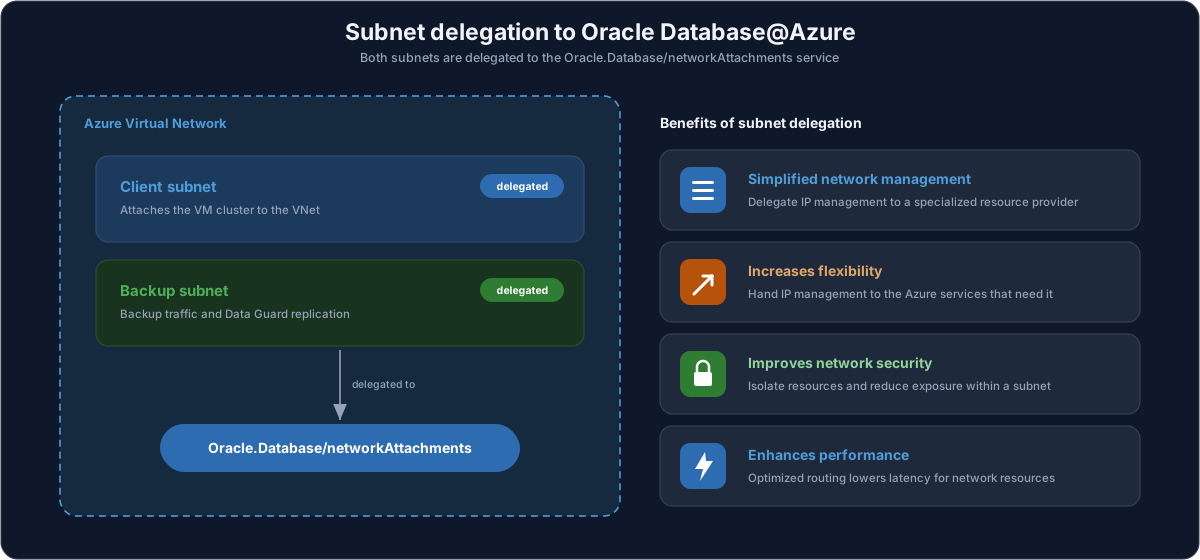
Delegation is what links an Azure subnet to Oracle Database@Azure. When you delegate the client and backup subnets to Oracle.Database/networkAttachments, you are telling Azure that the Oracle resource provider — not your own deployments — owns the IP-address management inside those subnets. The Oracle database cluster then attaches to your VNet through a virtual NIC from the delegated subnet.
Why delegation helps
- Simplified network management — IP-address management is delegated to a specialized resource provider instead of being maintained by hand.
- Increases flexibility — IP management is handed to the Azure services that actually need it.
- Improves network security — resources are isolated and exposure is reduced within a subnet.
- Enhances performance — optimized routing lowers latency for the network resources in the subnet.
Connectivity topologies
The application has to reach the database, and where you place the application relative to the database VNet decides both latency and cost. Four topologies are common.
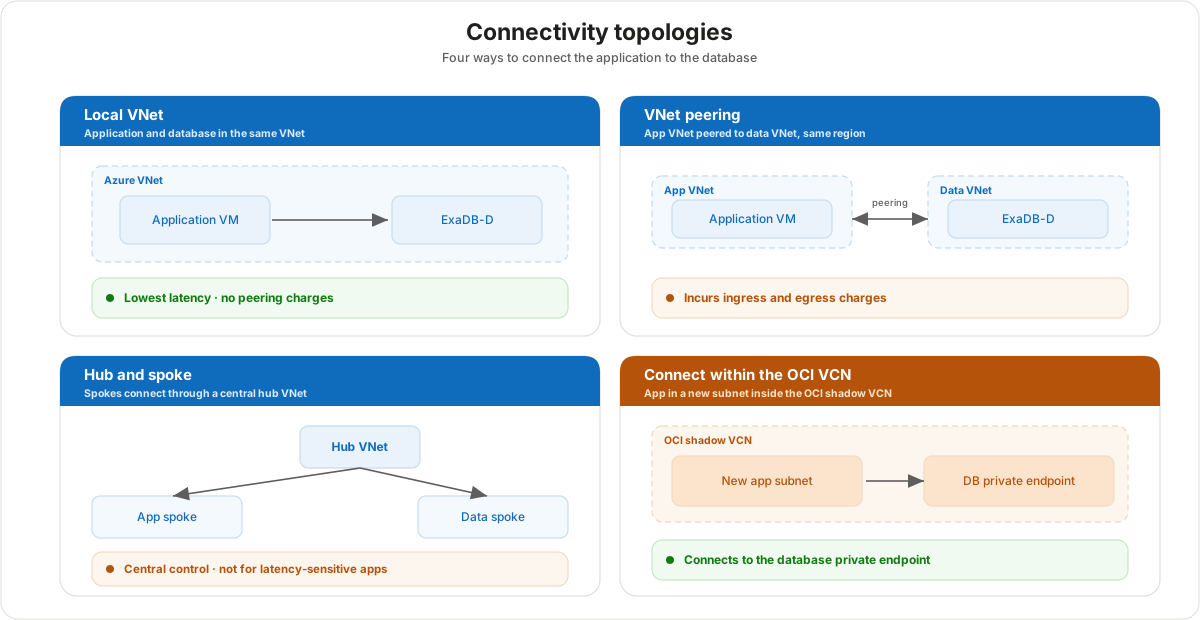
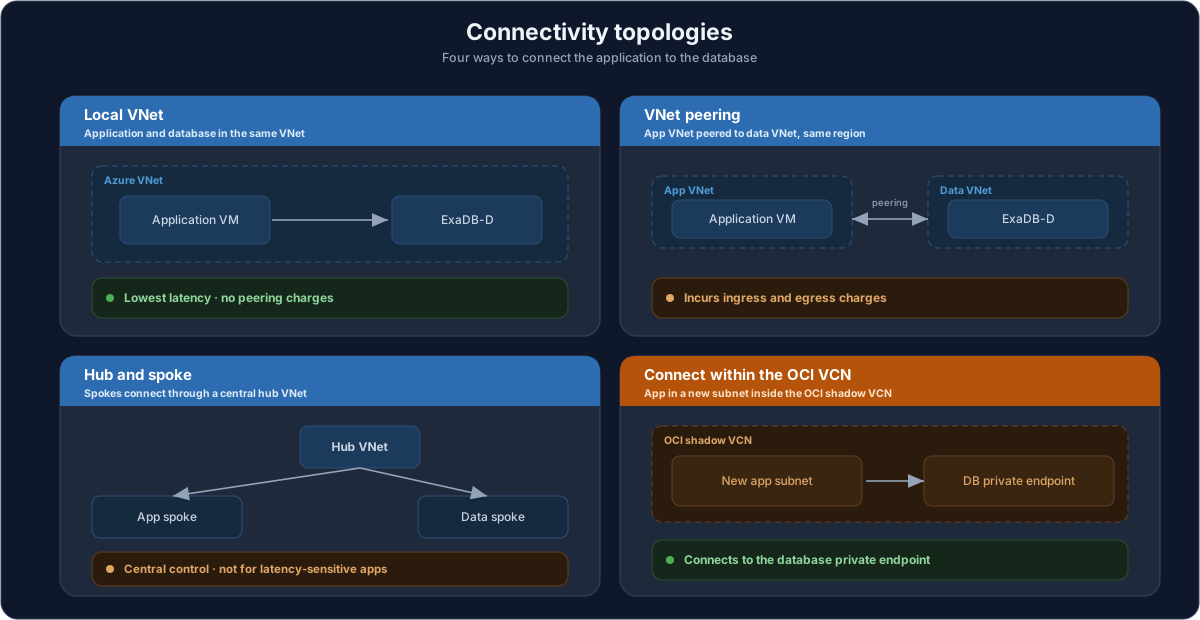
- Local VNet — the application and the database cluster sit in the same VNet. This gives the lowest latency and avoids peering ingress and egress charges. It is the recommended pattern for latency-sensitive workloads.
- VNet peering — the application VNet is peered to the data VNet in the same region. It works well but incurs ingress and egress charges for traffic that crosses the peering.
- Hub and spoke — the application and data spokes connect through a central hub VNet (typically with a virtual router or firewall). It gives central connectivity and control, still incurs ingress and egress charges, and is not recommended for latency-sensitive applications because traffic takes an extra hop.
- Connect within the OCI VCN — the application is deployed into a new subnet inside the OCI shadow VCN and connects to the database's private endpoint. This keeps the application alongside the database within OCI's own virtual cloud network.
| Topology | Relative latency | Cross-VNet charges | Best for |
|---|---|---|---|
| Local VNet | Lowest | None | Latency-sensitive apps in one VNet |
| VNet peering | Low | Ingress/egress | App and DB in separate VNets, same region |
| Hub and spoke | Higher (extra hop) | Ingress/egress | Central governance across many spokes |
| Within the OCI VCN | Low | N/A | Apps placed beside the DB private endpoint |
Customer value
- Private connectivity over the customer's own Azure VNet means application traffic to the database never leaves the private network.
- Subnet delegation hands the fiddly IP-address management to Oracle, so the team manages a VNet, not a database fabric.
- The sizing rules are deterministic, so a subnet can be sized once — correctly — for the cluster's eventual size rather than reworked later.
- Choosing the local-VNet topology keeps latency lowest and avoids cross-VNet data charges, which matters for chatty application workloads.
Risks and constraints to remember
- Size the client subnet for growth. A 2-node cluster needs 24 addresses (8 VMs + 3 SCAN + 13 networking); a
/28client subnet only offers 3 usable, so it will not fit. Masks cannot be changed after the subnet is created. - The interconnect ranges are off-limits.
100.106.0.0/16and100.107.0.0/16are reserved for the Exadata X9M interconnect and must not be used for the client or backup subnets. - Both subnets must be delegated. The client and backup subnets are delegated to
Oracle.Database/networkAttachments; without delegation the cluster cannot attach to the VNet. - Topology drives latency and cost. Hub-and-spoke adds a hop and is not for latency-sensitive apps; peering and hub-and-spoke both incur ingress and egress charges, while a local VNet avoids them.
- One delegated subnet per VNet. A virtual network supports a single Oracle-delegated subnet, so plan the VNet layout accordingly.
Terms to remember
- Virtual network (VNet) — the Azure private network the Oracle database attaches to.
- Client subnet — the delegated subnet carrying application, listener, and SCAN traffic; the larger of the two.
- Backup subnet — the delegated subnet carrying backup and Data Guard traffic; the smaller of the two.
- SCAN (Single Client Access Name) — the cluster's client-facing name; the client subnet reserves 3 SCAN addresses per cluster.
- Subnet delegation — assigning a subnet's IP-address management to a resource provider.
Oracle.Database/networkAttachments— the resource provider the client and backup subnets are delegated to.- Exadata X9M interconnect — the internal cluster fabric whose
100.106.0.0/16and100.107.0.0/16ranges are reserved. - Data Guard — Oracle's replication for high availability and disaster recovery; its traffic uses the backup subnet.
- VNet peering — a connection between two VNets in the same region; incurs ingress and egress charges.
- Hub and spoke — a topology where spokes connect through a central hub VNet.
- Private endpoint — a private IP into a service; the OCI-VCN topology connects the app to the database's private endpoint.
- Shadow VCN — the OCI virtual cloud network mirrored alongside the Azure deployment.
"Oracle Database@Azure connects into your own Azure virtual network through two delegated subnets — a client subnet for your applications and a backup subnet for backups and Data Guard. Oracle manages the IP addresses inside them, so your team just owns the VNet. The one thing we size carefully up front is the client subnet: a standard two-node cluster needs 24 addresses, and the subnet mask can't be changed later, so we give it room to grow. For the lowest latency and no cross-network charges, we keep your application in the same VNet as the database."