8 · Oracle Database@Azure provisioning
These are original revision notes for the provisioning video. They walk through the resource-creation flow in our own words rather than reproducing the recording.
Core message
Oracle Database@Azure currently runs on OCI Exadata Database Service, and you stand it up in three steps. The first two resources — the Exadata Infrastructure and the Exadata VM Cluster — are provisioned from the Azure portal (or via APIs, SDKs, and Terraform), and they live in the Azure data center plugged into your Azure VNet. The third step — the container database (CDB) and pluggable database (PDB) — happens in the OCI Console, reached through the Go to OCI link on the VM cluster. Apart from running inside the Azure portal and delegating two subnets in Azure, the order matches provisioning Exadata on dedicated OCI infrastructure.
Two operational interfaces
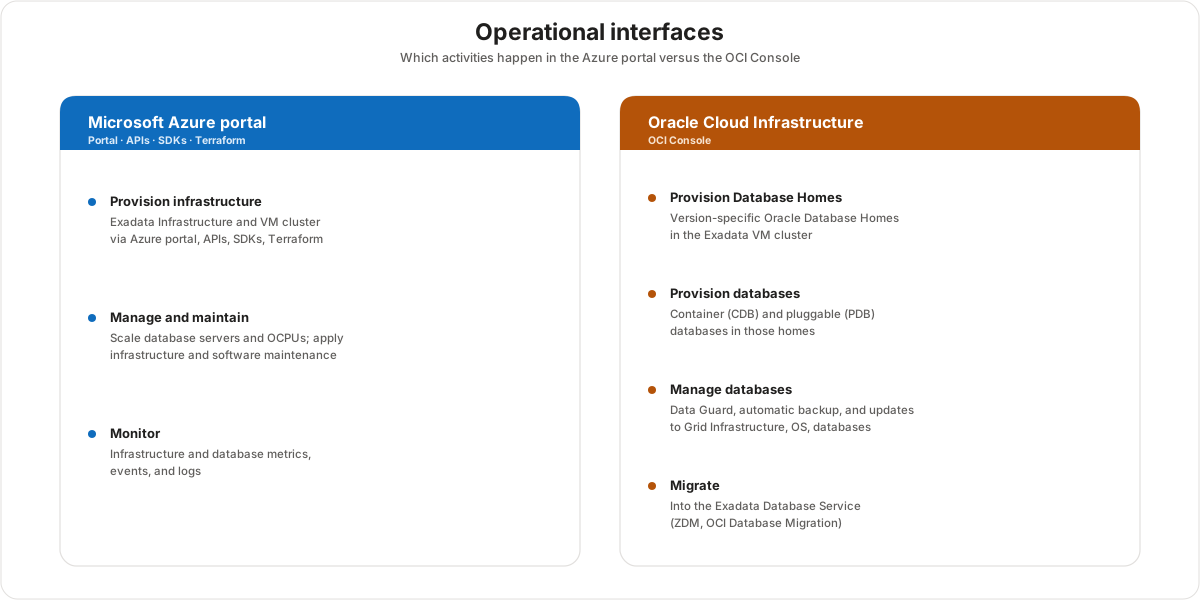
The split between the two consoles is the thing to internalize: the Azure portal owns the infrastructure lifecycle, and the OCI Console owns the database lifecycle.
- Azure portal — provision the two Exadata resources, manage and maintain them (scale database servers and OCPUs, apply OCI software and infrastructure updates), and monitor infrastructure and database metrics and events. The same actions are available through APIs, SDKs, and Terraform.
- OCI Console — do the database-specific work: create version-specific Oracle Database Homes, provision CDBs and PDBs, configure Data Guard and Automatic Backup, apply Grid Infrastructure, database, and system updates, and run migrations (conventional tools, Zero Downtime Migration, or the OCI Database Migration service).
Provisioning sequence
Provisioning is a strict order because each resource is a prerequisite for the next: the VM cluster needs an existing Exadata Infrastructure, and the databases need an existing VM cluster.


- Provision the Exadata Infrastructure in the Azure portal.
- Provision the Exadata VM Cluster in the Azure portal — this is where the delegated client and backup subnets attach.
- Provision the CDB and PDB in the OCI Console, reached with the Go to OCI link.
Step 1 — Provision Exadata Infrastructure
Provisioning the infrastructure is the longest-running step and is a prerequisite for everything that follows. It is created from the OracleDB@Azure blade by the Infrastructure admin group. The Basics, Configuration, and Maintenance tabs collect:
- Subscription and resource group, a unique instance name, the region, the availability zone, and the read-only Oracle Cloud account name (populated from onboarding — if it is blank, the OCI account link did not complete).
- The Exadata infrastructure model (Oracle Database@Azure supports the Exadata X9M shape).
- Database servers — selectable from 2 to 32; the minimum is 2.
- Storage servers — selectable from 3 to 64; the minimum is 3.
- The OCPUs and Storage fields are read-only and auto-populate from the database-server and storage-server counts you select.
- The Maintenance method (Rolling or Nonrolling) and the Maintenance schedule (default No preference, or a schedule you specify with up to 10 contact names and email addresses).
Step 2 — Provision Exadata VM Cluster
The VM cluster requires an existing Exadata Infrastructure and is itself the prerequisite for the databases. It is created by the VM Cluster admin group across three tabs — Basics, Configuration, and Networking.


- Basics — subscription and resource group, a unique name, the region (same region as the parent infrastructure), a cluster name (match the name to avoid conflicts), the parent Exadata infrastructure, the license type (License included or Bring your own license), the time zone (UTC by default), the Grid Infrastructure version (which limits the database versions the cluster supports), and the SSH public key (generate a new pair, use an existing key in Azure, or supply your own public key).
- Configuration — the compute (database-server) count, the OCPU count per VM, memory per VM, and local storage per VM (each capped by the infrastructure), the usable Exadata storage, and three options — Exadata sparse snapshots, local backups, and usable storage allocation — that can only be set now, before the cluster is provisioned, and cannot be changed afterward.
- Networking — the virtual network and the delegated client subnet (the prerequisite client and backup subnet delegation from the networking step), plus optional custom DNS, host-name prefix, and network ingress rules.
The single most important point: the sparse snapshots, local backups, and storage-distribution options are set at create time only — get them right before you click Create.
Step 3 — Provision databases in OCI
The databases are provisioned by the CDB / PDB admin group in the OCI Console, not the Azure portal. From the VM cluster:
- Open the VM Cluster overview page in the Azure portal.
- Click Go to OCI to cross into the OCI Console for this cluster.
- Create a version-specific Oracle Database Home.
- Provision the container database (CDB) and then the pluggable database (PDB), and set the administrator credentials.
- Configure application connectivity to the databases.
Whether the CDB / PDB admin group can act in OCI depends on identity federation. If identity federation was configured during onboarding, the Azure group is replicated into OCI and the matching authorization policies are defined there automatically. Without federation, OCI users need to be authorized manually in OCI before they can provision databases.
Customer value
- One portal — the Azure portal — provisions and operates the Exadata infrastructure, so the platform team works in the tool they already use, with the same APIs, SDKs, and Terraform.
- The provisioning order is deterministic and gated by prerequisites, so each step has a clear owner and a clear admin group.
- Database work stays in the OCI Console where the Oracle-native tooling lives (Database Homes, Data Guard, Automatic Backup, migration services), so no Oracle capability is lost in the move to Azure.
- Identity federation set at onboarding means the same Azure admin group governs the databases in OCI, so access is managed once rather than maintained in two places.
Risks and constraints to remember
- Order is enforced. Infrastructure → VM cluster → CDB/PDB. The VM cluster needs an existing infrastructure, and the databases need an existing VM cluster.
- Some VM cluster options are permanent. Sparse snapshots, local backups, and storage distribution can only be set during creation and cannot be changed afterward — plan them before clicking Create.
- Minimums apply. At least 2 database servers and 3 storage servers for the infrastructure; OCPU and storage auto-populate from those counts.
- Subnet delegation is a prerequisite. The VM cluster attaches to the delegated client and backup subnets from the networking design; without them the Networking tab cannot complete.
- Databases are an OCI task. CDBs and PDBs are not created in the Azure portal — you cross over with Go to OCI. Without identity federation, OCI database admins need manual authorization in OCI.
- Tags do not propagate. Azure tags applied during provisioning are not carried into the OCI portal.
Terms to remember
- Exadata Infrastructure — the first resource, provisioned in the Azure portal; the database and storage servers that everything else runs on.
- Exadata VM Cluster — the second resource, provisioned in the Azure portal; the compute cluster that hosts the databases and attaches to the delegated subnets.
- CDB (container database) — the multitenant container provisioned in the OCI Console.
- PDB (pluggable database) — the database that plugs into the CDB, provisioned in the OCI Console.
- Database Home — the version-specific Oracle home created in OCI before a CDB is provisioned.
- Infrastructure / VM Cluster / CDB-PDB admin groups — the three Oracle Database@Azure admin groups that own each provisioning step.
- Go to OCI — the link on the VM cluster that crosses from the Azure portal into the OCI Console.
- Identity federation — the onboarding option that replicates the Azure admin group into OCI and defines its policies there.
- Rolling / Nonrolling maintenance — the two infrastructure maintenance methods chosen at provisioning.
- License included / BYOL — the two VM cluster license types; Bring your own license reuses existing Oracle licensing.
- Grid Infrastructure version — the cluster software version that limits which Oracle Database versions the cluster supports.
- Delegated client and backup subnets — the Azure subnets the VM cluster attaches to on the Networking tab.
"You stand up Oracle Database@Azure in three steps. First, from the Azure portal, you provision the Exadata Infrastructure — choosing the model and at least two database servers and three storage servers, with OCPU and storage filled in automatically. Second, still in the Azure portal, you provision the Exadata VM Cluster and attach it to your delegated client and backup subnets — and a few options like sparse snapshots and local backups can only be set here, so we get them right before creating. Third, you click Go to OCI and create the container and pluggable databases in the OCI Console. Because we set up identity federation at onboarding, the same Azure admin group governs those databases in OCI — so your team manages access once, not twice."