Oracle → Azure SQL: Conceptual Modernization Mapping
This page maps Oracle Database concepts to their closest Azure SQL capabilities for learning, internal sharing, and customer-facing modernization conversations.
Read this first. This page provides a conceptual Oracle-to-Azure SQL modernization mapping for learning and architecture discussions. Some features do not have a direct 1:1 equivalent because Oracle Database and Azure SQL use different architectures. The mappings focus on similar business outcomes, operational patterns, and Azure-native capabilities — not strict feature-for-feature replacements.
For the engineering-level companion (latches & lock managers, page/block byte layouts, columnstore vs Oracle In-Memory, Hekaton, Query Store vs AWR/ASH/SPM, Resource Governor, Service Broker, partitioning gaps, RMAN ↔ T-SQL BACKUP, Always Encrypted with secure enclaves, and where SQL Server 2025 closes historical Oracle gaps), see Oracle → SQL Server Engine Internals.
The Big Picture
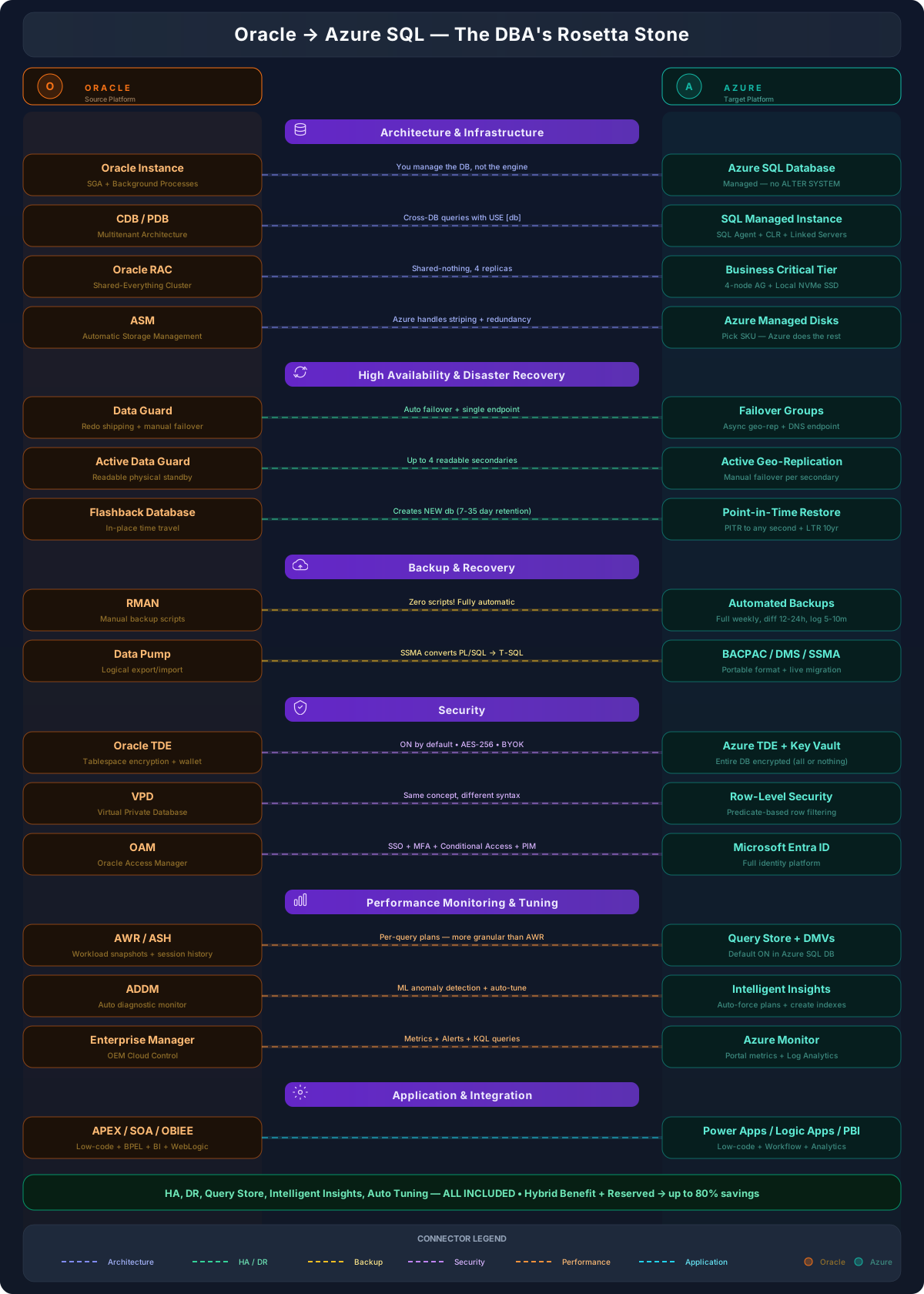
Conceptual Mapping at a Glance
| Oracle | Closest Azure SQL Capability | Modernization Note |
|---|---|---|
| Oracle Instance | Azure SQL Database / SQL Managed Instance | You manage the database and workload; Microsoft manages the engine and platform operations. |
| CDB / PDB | SQL Managed Instance (multiple DBs) / Elastic Pools | No direct 1:1 to multitenant CDB/PDB. MI hosts many DBs in one instance; Elastic Pools share resources across SQL DBs. |
| Oracle RAC | Business Critical / Zone-Redundant HA | Similar HA outcome, different architecture (replicas + fast failover, not shared-disk clustering). |
| ASM | Azure SQL managed storage layer | Microsoft manages storage, striping, and redundancy in PaaS. Managed Disks apply only to SQL Server on Azure VM. |
| Data Guard | Failover Groups / Active Geo-Replication | Conceptual DR mapping — managed cross-region replication and failover, not Data Guard internals. |
| Active Data Guard | Active Geo-Replication | Closest equivalent for read-scale secondary scenarios. |
| Flashback Database | Point-in-Time Restore (+ LTR) | PITR restores to a new database from automated backups; LTR for long-term/compliance. |
| RMAN | Automated Backups + PITR + LTR | No manual backup scheduling in Azure SQL PaaS — full, differential, and log backups are platform-managed. |
| Data Pump | SSMA for Oracle (+ DMS where applicable) | SSMA is the primary Oracle-to-Azure SQL migration tool. BACPAC is a SQL-side export format, not the Data Pump equivalent. |
| Oracle TDE | Azure SQL TDE + Azure Key Vault | Service-managed or customer-managed keys (BYOK/CMK) via Key Vault or Managed HSM. |
| VPD | Row-Level Security | Predicate-based row filtering — strong conceptual match. |
| OAM | Microsoft Entra ID + Conditional Access + MFA + PIM | Identity, SSO, MFA, conditional access, and privileged access modernization. |
| AWR / ASH | Query Store + DMVs + Azure Monitor | No exact 1:1; together they cover query history, live diagnostics, and platform observability. |
| ADDM | Intelligent Insights + Automatic Tuning | Intelligent performance recommendations and automated tuning, not an ADDM clone. |
| Enterprise Manager | Azure Portal + Azure Monitor + Log Analytics | Combined platform for monitoring, alerts, and operational visibility. |
| APEX / SOA / OBIEE | Power Apps / Logic Apps + API Management / Power BI | Application and reporting modernization mapping — not a database engine feature mapping. |
Architecture & Infrastructure
| Oracle Concept | Closest Azure SQL Capability | Modernization Note |
|---|---|---|
| Oracle Instance (SGA + background processes) | Azure SQL Database / Azure SQL Managed Instance | You manage the database and workload; Microsoft manages the engine and platform operations. Choose MI when you need instance-level features (SQL Agent, cross-database queries, near SQL Server instance behavior). |
| CDB / PDB (Multitenant) | SQL Managed Instance (multiple DBs) / Azure SQL Database Elastic Pools | No direct 1:1 to Oracle multitenant. MI hosts many databases under one managed instance. Elastic Pools let multiple SQL DBs share a resource pool. Cross-database queries in Azure SQL Database use Elastic Query / external tables — not three-part USE [db] access. |
| Oracle RAC (shared-everything cluster) | Azure SQL Business Critical / Zone-Redundant HA | Similar HA outcome, different architecture. RAC is shared-disk clustering; Business Critical uses multiple replicas with fast failover. Zone-redundant HA spreads replicas across availability zones. |
| ASM (Automatic Storage Management) | Azure SQL managed storage layer | In Azure SQL DB / MI, customers do not manage disk striping, redundancy, or ASM-style configuration — Microsoft manages the underlying storage and resilience. Azure Managed Disks apply only when the target is SQL Server on Azure VM, not Azure SQL PaaS. |
| Oracle Data Directory (data files, redo, archive) | Platform-managed storage (remote for GP, local SSD for BC) | General Purpose uses remote premium storage; Business Critical uses local NVMe SSD with synchronous replicas. Storage layout is managed by the platform. |
Mental shift: In Oracle you tune the instance (SGA, PGA, background processes). In Azure SQL PaaS you tune the workload (queries, indexes, tier selection) — Microsoft manages the engine.
High Availability & Disaster Recovery
| Oracle Concept | Closest Azure SQL Capability | Modernization Note |
|---|---|---|
| Data Guard (Physical Standby) | Failover Groups / Active Geo-Replication | Failover Groups provide managed failover across servers/regions with a single endpoint. Conceptual DR mapping — not identical to Data Guard internals. |
| Active Data Guard | Active Geo-Replication | Closest Azure SQL equivalent for read-scale secondary scenarios; readable secondary databases for offloading reads. |
| RAC (local HA) | Business Critical / Zone-Redundant HA | Built-in HA via multiple replicas with fast failover. Different architecture, similar outcome. |
| Fast-Start Failover (FSFO) | Automatic failover in Failover Groups | Built-in health detection with a configurable grace period — no separate Observer to manage. |
| Flashback Database | Point-in-Time Restore (PITR) | PITR restores to a selected point in time using automated backups. Restores to a new database rather than rewinding in place. Configure Long-Term Retention (LTR) for compliance or extended restore needs. |
| Maximum Availability (MAA) | Business Critical + Failover Groups | Combine BC tier (local HA) with a Failover Group (cross-region DR) for an MAA-style outcome. |
DP-300 angle: Failover Groups abstract away redo transport, apply processes, and role transitions — you define the group, endpoint, and grace period; the platform handles the rest.
Backup & Recovery
| Oracle Concept | Closest Azure SQL Capability | Modernization Note |
|---|---|---|
| RMAN (backup/restore) | Automated Backups + PITR + LTR | Azure SQL provides automated full, differential, and transaction log backups. PITR and LTR are built-in platform capabilities. You do not manually schedule RMAN-style backup jobs in Azure SQL Database PaaS. |
| RMAN catalog | Long-Term Retention (LTR) | LTR stores backups for years in Azure Blob — fully managed. |
| Recovery Window | Backup retention (7-35 days) + LTR | Set the retention window for PITR; use LTR policies for compliance and longer windows. |
| Data Pump (export/import) | SSMA for Oracle / migration scripts / DMS where applicable | SSMA for Oracle is the primary tool for Oracle-to-Azure SQL assessment, schema conversion, and data migration. DMS may be used in the broader migration workflow. BACPAC is for SQL Server / Azure SQL export/import — it is not the Oracle Data Pump equivalent. |
| Flashback (table, database) | PITR + Deleted database restore | No direct in-place flashback for tables; use PITR to a new database, then copy the rows back. |
| Cross-platform transportable tablespaces | SSMA (+ DMS) | SSMA converts Oracle schemas and PL/SQL to T-SQL; DMS supports live data migration. |
Migration tip: Run an SSMA for Oracle assessment first. It flags PL/SQL constructs that won't convert cleanly (autonomous transactions, varrays, Oracle-specific data types) so you can plan remediation before cutover.
Security
| Oracle Concept | Closest Azure SQL Capability | Modernization Note |
|---|---|---|
| Oracle TDE | Azure SQL TDE + Azure Key Vault | AES-256 encryption at rest. Use service-managed keys or customer-managed keys (BYOK/CMK) through Azure Key Vault or Managed HSM. Azure TDE is on by default. |
| VPD (Virtual Private Database) | Row-Level Security (RLS) | Strong conceptual mapping — RLS uses predicate-based filtering to restrict row access per user/tenant. |
| Oracle Data Redaction | Dynamic Data Masking | Both mask at query time without changing stored data. Neither encrypts data at rest. |
| Oracle Audit (Unified Audit) | Azure SQL Auditing → Log Analytics / Storage / Event Hub | Centralized audit destinations integrated with Azure Monitor. |
| Oracle Vault (privilege control) | Azure RBAC + Entra ID + PIM | Role-based access, just-in-time elevation, MFA, and Conditional Access. |
| Oracle Wallet (credential store) | Azure Key Vault / Managed HSM | Centralized keys, secrets, and certificates across all Azure services. |
| Oracle DBMS_CRYPTO | Always Encrypted | Column-level encryption where the database engine never sees plaintext. |
Scope difference: Oracle TDE encrypts tablespaces; Azure TDE encrypts the entire database (data files, log files, backups) and is on by default. You cannot selectively encrypt filegroups in Azure SQL Database.
Concurrency & Locking
| Oracle Concept | Azure SQL Equivalent | Modernization Note |
|---|---|---|
| Row-level locks + UNDO/MVCC (non-blocking readers) | RCSI / Snapshot Isolation (row versioning in tempdb / PVS) | Azure SQL Database has RCSI on by default. Set it explicitly on SQL Server / Managed Instance for similar reader behavior. |
ITL slots, enq: TX – allocate ITL entry | Lock Manager + KEY/PAGE/RID locks (classic) | No ITL concept — locks are tracked centrally in the lock manager. Watch sys.dm_tran_locks, sys.dm_os_wait_stats for LCK_* waits. |
| Lock byte in row header (Oracle never escalates row→table) | 🆕 Optimized Locking (TID stamping + LAQ) — see SQL Server 2025 Optimized Locking | New in SQL 2025 / Azure SQL: a single transaction-level lock replaces thousands of KEY locks; eliminates lock escalation pressure. Requires ADR + RCSI. |
Performance Monitoring & Tuning
| Oracle Concept | Closest Azure SQL Capability | Modernization Note |
|---|---|---|
| AWR / ASH | Query Store + DMVs + Azure Monitor | No exact 1:1 replacement. Query Store captures query history and plans; DMVs provide live diagnostic metadata; Azure Monitor / Log Analytics provide platform-level observability. |
| ADDM (Automatic Diagnostic Monitor) | Intelligent Insights + Automatic Tuning | Intelligent Insights detects performance issues; Automatic Tuning can apply and validate tuning actions where supported. Intelligent recommendations and tuning — not an ADDM clone. |
| SQL Tuning Advisor | Automatic Tuning + Query Store | Automatic Tuning can force last-known-good plans and create/drop indexes; Query Store provides the data backing those decisions. |
Wait Events (v$session_wait) | Wait Statistics (sys.dm_os_wait_stats) | Same diagnostic concept, different catalog. Common waits: PAGEIOLATCH_* (I/O), LCK_* (locks), CXPACKET (parallelism). |
| Explain Plan / Autotrace | Execution Plans (SET STATISTICS IO ON, actual/estimated plans) | In SSMS: Ctrl+M actual plan, Ctrl+L estimated plan. Look for scans vs. seeks, key lookups, sort/spill warnings. |
| Oracle Statspack (legacy) | Query Store + Extended Events | Extended Events provides lightweight, targeted event tracing. |
| Enterprise Manager (Cloud Control) | Azure Portal + Azure Monitor + Log Analytics | Enterprise Manager is a broader Oracle management platform; Azure Portal, Azure Monitor, Log Analytics, Query Store, and SQL insights together provide monitoring and operational visibility. |
DP-300 loves Query Store questions. Think of Query Store as "AWR on steroids" — it captures per-query plans (not just top SQL), lets you force specific plans (like SQL Profiles), and is enabled by default in Azure SQL DB.
Automation & Scheduling
| Oracle Concept | Azure Equivalent | When to Use |
|---|---|---|
| DBMS_SCHEDULER | SQL Agent (MI/VM) / Elastic Jobs (SQL DB) | DBMS_SCHEDULER = Oracle's built-in job scheduler. SQL Agent is the direct equivalent for MI/VM. Elastic Jobs replaces SQL Agent for Azure SQL DB. |
| DBMS_JOB (legacy) | Elastic Jobs | DBMS_JOB is deprecated in Oracle. Elastic Jobs is the modern Azure approach for Azure SQL Database. |
| Oracle Streams / GoldenGate | Change Data Capture (CDC) / DMS | Oracle replication tools. Azure CDC captures row-level changes. DMS handles live migrations. |
| Oracle Enterprise Manager Jobs | Azure Automation Runbooks | EM jobs run shell/SQL scripts on a schedule. Azure Automation runs PowerShell/Python runbooks with managed identity. |
| cron jobs (OS-level) | Azure Functions (Timer Trigger) | cron on Linux/Task Scheduler on Windows → Timer-triggered Azure Function. Serverless, auto-scaling, pay-per-execution. |
Application & Integration
This section is an application and reporting modernization mapping, not a database engine feature mapping.
| Oracle Concept | Closest Azure Capability | Modernization Note |
|---|---|---|
| Oracle APEX | Power Apps (low-code) / Static Web Apps | Conceptual mapping for low-code, database-centric application modernization. |
| Oracle Forms | Power Apps or custom .NET/React on App Service | No direct equivalent — modernize to a low-code or custom web app pattern. |
| Oracle SOA Suite / WebLogic integration | Logic Apps + API Management + Azure Functions + App Service + Service Bus / Event Grid | Integration scenarios map to a combination of services depending on architecture (workflow, APIs, eventing, messaging). |
| OBIEE | Power BI | Conceptual mapping for reporting and analytics modernization with native Azure SQL integration. |
| Oracle OAM (Access Manager) | Microsoft Entra ID + Conditional Access + MFA + PIM | Identity, SSO, MFA, conditional access, and privileged access modernization. |
| Oracle WebLogic (app server) | Azure App Service / AKS / Container Apps | Managed Java/Node/.NET hosting or container platforms; WebLogic on Azure VM is also supported for lift-and-shift. |
| Oracle GoldenGate | Azure Data Factory / Synapse Link / Fabric Mirroring | Data movement, ETL/ELT, and real-time analytics patterns — not a like-for-like CDC replication product. |
Oracle SOA + OAM + BI maps cleanly to the Azure integration story: Logic Apps + API Management (orchestration and APIs), Entra ID (identity), and Power BI (analytics).
Pricing & Licensing
| Oracle Concept | Azure Equivalent | Cost Insight |
|---|---|---|
| Oracle Processor licensing | vCore model | Oracle charges per processor core. Azure vCore charges per virtual core. Mapping: 1 Oracle processor ≈ 1-2 vCores depending on tier. |
| Oracle Named User Plus | Pay-as-you-go or reserved capacity | NUP per-user licensing → Azure PAYG (no per-user DB fee). Reserved capacity saves up to 55%. |
| Oracle RAC license | Included in BC tier | RAC is an expensive add-on license. Azure Business Critical tier includes HA replicas at no extra license cost. |
| Data Guard license | Included | Data Guard requires Active Data Guard for readable standby (extra $). Azure Failover Groups include readable secondary. |
| Oracle Tuning/Diagnostic Pack | Included | These Oracle packs cost extra. Query Store, DMVs, Intelligent Insights — all included in Azure SQL at no extra charge. |
| Oracle Support (22% of license/year) | Included in compute cost | Oracle annual support is 22% of license. Azure includes all patches, updates, support in the compute price. |
This is your strongest migration argument for customers: Oracle licensing is per-processor + RAC + Data Guard + Tuning Pack + 22% annual support. In Azure, HA, DR, monitoring, and tuning are ALL INCLUDED. Azure Hybrid Benefit + Reserved Capacity can cut costs by up to 80%.
Summary. Azure SQL provides built-in HA, automated backups, Query Store, Intelligent Insights, Automatic Tuning, encryption, monitoring, and platform-managed operations. Some Oracle features map directly, while others map to Azure-native patterns that deliver similar outcomes using a different architecture. Use this page for learning and architecture discussions \u2014 always validate the right Azure SQL deployment option (DB, MI, or SQL Server on VM) against the workload's specific requirements.
Quick Reference: Oracle → Azure Commands
| Task | Oracle | Azure SQL |
|---|---|---|
| Check database status | SELECT STATUS FROM V$INSTANCE; | SELECT DATABASEPROPERTYEX(DB_NAME(), 'Status'); |
| Active sessions | SELECT * FROM V$SESSION WHERE STATUS='ACTIVE'; | SELECT * FROM sys.dm_exec_sessions WHERE is_user_process = 1; |
| Running queries | SELECT * FROM V$SQL WHERE EXECUTIONS > 0; | SELECT * FROM sys.dm_exec_requests CROSS APPLY sys.dm_exec_sql_text(sql_handle); |
| Table sizes | SELECT segment_name, bytes/1024/1024 MB FROM DBA_SEGMENTS; | EXEC sp_spaceused 'TableName'; |
| Wait events | SELECT * FROM V$SESSION_WAIT; | SELECT * FROM sys.dm_os_wait_stats ORDER BY wait_time_ms DESC; |
| Explain plan | EXPLAIN PLAN FOR ... then SELECT * FROM TABLE(DBMS_XPLAN.DISPLAY); | SET STATISTICS IO ON; + Actual Execution Plan in SSMS |
| Index fragmentation | ANALYZE INDEX ... VALIDATE STRUCTURE; | SELECT * FROM sys.dm_db_index_physical_stats(DB_ID(), NULL, NULL, NULL, 'LIMITED'); |
| Backup | RMAN> BACKUP DATABASE PLUS ARCHIVELOG; | Automated. Manual: BACKUP DATABASE TO URL = 'https://storage.blob.core.windows.net/...' |
| Kill session | ALTER SYSTEM KILL SESSION 'sid,serial#'; | KILL <session_id>; |