High Availability & Disaster Recovery
The HA/DR Architecture Map
Oracle DBA parallel: Local HA = RAC. Cross-Region DR = Data Guard. The big difference: in Azure, local HA is built-in to the service tier (you don't configure it). You only configure DR (Failover Groups, Geo-Replication).
Backup & Restore — The Safety Net
For a comprehensive deep dive into backup, restore, PITR, and LTR, see the dedicated page: Backup, Restore, PITR & LTR.
Automated Backups (Zero Configuration)
| Backup Type | Frequency | You Configure? |
|---|---|---|
| Full | Weekly | ❌ Automatic |
| Differential | Every 12-24 hours | ❌ Automatic |
| Transaction log | Every 5-10 minutes | ❌ Automatic |
| Setting | Range | Default |
|---|---|---|
| Short-term retention (PITR) | 7-35 days | 7 days |
| Long-term retention (LTR) | Up to 10 years | Not configured |
| Backup storage redundancy | LRS / ZRS / GRS / RA-GRS | GRS |
Backup frequencies are exam favorites: Full = weekly, Diff = 12-24h, Log = 5-10 min. Point-in-time restore creates a new database — it NEVER overwrites the existing one. This catches many exam takers.
Restore Options
| Scenario | Method | RPO |
|---|---|---|
| "Restore to 3 hours ago" | PITR (point-in-time restore) | Seconds (within retention) |
| "Restore deleted database" | Deleted database restore | To deletion time |
| "Keep backup for 5 years" | Long-Term Retention (LTR) | Weekly/monthly/yearly snapshots |
| "Restore to different region" | Geo-restore from GRS backup | Up to 1 hour lag |
Backup Storage Redundancy — Architecture
Backup storage redundancy can only be set at database creation time (or within a short window for SQL DB). You CANNOT change from LRS to GRS after the fact. Choose wisely based on compliance requirements.
Active Geo-Replication
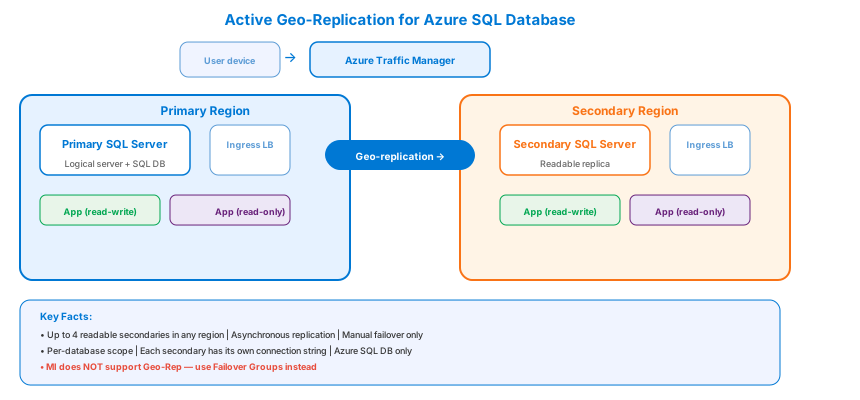
Asynchronous replication to up to 4 readable secondaries in any Azure region.
| Aspect | Detail |
|---|---|
| Max secondaries | 4 (any region) |
| Replication | Asynchronous |
| Readable? | ✅ Yes — offload reporting |
| Auto failover? | ❌ No — manual only |
| Endpoint | Each secondary has its own connection string |
| Scope | Per-database |
When to use: You need more than 1 secondary, or you want readable replicas in multiple regions for read locality.
For a detailed side-by-side comparison, see Failover Groups vs Geo-Replication.
Auto-Failover Groups (Recommended for DR)
Automatic failover with a single connection endpoint that doesn't change.
Architecture
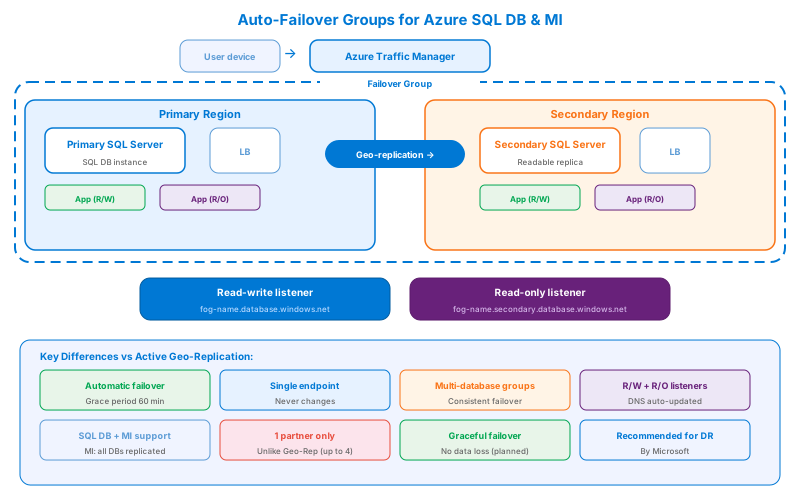
Connection endpoints (they NEVER change):
- Read-Write:
fog-name.database.windows.net - Read-Only:
fog-name.secondary.database.windows.net
Failover Groups vs Geo-Replication — the key exam differences:
- Failover Groups = auto failover + single endpoint. Geo-Rep = manual failover + per-replica endpoint.
- Failover Groups can include multiple databases. Geo-Rep is per-database.
- Failover Groups have a grace period before auto-failover triggers (default 60 min).
- For MI: Failover Groups replicate ALL user databases (all or nothing).
Comparison Table
| Feature | Active Geo-Rep | Failover Group | Always On AG (VM) |
|---|---|---|---|
| Scope | Azure SQL DB | Azure SQL DB + MI | SQL Server on VM |
| Max replicas | 4 | 1 partner | Up to 9 |
| Auto failover | ❌ | ✅ | ✅ (within cluster) |
| Single endpoint | ❌ | ✅ | ✅ (Listener) |
| Cross-region | ✅ | ✅ | ✅ |
| Read-only routing | ✅ | ✅ | ✅ |
| Grace period | N/A | Configurable (default 60 min) | N/A (cluster quorum) |
RTO and RPO — The Business Conversation
| Solution | RPO (data loss) | RTO (downtime) |
|---|---|---|
| PITR (backup restore) | 5-10 min | Hours (depends on DB size) |
| Geo-Restore (GRS backup) | Up to 1 hour | Hours |
| Active Geo-Replication | < 5 seconds | 30 seconds (manual trigger) |
| Failover Groups (auto) | < 5 seconds | Grace period + ~30 seconds |
| BC tier read replica | 0 (synchronous) | < 10 seconds |
| Always On AG (sync) | 0 (synchronous) | < 30 seconds |
Cost vs. RTO/RPO tradeoff: Automated backups (free) give you hours of RTO. Geo-Replication/Failover Groups (extra cost for secondary) give you seconds of RPO and ~30s RTO. Business Critical tier gives you near-zero downtime for local failures. Choose based on business requirements, not maximum capability.
Anti-Patterns
- "PITR is our DR." PITR restores into the same region. A regional outage takes the backups with it (unless GRS / geo-restore is on). PITR is recovery-from-mistake, not recovery-from-region-loss.
- "Geo-Replication = HA." Geo-Rep is async (RPO < 5 s but non-zero) and manual failover only. If the app has to fail over by itself, you need Failover Groups, not raw Geo-Rep.
- "Set the grace period to 0 minutes for fastest failover." Grace period = 0 means flapping triggers cross-region failover. The recommended floor is 60 minutes for production. Faster RTO is what manual failover is for.
- "BC tier replicas are a DR strategy." BC's 4 local replicas are zone HA, all in one region. They do not survive a region-wide outage. Pair BC with a Failover Group for DR.
- "Use Always On AG on Azure VM the same way as on-prem." Azure-specific: you need Azure Load Balancer (or DNN listener), Standard SKU LB rules, floating IP, and a witness in a 3rd zone or Cloud Witness in Storage. Skipping any of these breaks failover silently.
- "Test DR by restoring backups in a runbook." Real DR drill = trigger a forced failover on a Failover Group during business hours. If you only do planned failovers, you've never actually tested the unplanned path.
Failover Group grace period is per-region, not per-DB. All databases in the FOG fail over together after the grace period elapses. You cannot fail over one DB while keeping the others on the primary.
Migration Between HA/DR Postures
| From → To | Path | Cost |
|---|---|---|
| PITR-only → + Geo-Restore | Switch backup storage to GRS | Free; takes effect on next backup cycle |
| Geo-Restore → Active Geo-Replication | Provision secondary; seed copy | Doubles compute cost; seeding online |
| Active Geo-Rep → Failover Group | Wrap existing replica into a FOG | Online; no data move; gain auto-failover endpoint |
| GP → BC (zone HA) | Online scale within vCore | ~5–10 s disconnect at swap; 4 local replicas appear |
| Single region BC → BC + FOG | Add secondary in paired region | Doubles compute; one-time seed |
| VM with no AG → AG with sync replica | Add 2nd VM, configure WSFC + AG + LB | Manual; cluster build is the work, not the DB seed |
| Premium DTU read-scale → BC vCore replica | Reprovision to vCore BC | Brief disconnect; explicit replica endpoint becomes available |
Most upgrades are additive (provision a secondary, scale up a tier) — cheap and online. The only expensive step is VM AG because the work is cluster + LB, not the database itself.
Real Scenarios
- SaaS with 99.99 % SLA, single region OK → GP + zone-redundant config. Driver: SLA met without DR cost. Trade-off: regional outage = downtime, accepted contractually.
- Banking app, 99.995 % + cross-region failover → BC + Failover Group, paired region. Driver: zero local RPO + auto-failover endpoint. Trade-off: 2× compute cost; reads from secondary forbidden by compliance.
- Reporting workload that can tolerate stale data → GP + Active Geo-Replication, secondary used for reads. Driver: offload reads, no FOG needed because failover is manual. Trade-off: app must know about two endpoints.
- SQL VM running ISV software, no PaaS option → Always On AG, 2 sync nodes in zones + 1 async DR node in paired region, ALB DNN listener. Driver: ISV certification. Trade-off: customer owns the cluster + LB + witness lifecycle.
- Dev/test, recoverability matters but cost doesn't → PITR with 7-day retention, no Geo-Restore. Driver: recover from accidental DROP TABLE. Trade-off: regional outage = restore from scratch in another region from a separate copy.