Authentication & Authorization
For a quick comparison of TDE, Always Encrypted, RLS, DDM, and Auditing, see the Security Controls Comparison.
The Security Architecture
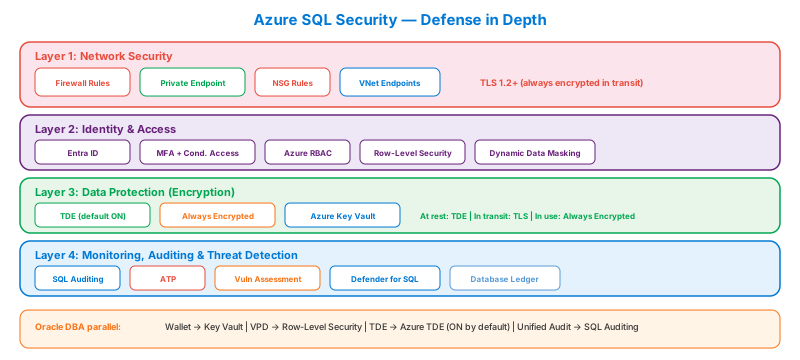
Authentication Methods
SQL Authentication
Traditional username/password stored in the database.
- Server level:
CREATE LOGIN→ creates a login on the logical server - Database level:
CREATE USER FOR LOGIN→ maps the login to a database user - Weakness: passwords stored in the DB, no MFA, no central revocation
Microsoft Entra ID (Recommended)
Centralized identity with MFA, conditional access, and no password management.
| Feature | SQL Auth | Entra ID |
|---|---|---|
| MFA | ❌ | ✅ |
| Conditional Access | ❌ | ✅ (require compliant device, location-based) |
| Central revocation | ❌ (must alter each server) | ✅ (disable in Entra → blocked everywhere) |
| Group-based access | ❌ | ✅ (add users to Entra groups) |
| Managed Identity | ❌ | ✅ (passwordless app auth) |
Microsoft Entra authentication is the recommended method. For the exam, know that you must configure an Entra admin on the SQL Server before creating Entra users. Only ONE Entra admin can be set per logical server, but it can be a group (best practice: always use a group).
Entra ID setup — enable order
CREATE USER FROM EXTERNAL PROVIDER must be run by an account that itself authenticates with Entra (the Entra admin or another Entra user). A SQL-auth login — even sa equivalent — will fail with Principal not found.
Managed Identity (App-to-Database)
The best pattern for application connections — no passwords, no secrets, no rotation:
Oracle DBA parallel: This is like Oracle External Authentication + Kerberos, but simpler. The app gets a token from Entra ID automatically — no keytab, no wallet, no password rotation ever. Use this for ALL app-to-DB connections in Azure.
Authorization — Role Hierarchy
Granting access — the canonical 4-step sequence
Most "the user can't see / write to the table" exam questions test this exact order:
A login alone cannot query a database — it needs a user mapped in that DB. A user without a role gets permission denied. The exam loves to give you 3 steps and ask which one is missing.
Fixed Database Roles — Quick Reference
| Role | Can SELECT | Can INSERT/UPDATE/DELETE | Can DDL | Can Manage Security |
|---|---|---|---|---|
db_owner | ✅ | ✅ | ✅ | ✅ |
db_datareader | ✅ | ❌ | ❌ | ❌ |
db_datawriter | ❌ | ✅ | ❌ | ❌ |
db_ddladmin | ❌ | ❌ | ✅ | ❌ |
db_securityadmin | ❌ | ❌ | ❌ | ✅ |
Common exam trap: db_datareader does NOT grant INSERT/UPDATE/DELETE. db_datawriter does NOT grant SELECT. To read AND write, a user needs BOTH roles.
Row-Level Security (RLS)
Controls which rows a user can see. Perfect for multi-tenant applications.
How it works: A filter predicate function checks SESSION_CONTEXT (set by the app) against the row's tenant column. Azure applies this transparently — queries return only matching rows.
Oracle DBA parallel: RLS = Oracle VPD (Virtual Private Database). VPD uses policy functions on tables. RLS uses security predicate functions + security policies. Same concept, different syntax. If you've built multi-tenant Oracle apps with VPD, RLS will feel natural.
Dynamic Data Masking
Masks sensitive data in query results without changing stored data:
| Mask Function | What It Does | Example |
|---|---|---|
default() | Full mask | XXXX |
email() | Masks email | aXX@XXXX.com |
partial(prefix, mask, suffix) | Custom mask | XXXX-XXXX-XXXX-1234 |
random(start, end) | Random number | 42 (within range) |
partial(prefix, mask, suffix) exam trap — the first and third arguments are integer counts of characters left visible, not the literal text. The middle argument is the literal mask string.
-- Show first 0 chars, mask with 'XXXX-XXXX-XXXX-', show last 4 chars
ALTER TABLE Customers
  ALTER COLUMN CreditCard ADD MASKED
  WITH (FUNCTION = 'partial(0,"XXXX-XXXX-XXXX-",4)');
-- Result: XXXX-XXXX-XXXX-1234

-- Show first 1 char, mask with 'XXX', show last 0 chars
-- 'partial(1,"XXX",0)' on 'Ehab' → 'EXXX'
If the question gives you a mask result and asks which partial() produced it, count exposed chars left and right — that's your prefix and suffix.
Dynamic Data Masking does NOT encrypt data at rest — it only masks the display. Users with db_owner or UNMASK permission see unmasked data. It's a presentation-layer security feature, not encryption. For true encryption → use Always Encrypted.
Auth/permission troubleshooting — check in this order
When a user reports "login failed" or "can't see data", walk down this list:
Security Feature Comparison
Full side-by-side matrix lives on the Security Controls Comparison page — don't duplicate, just learn it once there.
Anti-Patterns
- "Two Entra admins for redundancy." Only one Entra admin per logical server is allowed — but it can (and should) be a group. Setting an individual user creates a single point of human failure.
- "Use the SQL
saadmin in cloud too." Azure SQL DB has nosa. The closest equivalent is the server admin login set at provisioning + the Entra admin. SQL VM still hassa— disable it after creating a least-privileged sysadmin. - "Server-level firewall rule = enough." Server FW is permissive across all DBs on that logical server. Layer with DB-level FW rules (or, better, Private Endpoint + deny public network).
- "GRANT SELECT to public."
publicincludes every login. Always GRANT to specific roles or groups. The most common cause of lateral data leakage on shared servers. - "Contained DB user with password — we'll rotate later." Contained user passwords don't sync to a central directory. They drift. Prefer Entra-mapped contained users (
CREATE USER [user@tenant.com] FROM EXTERNAL PROVIDER). - "Service principal authenticates with a client secret." Secrets expire and end up in source control. Use managed identity (
Connect-AzAccount -Identity) wherever the consumer runs in Azure.
DENY beats GRANT — always. A user in a group GRANTed SELECT and individually DENYed SELECT cannot read. Audit DENYs separately from GRANTs; they're the silent troubleshooting trap.
Migration Between Auth Models
| From → To | Path | Cost |
|---|---|---|
| SQL auth only → Mixed (SQL + Entra) | Set Entra admin at logical server; create Entra users in DB | Online; new auth path coexists |
| SQL auth → Entra-only | Add Entra admin, migrate apps, then Set-AzSqlServerActiveDirectoryOnlyAuthentication -Enabled $true | Cuts SQL auth completely; verify all clients first |
| Local SQL logins → Contained DB users | CREATE USER ... WITH PASSWORD (SQL) or FROM EXTERNAL PROVIDER (Entra) | DB now portable across servers |
| Per-user GRANTs → Role-based (DB roles) | Create custom DB roles, GRANT to roles, ADD users to roles | Cleaner audit; reduces sprawl |
| Per-user GRANTs → Entra group + role | Same as above but ADD an Entra group instead of users | Lifecycle managed in Entra, not SQL |
| Server FW → Private Endpoint | Create PE in app VNet; flip publicNetworkAccess = Disabled | Eliminates public IP attack surface; DNS rework |
| Service principal + secret → Managed identity | Replace Connect-AzAccount -ServicePrincipal with -Identity | Removes secret rotation entirely |
| Standalone SQL logins on MI → Entra logins | CREATE LOGIN ... FROM EXTERNAL PROVIDER at MI level | Centralized auth; legacy logins can coexist during cutover |
Most expensive move: server FW → Private Endpoint (DNS + on-prem hub-spoke planning).
Real Scenarios
- Net-new Azure SQL DB for a regulated app → Entra-only auth, Entra group as admin, Private Endpoint, public network disabled. Driver: zero-secret + zero-public-IP posture. Trade-off: client connectivity needs hybrid DNS resolution.
- Lift-and-shift legacy app, hardcoded SQL connection string → Mixed mode auth on Azure SQL DB, plan to migrate to managed identity quarter-on-quarter. Driver: app-side change isn't immediate. Trade-off: temporarily larger attack surface — mitigate with KV-stored secret rotated quarterly.
- Multi-tenant SaaS, separate DB per tenant → Contained DB users (Entra-mapped) in each DB. Driver: DB portability + per-tenant identity. Trade-off: no cross-DB queries from a single connection.
- CI/CD pipeline deploys schema → Pipeline managed identity, granted
db_ddladminonly. Driver: least privilege. Trade-off: requires pipeline auth wiring (OIDC). - DBA team needs break-glass access → PIM-eligible Entra group + Entra admin = that group. Driver: Just-in-time elevation, audit trail in Entra. Trade-off: requires Entra ID P2 for PIM.