SQL Managed Instance — High Availability Architecture
SQL Managed Instance has built-in HA that works differently from SQL Server on VMs. You don't configure WSFC or load balancers — Microsoft handles it. But understanding the architecture is critical for DP-300 and for choosing the right service tier.
General Purpose vs Business Critical HA
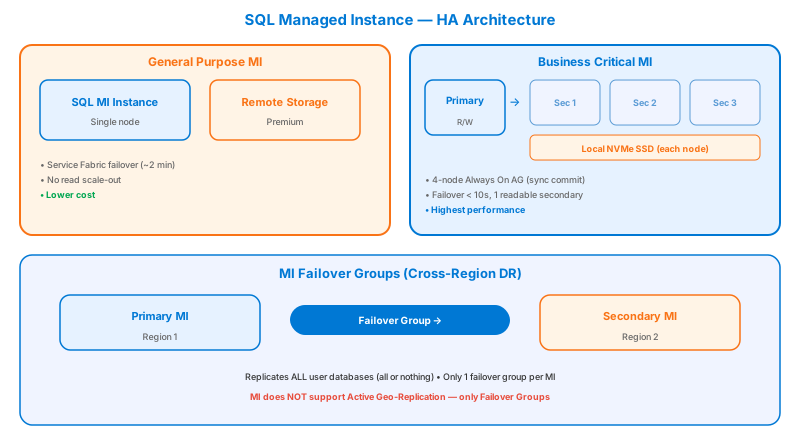
General Purpose Tier
| Aspect | Details |
|---|---|
| HA Mechanism | Azure Service Fabric manages compute. Storage is remote (Azure Premium Storage). |
| Replicas | 1 compute node + 1 standby (no data, spun up on failure) |
| Failover time | ~30 seconds (new node must attach remote storage) |
| Read replicas | ❌ None |
| Storage | Remote — Azure Premium Storage (up to 16 TB) |
| IOPS | Lower — depends on storage tier, not local SSD |
| Use case | Cost-sensitive workloads, dev/test, apps tolerant of brief failover |
| SLA | 99.99% |
How General Purpose failover works:
- Azure detects compute node failure
- A new compute node is provisioned (from standby pool)
- The new node attaches to the existing remote storage
- Databases come online — no data loss (storage is durable)
- Client connections are redirected via the gateway
General Purpose failover can take up to 30 seconds or longer because the standby node needs to start SQL Server and attach remote storage files. Applications should implement retry logic with exponential backoff.
Business Critical Tier
| Aspect | Details |
|---|---|
| HA Mechanism | Built-in Always On AG (similar technology as SQL Server AG) |
| Replicas | 1 primary + 3 secondary replicas (all with local data) |
| Failover time | ~5-10 seconds |
| Read replicas | ✅ 1 free read-only replica (built-in read scale-out) |
| Storage | Local SSD on each replica — much faster I/O |
| IOPS | Higher — local NVMe/SSD storage |
| Use case | Mission-critical workloads, OLTP, low latency requirements |
| SLA | 99.99% |
How Business Critical failover works:
- Primary replica failure is detected
- One of the 3 secondaries is promoted to primary (all have local data copies)
- Failover is near-instant because data is already local
- The gateway redirects connections to the new primary
- A new secondary is provisioned in the background
Business Critical = Always On AG under the hood (4-node AG with synchronous commit). You get one free read-only replica accessible via the connection string option ApplicationIntent=ReadOnly. This is the same technology as SQL Server AG but fully managed.
VNet Architecture
Unlike Azure SQL Database, MI is deployed inside your VNet:
Subnet Requirements
| Requirement | Details |
|---|---|
| Dedicated subnet | MI requires its own subnet — no other resources allowed |
| Minimum size | /27 (32 IPs) for a single MI, /26 recommended |
| NSG | Auto-created and managed by Azure; you can add additional rules |
| Route Table | Auto-created; includes mandatory routes for MI management |
| Delegation | Subnet must be delegated to Microsoft.Sql/managedInstances |
Don't put anything else in the MI subnet! The subnet must be delegated exclusively to Managed Instance. Also, you cannot easily change the subnet size after MI is deployed — plan for growth (use /26 or /25).
Failover Groups for Managed Instance
For cross-region DR, MI uses Failover Groups (similar to Azure SQL DB):
# Create MI failover group
az sql instance-failover-group create \
  --resource-group rg-dp300 \
  --location eastus \
  --mi mi-primary \
  --partner-mi mi-secondary \
  --partner-resource-group rg-dp300-dr \
  --name fog-mi-dp300 \
  --failover-policy Automatic \
  --grace-period 60

# Connection endpoints (auto-generated):
# Read-Write: fog-mi-dp300.zone-id.database.windows.net
# Read-Only:  fog-mi-dp300.secondary.zone-id.database.windows.net
| Feature | Details |
|---|---|
| Scope | All user databases on the instance (all or nothing) |
| Endpoint | Single DNS endpoint, no change on failover |
| Failover | Automatic with configurable grace period |
| Replication | Asynchronous geo-replication |
| Read-Only | Secondary is readable via .secondary endpoint |
MI Failover Groups replicate all user databases — you can't pick individual databases like in Azure SQL DB. The system databases (master, msdb) are NOT replicated. Logins and agent jobs must be manually synced or scripted.
MI Link Feature
The MI Link enables near real-time data replication between on-premises SQL Server and Managed Instance:
Use cases:
- Offload reporting to MI while keeping on-prem as primary
- Migration staging — replicate continuously, then cut over
- Hybrid DR — MI as a disaster recovery target
Performance Comparison
| Metric | General Purpose | Business Critical |
|---|---|---|
| vCores | 4-80 | 4-128 |
| Max storage | 16 TB | 16 TB |
| IOPS | ~500-7500 (storage-dependent) | ~30,000-400,000+ (local SSD) |
| Latency | ~5-10ms (remote storage) | ~1-2ms (local SSD) |
| Read replicas | 0 | 1 (free) |
| Failover time | ~30s | ~5-10s |
| Zone redundancy | ✅ (optional) | ✅ (optional) |
| In-memory OLTP | ❌ | ✅ |
| Price | ~40-60% less | Higher |
Start with General Purpose for most workloads. Move to Business Critical only if you need: sub-2ms latency, very high IOPS, read replicas, or In-memory OLTP. The cost difference is significant — Business Critical is roughly 2-3x the price.
Anti-Patterns
- "BC tier = our DR." BC's 4 replicas are all in one region (zone-redundant if enabled). A regional outage takes the whole instance. Pair BC with a Failover Group for DR.
- "GP tier failover is too slow for production." ~30 s is fine for the vast majority of OLTP. Re-architecting to BC for the failover speed alone is usually a 2–3× cost increase for a few seconds.
- "Use the BC read replica for everything." It's an eventually-consistent secondary. Reports tolerating < 5 s lag = fine. Anything reading-then-writing on the same data = race condition.
- "MI Failover Group fails over one DB." No — MI FOG is instance-scoped, all-or-nothing. All user DBs fail over together. If apps need per-DB control, MI is the wrong target.
- "Skip the subnet planning." MI subnets are dedicated, immutable, and minimum /27 (32 IPs). Resizing means redeploying the MI. Right-size at create.
- "GP → BC scaling is online and free." Online yes, free no — the BC tier is 2–3× the cost. The scaling operation itself can take hours for large DBs because the storage layer changes (remote → local SSD).
MI subnet provisioning is the longest single step in MI deployment (delegation, NSG, route table, ~4 hour first-instance provisioning). Subnets cannot be reused across MI instances if the MIs need different versions / features. Plan subnet sprawl carefully.
Migration Between Tiers / HA Postures
| From → To | Path | Cost |
|---|---|---|
| GP → BC | Online tier scale | Long (hours for big DBs) due to storage layer rebuild; 2–3× cost |
| BC → GP | Online tier scale | Same long operation reversed; saves cost; loses read replica + In-Memory OLTP |
| Single-region MI → MI + Failover Group | Add secondary MI in paired region; create FOG | Doubles MI cost; instance-level FOG (all DBs) |
| Non-zone-redundant → Zone-redundant | Configure at instance level (BC supports it; GP rolling out) | Slight latency increase; gain AZ resilience |
| MI → SQL VM | Backup/restore or AG seeding to a new VM | Drop PaaS; gain CmdExec/CLR/SSIS Server-side execution |
| SQL VM → MI | MI Link (online) or LRS (offline) or backup/restore | Lose host control; gain managed lifecycle |
| MI Link primary on-prem → cutover to MI | Promote MI side; redirect apps | Online during sync; cutover window for app reconfig |
| MI standard → NextGen General Purpose | In-place via service tier change (where available) | Larger storage ceiling (128 TB), better IOPS |
The expensive move is GP ↔ BC — not the operation, but the price delta.
Real Scenarios
- ERP migration from on-prem SQL 2019 with SQL Agent + CLR + SSIS → MI BC, zone-redundant, FOG to paired region. Driver: near-100 % compatibility + HA + DR. Trade-off: BC pricing + 4-hour first MI provisioning + permanent subnet.
- Internal app, OLTP, modest IOPS → MI GP, zone-redundant, no FOG. Driver: cost-effective PaaS, ~30 s failover acceptable. Trade-off: regional outage = downtime, RPO from PITR.
- Read-heavy reporting on top of OLTP → MI BC, point reports at the readable secondary. Driver: offload reads with no app rewrite. Trade-off: BC cost; replicas eventually consistent.
- Multi-region active-passive ISV deployment → MI BC + FOG in paired region. Driver: automatic failover + single endpoint. Trade-off: 2× MI cost; all DBs fail over together.
- Lift-and-shift of a 64 TB legacy DB → MI NextGen GP (standard MI tops at 16 TB on most SKUs). Driver: only MI variant that fits. Trade-off: NextGen GP region availability still rolling out.