Azure SQL Deployment Options
The Decision Tree
The #1 question on DP-300: "Which deployment option should you recommend?" Use this mental model:
| Result | When to Choose |
|---|---|
| 🔴 SQL Server on VM | OS access, FILESTREAM, MSDTC, 3rd-party software |
| 🔵 Managed Instance | Lift-and-shift migration, need Agent/CLR/cross-DB, ~99% compat |
| 🟢 Azure SQL Database | Greenfield cloud-native apps, serverless, elastic pools |
| 🟣 Hyperscale | Databases > 4 TB, up to 100 TB, instant backups |
Comparison Matrix
| Feature | Azure SQL Database | SQL Managed Instance | SQL Server on VM |
|---|---|---|---|
| Type | PaaS | PaaS | IaaS |
| Compatibility | ~95% T-SQL | ~99% SQL Server | 100% SQL Server |
| You manage | Queries, indexes, security | + Agent jobs, instance settings | + OS, patching, HA config |
| Microsoft manages | Patching, HA, backups, OS | Patching, HA, backups, OS | Hardware only |
| OS Access | ❌ | ❌ | ✅ |
| Max Size | 100 TB (Hyperscale) | 16 TB | Unlimited |
| Agent Jobs | ❌ (Use Elastic Jobs) | ✅ | ✅ |
| Cross-DB Queries | Elastic Query only | ✅ (USE works) | ✅ |
| CLR | ❌ | ✅ | ✅ |
| Linked Servers | ❌ | ✅ | ✅ |
| FILESTREAM | ❌ | ❌ | ✅ |
| MSDTC | ❌ | ❌ | ✅ |
The migration evaluation order: MI first → VM only if MI can't support the workload → SQL DB for greenfield. This is the official Microsoft recommendation and appears frequently in exam scenarios.
Azure SQL Database — Architecture Deep Dive
Fully managed database engine. Think of it as "database as a service" — you never touch the instance.
Architecture
Azure SQL Database uses a Logical Server as a management boundary (not a compute instance). Each database gets its own compute + storage. Security policies (firewall, auditing, TDE) are set at server level.
Key architectural concepts:
- Logical server = management container (firewall rules, admin login, auditing). NOT a compute instance.
- Each database has its own compute + storage (they don't share unless in an Elastic Pool).
- Elastic Pools = shared DTU/vCore budget across multiple databases. Perfect for SaaS (database-per-tenant).
Purchasing Models (Critical for Exam)
| DTU Model | vCore Model | |
|---|---|---|
| Analogy | Meal deal (bundled) | A la carte (pick components) |
| CPU | Abstracted | Explicit vCore count |
| Storage | Included per tier | Independent — pay for what you provision |
| Serverless | ❌ | ✅ (auto-pause to $0 compute) |
| Hyperscale | ❌ | ✅ (up to 100 TB) |
| Azure Hybrid Benefit | ❌ | ✅ (save up to 55%) |
| Best for | Simple/dev workloads | Production, migrations, cost optimization |
Three facts the exam loves: 1) Azure Hybrid Benefit = vCore only. 2) SQL Managed Instance = vCore only (no DTU). 3) Serverless and Hyperscale = vCore only. If the question mentions any of these → answer involves vCore.
SQL Managed Instance — Architecture Deep Dive
Best for lift-and-shift migrations. Think of it as "SQL Server instance as a service".
Key architectural concepts:
- VNet-native — deployed inside YOUR virtual network (unlike SQL DB which has a public endpoint by default)
- SQL Agent — fully supported (critical for migrations from on-prem)
- Cross-database queries —
USE [OtherDB]just works (SQL DB can't do this) - Link feature — near real-time replication from on-prem SQL Server (great for staged migrations)
- Subnet must be dedicated — no other resources allowed, minimum /27
Oracle DBA parallel: MI is like having a CDB/PDB architecture — one instance, multiple databases, cross-DB queries work natively. SQL DB is more like a single PDB — isolated, no cross-DB.
SQL Server on Azure VMs — When You Need Full Control
Full SQL Server, full OS access. Use when you need:
- FILESTREAM, MSDTC — not supported in MI
- Third-party software on the same server (backup agents, monitoring tools)
- Exact SQL Server version matching (e.g., SQL 2016 compatibility)
- Cluster features not available in MI (FCIs with shared disks)
Key architectural fact: Register SQL VMs with the SQL IaaS Agent extension to get:
- Automated backups, patching, and monitoring
- Storage configuration optimization
- Azure portal integration
- License management (AHB tracking)
SQL VM Storage Architecture
SQL VM storage best practices (heavily tested on DP-300):
- Separate disks for data, log, and tempdb — never put them on the same disk
- TempDB on local SSD (D: drive) — fastest I/O, zero cost, but ephemeral (lost on VM restart)
- Premium SSD P30+ for data/log — minimum 5000 IOPS
- Enable Read Caching on data disks, disable caching on log disks
- Use Storage Spaces to stripe multiple disks for higher IOPS/throughput
Common exam trap: "You need full SQL Server compatibility" → NOT always VM! MI offers ~99% compatibility. VM is only needed for the ~1% of features MI doesn't support (FILESTREAM, MSDTC, FCI, third-party OS software).
Storage Architecture — The Complete Comparison
This is the most important architecture difference between the three deployment options. Understanding storage = understanding performance, cost, and HA behavior.
Side-by-Side Architecture
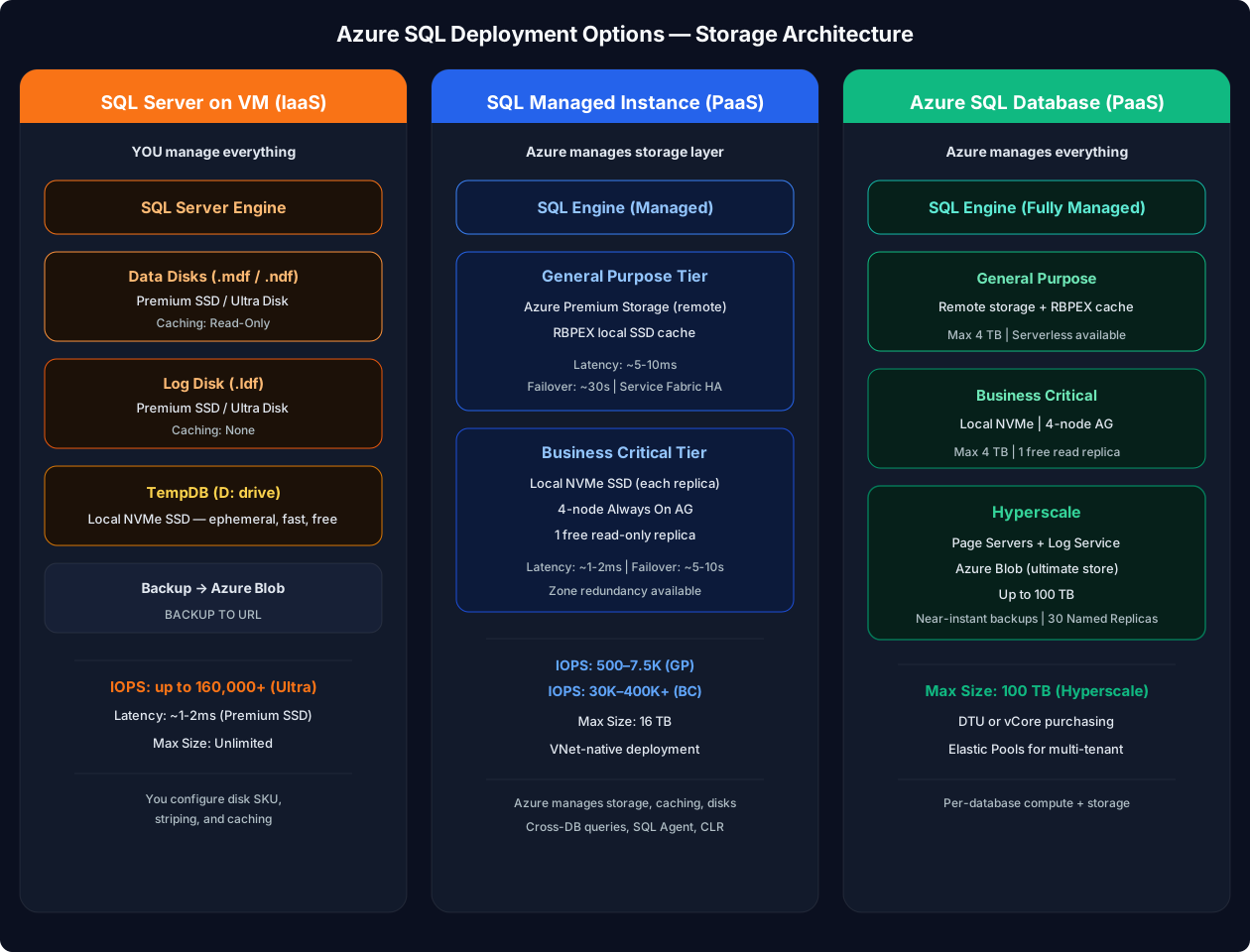
Detailed Storage Comparison
| Aspect | SQL Server on VM | SQL Managed Instance | Azure SQL Database |
|---|---|---|---|
| Storage type | Azure Managed Disks (you choose) | Azure Premium Storage (GP) or Local SSD (BC) | Remote storage (GP) or Local SSD (BC/HS) |
| Max size | Unlimited (add disks) | 16 TB | 4 TB (GP/BC), 100 TB (Hyperscale) |
| IOPS control | Full — pick disk SKU, count, stripe | Limited — tied to tier/vCores | Limited — tied to tier/vCores |
| Data disk IOPS | 160–160,000+ (Ultra Disk) | GP: ~500-7,500 / BC: ~30K-400K+ | GP: ~500-7,500 / BC: ~30K-400K+ |
| Latency | ~1-2ms (Premium SSD) | GP: ~5-10ms / BC: ~1-2ms | GP: ~5-10ms / BC: ~1-2ms |
| TempDB | Local SSD (D: drive) — YOU configure | Managed — scales with vCores | Managed — scales with compute |
| Storage scaling | Add/resize disks (may need restart) | Grow online (no downtime) | Grow online (no downtime, GP/HS) |
| Backup storage | You manage (Blob, disk, URL) | Automated — Azure Premium Storage + LRS/GRS | Automated — Azure Blob + LRS/ZRS/GRS |
| Read caching | You configure per disk (Host Caching) | Managed by Azure | Managed by Azure |
| Disk striping | Storage Spaces (you configure) | Managed by Azure | Managed by Azure |
| Encryption at rest | SSE + optional ADE (BitLocker) | TDE (always on) | TDE (always on) |
General Purpose Storage Architecture (MI & SQL DB)
How it works:
- Compute node is stateless — it can be replaced without data loss
- Local SSD cache keeps hot pages — improves read latency
- Remote Premium Storage holds all data — durable even if compute dies
- Failover: Azure provisions new compute, attaches to same storage (~30 seconds)
Local SSD cache is the key to General Purpose tier performance. Each compute node has a local SSD that caches frequently accessed data pages. If your working set fits in the cache, GP read performance approaches BC. If it doesn't → you see ~5-10ms storage latency.
Business Critical Storage Architecture (MI & SQL DB)
Key facts: Failover ~5-10 sec | SLA 99.995% (zone-redundant) | 1 free read replica | In-Memory OLTP supported
How it works:
- 4 replicas, each with its own local NVMe SSD (full data copy)
- All writes go to primary → synchronously committed to all 3 secondaries
- Failover: promote a secondary (~5-10 seconds) — data already local
- One free read-only replica — use
ApplicationIntent=ReadOnly
Hyperscale Storage Architecture (SQL DB Only)
How it works:
- Page Servers each cache a portion of the database in memory + local SSD
- Log Service handles write-ahead logging (fast, persistent)
- Azure Blob is the ultimate durable store — holds the complete database
- Backups are near-instant (snapshot-based, regardless of DB size)
- Named Replicas can have different compute sizes — perfect for isolating workloads
Hyperscale is the only tier that:
- Supports databases > 4 TB (up to 100 TB)
- Has near-instant backups regardless of size
- Supports Named Replicas (independent compute scale)
- Can reverse-migrate back to General Purpose (if ≤ 1 TB) If the exam mentions a 10+ TB database → Hyperscale is the answer.
Storage Decision Quick Reference
| Question | Answer | Recommendation |
|---|---|---|
| Need full disk control? | Yes | SQL VM — Premium SSD + Ultra Disk |
| Need < 2ms latency or read replicas? | Yes | Business Critical — Local NVMe SSD, 4-node AG |
| Database > 4 TB? | Yes | Hyperscale — Page Servers + Blob, up to 100 TB |
| None of the above | Default | General Purpose — Remote storage + local SSD cache, best price/perf |
SQL VM Disk Configuration Cheat Sheet
| Disk Role | Recommended SKU | Caching | IOPS Example | Notes |
|---|---|---|---|---|
| OS | Premium SSD P6 (64 GB) | Read/Write | 240 | Default, no tuning needed |
| Data (.mdf) | Premium SSD P30+ or Ultra | Read-Only | 5,000-160,000 | Stripe multiple for higher IOPS |
| Log (.ldf) | Premium SSD P20+ or Ultra | None | 2,300+ | Sequential writes — caching hurts |
| TempDB | Local SSD (D: drive) | N/A | Very high | Free, ephemeral, lost on restart |
| Backup | Standard SSD or Blob | None | N/A | Cost-efficient, URL backup to Blob preferred |
Oracle DBA parallel: Think of this as Oracle ASM disk groups but simpler. Data disks = +DATA, Log disks = +REDO, TempDB = +TEMP on local flash. The key difference: Azure handles redundancy at the storage layer (triple replication) — you don't need ASM mirroring.
Elastic Pools — The Multi-Tenant Architecture
| Without Pool | With Elastic Pool | |
|---|---|---|
| DB 1 | 50 DTU (peak 2pm) | Shares pool |
| DB 2 | 50 DTU (peak 6pm) | Shares pool |
| DB 3 | 50 DTU (peak 10am) | Shares pool |
| Total cost | 150 DTU (3 x 50) | 80 eDTU (peaks don't overlap) |
| Savings | — | ~47% less |
When to use: Databases with spiky, unpredictable, non-overlapping usage patterns. Rule of thumb: Pool makes sense when 1.5x eDTUs × count < sum of individual DTUs.
Elastic Pools support both DTU and vCore models. They're available for Azure SQL Database only — NOT for Managed Instance. MI itself is a single-instance concept (no pooling).
Anti-Patterns
Common wrong picks and the consequence that shows up months later:
- "Pick MI because it's the safest migration." First-instance provisioning is ~4 h and the subnet is dedicated permanently. For a 50 GB single DB with no Agent jobs, SQL DB is faster to stand up and cheaper to run.
- "Pick SQL DB then bolt on Elastic Jobs to replace SQL Agent." Elastic Jobs runs in a separate database with its own auth, retry, and observability. If you already depend on Agent for ops, MI is the lower-friction path — Elastic Jobs is a greenfield tool, not a migration adapter.
- "Pick VM because we want full control." You inherit patching, AG configuration, backup tooling, monitoring, VM HA. PaaS HA SLAs (99.99–99.995 %) are usually higher than what teams build by hand on VM. "Control" frequently means "longer MTTR".
- "Mix MI Business Critical with auto-failover groups and a separate read-scale replica." The failover-group secondary already serves reads — adding a separate read path complicates RBAC and connection routing without extra throughput. Pick one read path.
- "Use Hyperscale because it scales to 100 TB." Hyperscale's storage architecture means no In-Memory OLTP, longer cold-cache reads after a node move, and a one-way migration (reverse only ≤ 1 TB). Don't pick HS unless you actually need > 4 TB or fast restore on a large DB.
The trap that bites teams 6 months in: MI subnet is permanent. You can't move an MI to a different subnet, and the subnet can't host other Azure resources. Pick the address space carefully — /27 is the floor, /24 is comfortable if you want room to scale instances.
Migration Between Options
If you pick wrong, what's the exit cost?
| From → To | Path | Cost |
|---|---|---|
| SQL DB → MI | BACPAC export/import; or Azure Data Migration Service (DMS) | Downtime = export + import; T-SQL surface usually grows, not shrinks |
| MI → SQL DB | DMS or BACPAC; rewrite Agent jobs as Elastic Jobs; remove cross-DB queries | Often a code rewrite, not a data move |
| VM → MI | MI Link (near-real-time replication from on-prem/VM, planned cutover) | Minutes of downtime if Link is healthy; FILESTREAM blocks the move |
| VM → SQL DB | DMS online for compatible workloads; manual for others | Highest friction — usually rewrite-in-place |
| SQL DB Hyperscale → SQL DB GP | Reverse migration (only if DB ≤ 1 TB at source) | Online; fails immediately if size exceeds the GP ceiling |
| MI → SQL Server on-prem / VM | Native backup → restore; or transactional replication | Supported but version-pin and compat-level constrained |
The cheaper the exit, the less time you should spend on the decision. Use this matrix to right-size how much analysis the choice actually deserves.
Real Scenarios
Four real choices and the single driver that pinned each one:
- SaaS multi-tenant CRM, 5 000 small DBs, spiky non-overlapping usage → Azure SQL Database with Elastic Pools. Driver: per-tenant isolation + pool economics. Trade-off accepted: no Agent, ops scripts moved to Elastic Jobs.
- Lift-and-shift of a 12-year-old ERP using SQL Agent + CLR + cross-DB joins → SQL Managed Instance Business Critical. Driver: zero code change for Agent and CLR. Trade-off accepted: 4 h first-instance provision, dedicated /27 subnet permanent.
- ISV software certified only against a specific SQL Server build with FILESTREAM → SQL Server on VM, SQL IaaS Agent extension enabled. Driver: certification. Trade-off accepted: customer owns patching + AG configuration.
- Analytics datamart, 12 TB and growing 1 TB/quarter, low-write read-heavy → SQL DB Hyperscale. Driver: > 4 TB ceiling on GP/BC; near-instant snapshot backups. Trade-off accepted: no In-Memory OLTP, no reverse migration once > 1 TB.