Performance Monitoring & Tuning
Not sure which monitoring tool to use? See the Monitoring Tools Matrix for a complete comparison of Query Store, DMVs, Extended Events, and Azure-native tools.
The Monitoring Mental Model
Oracle DBA parallel: This is your OEM → AWR → ADDM → SQL Tuning Advisor flow, but in Azure. Portal Metrics = OEM dashboard. Query Store = AWR. Intelligent Insights = ADDM. Automatic Tuning = SQL Profiles applied automatically.
Key Monitoring Signals
| Metric | What It Tells You | Oracle Equivalent |
|---|---|---|
| CPU % | Query/index issues | CPU used by this session wait |
| Data IO % | Storage bottleneck, missing indexes | db file sequential/scattered read |
| Log IO % | Write-heavy workload, log rate limit | log file sync |
| DTU % | Overall resource saturation (DTU model) | Top-N AWR metrics combined |
| Sessions/Workers % | Connection pool exhaustion | v$session active count |
| Deadlocks | Concurrent access conflicts | ORA-00060 |
Query Store — Your Flight Recorder
The most important tool for DP-300. Think of it as AWR on steroids — it captures per-query plans and stats continuously.
What Query Store Captures
| Data | Retention | Oracle Equivalent |
|---|---|---|
| Query text | Until purged | V$SQL |
| Execution plans (all historical) | Configurable | DBA_HIST_SQL_PLAN |
| Runtime stats (CPU, duration, reads, rows) | Configurable | DBA_HIST_SQLSTAT |
| Wait statistics per query | Configurable | V$SESSION_WAIT + ASH |
| Plan forcing information | Until removed | SQL Profiles / SQL Baselines |
Query Store Architecture
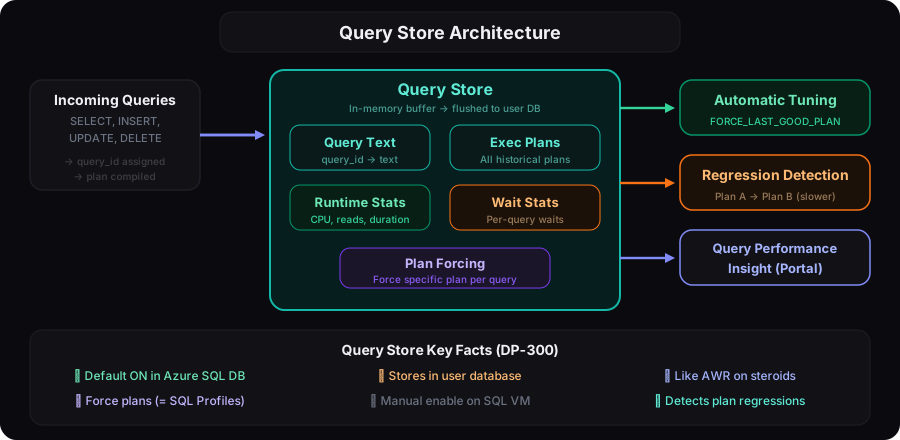
Query Store exam facts: 1) Enabled by default in Azure SQL DB. 2) Must be manually enabled on SQL Server/VM. 3) You can force a specific plan (like Oracle SQL Profiles). 4) It detects plan regressions automatically. 5) Stores data in the user database (not system DB).
The "Regressed Queries" Pattern (Exam Favorite)
- A query runs fine for months with Plan A
- Statistics update or schema change → optimizer picks Plan B
- Plan B is slower → performance regression
- Query Store detects this and can auto-force Plan A back
This is FORCE_LAST_GOOD_PLAN in Automatic Tuning — Azure's equivalent of Oracle's SQL Plan Baseline.
Dynamic Management Views (DMVs) — Cheat Sheet
| What You Need | DMV | Oracle Equivalent |
|---|---|---|
| Currently running queries | sys.dm_exec_requests + sys.dm_exec_sql_text() | V$SESSION + V$SQL |
| Top queries by CPU | sys.dm_exec_query_stats | V$SQL ORDER BY CPU_TIME |
| Missing indexes | sys.dm_db_missing_index_* | DBA_ADVISOR_RECOMMENDATIONS |
| Index fragmentation | sys.dm_db_index_physical_stats() | INDEX_STATS / ANALYZE INDEX VALIDATE |
| Wait statistics | sys.dm_os_wait_stats | V$SESSION_WAIT / ASH |
| Resource usage (last 1 hr) | sys.dm_db_resource_stats | V$SYSMETRIC |
| Active sessions | sys.dm_exec_sessions | V$SESSION |
| Blocking chains | sys.dm_exec_requests (blocking_session_id) | V$LOCK + DBA_BLOCKERS |
Most-tested DMVs: sys.dm_db_resource_stats (resource utilization), sys.dm_exec_query_stats (query performance), sys.dm_db_missing_index_details (missing indexes), and sys.dm_db_index_physical_stats (fragmentation).
Index Tuning — Architecture & Strategy
Index Types
| Type | Architecture | Best For | Oracle Equivalent |
|---|---|---|---|
| Clustered | IS the table (data sorted by key) | Primary key, range queries | Index-Organized Table (IOT) |
| Non-clustered | Separate B-tree with pointers to data | Lookups, filtered queries | Regular B-tree index |
| Columnstore | Column-based storage, high compression | Analytics, aggregations | No direct equivalent (closest: bitmap) |
| Filtered | NC index with WHERE clause | Sparse data, status columns | Function-based index (partial) |
Index Maintenance Decision Tree
REBUILD locks the table by default (offline). Always use ALTER INDEX ... REBUILD WITH (ONLINE = ON) in production. This requires Enterprise edition on VMs, but is always available in Azure SQL DB and MI (which include Enterprise features).
Columnstore — The Analytics Superpower
Why columnstore is fast for analytics: SUM(Amount) only reads the Amount column (not entire rows). Compression can be 10x+, reducing I/O dramatically. Perfect for GROUP BY, SUM, AVG, COUNT on large datasets.
Automatic Tuning — Azure's Self-Healing
| Option | What It Does | Default |
|---|---|---|
| FORCE_LAST_GOOD_PLAN | Detects plan regression → forces previous good plan | ✅ On (Azure SQL DB) |
| CREATE_INDEX | Creates missing indexes based on DMV recommendations | ❌ Off (opt-in) |
| DROP_INDEX | Drops unused indexes wasting storage/write overhead | ❌ Off (opt-in) |
FORCE_LAST_GOOD_PLAN is the only automatic tuning option enabled by default. CREATE_INDEX and DROP_INDEX must be explicitly enabled. The exam tests whether you know which are on vs off by default.
Intelligent Insights
ML-based performance analysis that detects:
- Timeout increasing — queries timing out more frequently
- Waiting increasing — specific wait types growing
- Regression — queries getting slower over time
- Tempdb contention — excessive tempdb usage impacting performance
Results are written to a diagnostics log in JSON format → viewable in Azure Portal or Log Analytics.
Think of Intelligent Insights as ADDM that runs continuously. Oracle ADDM analyzes AWR snapshots hourly. Intelligent Insights analyzes Query Store + metrics continuously and proactively alerts on anomalies. No manual AWR report generation needed.
Anti-Patterns
- "Trust Automatic Tuning blindly on prod." Plan correction (
FORCE_LAST_GOOD_PLAN) is generally safe; auto-create / auto-drop indexes can be risky on write-heavy or schema-frozen apps. Audit recommendations first, then enable per-action. - "Disable Query Store — it costs storage." Default 100 MB / 1 GB cap is trivial. Disabling QS removes Intelligent Insights, plan forcing, regression detection, and most performance reports. Almost always the wrong call.
- "Bigger DTU/vCore → fixes the slow query." Sometimes (CPU-bound). Often masks the root cause. Always check wait stats + plan before scaling. Scaling is the fastest and most expensive lever.
- "Resource Governor doesn't apply on Azure SQL DB." Correct — it's MI / SQL VM only. Apps that depend on RG must move to MI when migrating from on-prem.
- "
sp_who2andDBCC OPENTRANare enough." They show now. For trend-aware tuning usesys.dm_exec_query_stats, Query Store,sys.dm_db_wait_stats(DB-level on Azure SQL DB), and Intelligent Insights. - "Index suggestions in the portal — just apply them all." Same trap as
sys.dm_db_missing_index_*. Each is per-query; multiple may overlap; some increase write cost. Review before applying.
Query Store survives planned failover and PITR restore but NOT a schema-only deployment that drops/recreates the DB. If your CI/CD does drop+create, all QS history is lost. Use ALTER scripts.
Migration Between Tuning Strategies
| From → To | Path | Cost |
|---|---|---|
Manual plan tuning → Automatic Tuning (FORCE_LAST_GOOD_PLAN) | Toggle at server / DB level | Free; reduces incident response time |
| Manual indexing → Automatic Tuning (CREATE_INDEX) | Toggle; review log of changes | Auto-acts on dm_db_missing_index_*; risk on write-heavy workloads |
| Query Store off → on (on-prem SQL Server) | ALTER DATABASE ... SET QUERY_STORE = ON | Small storage; gains plan history |
| Reactive tuning → Intelligent Insights | Built-in on Azure SQL DB/MI; review JSON in Diagnostics | Free; alerts via Azure Monitor on top |
sp_who2 polling → Database Watcher | Watcher captures wait stats + blocking | Cross-server view; ADX cost |
| Performance Insight (deprecated) → Query Performance Insight + QS | Use new portal blade | Same QS data, better visualization |
| DTU model → vCore (for tuning visibility) | Scale tier; vCore exposes per-resource governor | One-time scale; gain transparent metrics |
| Resource Governor on SQL VM → MI workload group equivalents | Move to MI; reconfigure resource pools | Architecture change; most apps fit MI |
Most expensive moves: enabling Automatic Tuning CREATE_INDEX on a write-heavy DB without review, and DTU → vCore migration if it requires app reconfig.
Real Scenarios
- Production hit by a regressed plan after stats refresh → Query Store → Regressed Queries → Force previous plan. Driver: minutes-to-recovery. Trade-off: forced plans persist until reviewed.
- Cost spike on Azure SQL DB → Query Performance Insight → top CPU consumers + DTU/vCore consumption chart. Driver: identify the query, not just the spike. Trade-off: requires QS on.
- Greenfield app, want ‘set and forget’ → Automatic Tuning all options on for first 90 days; review the change log; selectively disable. Driver: lowest manual effort. Trade-off: must read the audit trail.
- MI hosting ISV ERP, Resource Governor required → MI workload management with workload groups + classifier. Driver: per-app CPU/IO caps. Trade-off: classifier maintenance.
- DBA team learning Azure tuning → Query Store + Database Watcher + Intelligent Insights JSON → LA + Workbook. Driver: build the muscle. Trade-off: tooling sprawl until stack standardized.