5 · Azure VNet Routing
These are original revision notes for the VNet routing lesson in the Azure Identity and Networking module. They explain, in our own words, how Azure decides where traffic goes inside a virtual network — the system routes it creates for you, and the custom routes you add to change that behavior — rather than reproducing the recording.
Core message
Azure routes traffic inside a virtual network using routes, and it gives every subnet a set of default routes automatically. These are the system routes: you can't create or delete them, but you can override some of them. Each route is an address prefix plus a next hop type — Virtual network, Internet, or None. When the defaults aren't enough — for example, to force traffic through a firewall appliance or to bring on-premises routes into Azure — you add custom routes in one of two ways: user-defined routes (UDRs) in a route table associated to a subnet, or BGP route exchange through a gateway. When several routes could match, Azure picks the one with the longest prefix, and on a tie the priority is UDR ▸ BGP ▸ system route.
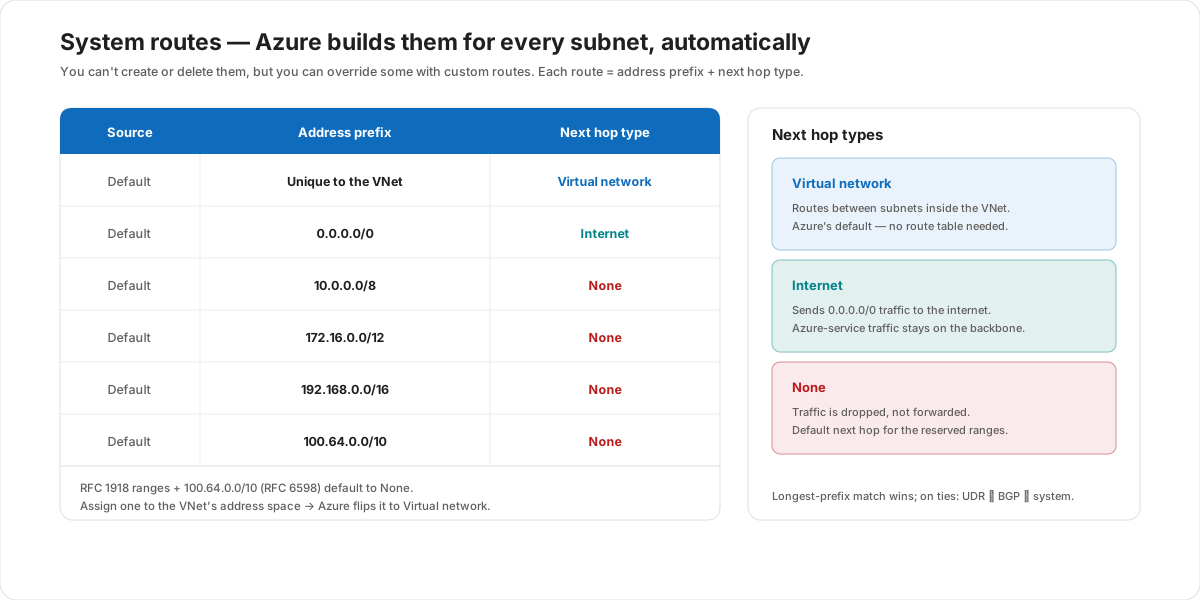
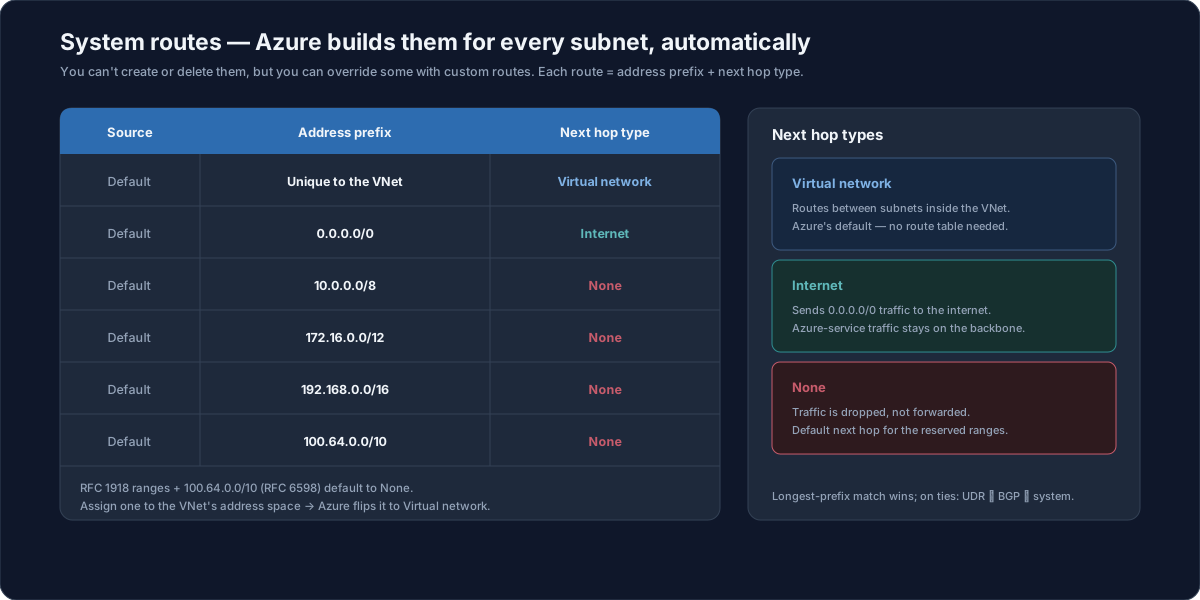
System routes
Azure automatically creates a set of default system routes for every subnet, and assigns them to the subnet. You can't create or delete system routes, but you can override some of them with custom routes. Every route has an address prefix and a next hop type, and Azure adds default routes for these prefixes:
| Source | Address prefix | Next hop type |
|---|---|---|
| Default | Unique to the virtual network | Virtual network |
| Default | 0.0.0.0/0 | Internet |
| Default | 10.0.0.0/8 | None |
| Default | 172.16.0.0/12 | None |
| Default | 192.168.0.0/16 | None |
| Default | 100.64.0.0/10 | None |
The first route covers the VNet's own address space, so subnets can talk to each other. The 0.0.0.0/0 route covers everything else — the internet. The last four are the private RFC 1918 ranges (10.0.0.0/8, 172.16.0.0/12, 192.168.0.0/16) plus the RFC 6598 shared range (100.64.0.0/10); Azure routes them to None by default so traffic to addresses you haven't used isn't silently sent to the internet. If you assign one of those reserved ranges to your VNet's address space, Azure changes its next hop from None to Virtual network.
Next hop types
The next hop type tells Azure what to do with traffic that matches a route's prefix. System routes use three of them:
- Virtual network — routes traffic between subnets inside the VNet. This is Azure's default for the VNet's own address space, and it needs no route table — it just works.
- Internet — sends traffic destined for
0.0.0.0/0out to the internet. Traffic bound for Azure services (such as storage) stays on the Azure backbone rather than traversing the public internet. - None — traffic routed to None is dropped, not forwarded. It's the default next hop for the reserved ranges above.
Custom routes can use additional next hop types (covered below), but these three are what the system routes give you out of the box.
Custom routes
When the default behavior isn't what you want — for instance, you need to send traffic through a network virtual appliance (a firewall) or pull on-premises routes into Azure — you add custom routes. There are two ways to do it.
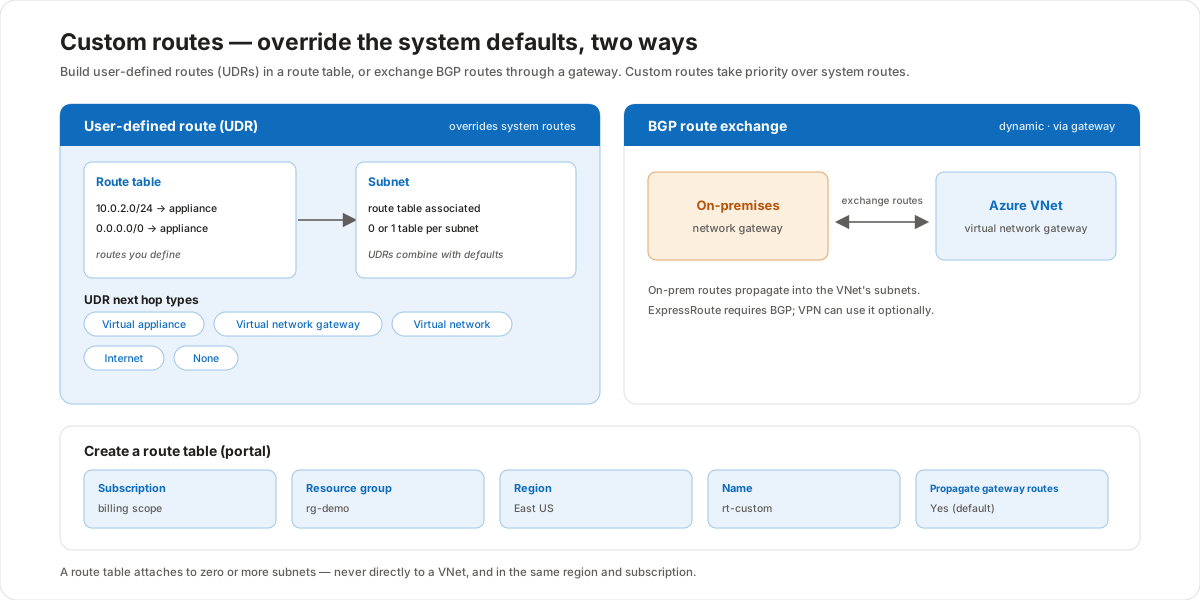
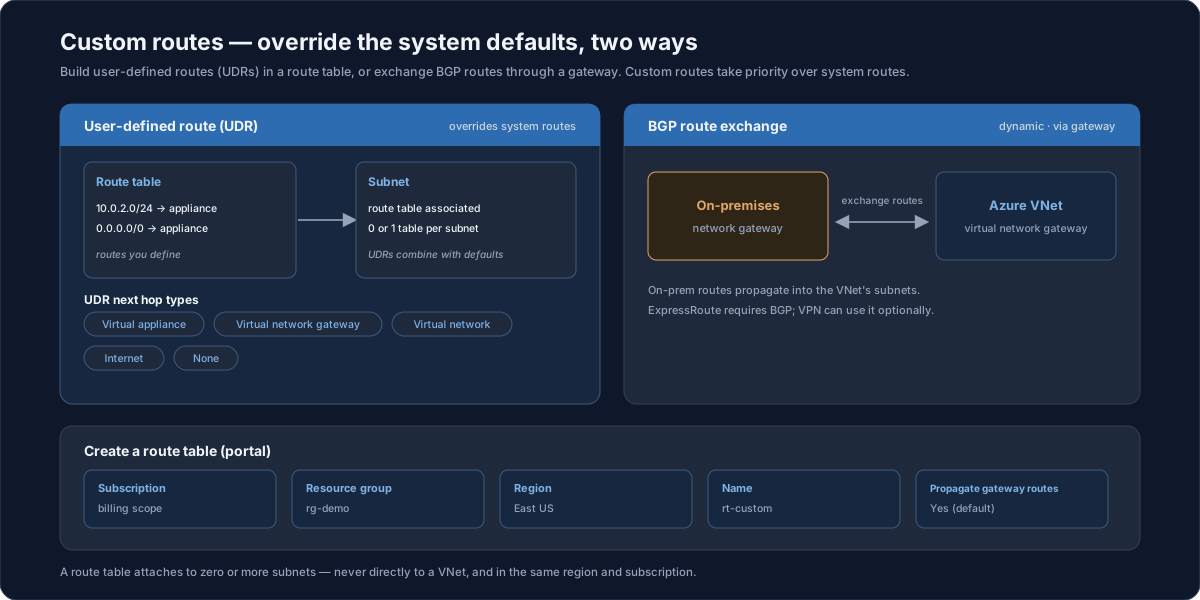
User-defined routes (UDRs)
A user-defined route is a route you create yourself and place in a route table. You then associate that route table with one or more subnets. Each subnet can have zero or one route table, and the UDRs in it combine with and override the default system routes. UDRs support a wider set of next hop types:
- Virtual appliance — send traffic to a network virtual appliance (for example, a firewall) at a specific IP.
- Virtual network gateway — send traffic to a VPN or ExpressRoute gateway.
- Virtual network — keep traffic inside the VNet.
- Internet — send traffic out to the internet.
- None — drop the traffic.
BGP route exchange
The second way uses Border Gateway Protocol (BGP). When you connect a VNet to your on-premises network through a virtual network gateway, the on-premises network gateway and the Azure gateway exchange routes dynamically. Those on-premises routes then propagate into the VNet's subnets, so you don't have to maintain them by hand. ExpressRoute requires BGP; a VPN connection can use it optionally.
Creating a route table
You create a route table as its own resource, then attach it to subnets. In the portal you provide:
- Subscription — the billing and access-control scope.
- Resource group — the container that holds the route table.
- Region — the route table is regional and must match the subnets it serves.
- Name — a name for the route table, for example
rt-custom. - Propagate gateway routes — whether gateway (BGP) routes flow into the associated subnets; this defaults to Yes.
A route table attaches to zero or more subnets — never directly to a VNet — and it must be in the same region and subscription as the subnets it's associated with.
Route selection
When more than one route could match a packet's destination, Azure chooses using two rules in order:
- Longest prefix match — the most specific route wins. A route for
10.0.2.0/24beats a route for10.0.0.0/8for an address in that smaller range. - Tie-break by type — when prefixes are equally specific, the priority is user-defined route ▸ BGP route ▸ system route.
This is why a UDR can override a system route: at the same prefix length, the UDR is preferred.
Customer value
- Traffic goes where you intend — system routes give working connectivity on day one, and custom routes let you steer traffic through a firewall, gateway, or appliance when policy requires it.
- Security through forced tunneling — a UDR pointing
0.0.0.0/0at a virtual appliance lets you inspect or block outbound traffic instead of letting it flow straight to the internet. - Hybrid connectivity without manual upkeep — BGP propagates on-premises routes into the VNet automatically, so routing stays correct as the on-premises network changes.
- Predictable precedence — the longest-prefix and UDR ▸ BGP ▸ system order make routing behavior deterministic and easy to reason about.
Risks and constraints to remember
- You can't delete system routes — you can only override some of them with more specific custom routes; the defaults are always present.
- One route table per subnet — a subnet can be associated with zero or one route table, not several; plan the routes you need into a single table.
- Route tables attach to subnets, not VNets — and they must be in the same region and subscription as those subnets.
Nonemeans dropped — a route (system or custom) with next hop None silently discards matching traffic; check for it when connectivity disappears.- Reserved ranges default to None —
10.0.0.0/8,172.16.0.0/12,192.168.0.0/16, and100.64.0.0/10go to None unless you bring one into the VNet's address space. - ExpressRoute requires BGP — BGP is mandatory for ExpressRoute and optional for VPN; plan the gateway accordingly.
Terms to remember
- System route — a default route Azure creates automatically for every subnet; you can't create or delete it, but you can override some with custom routes.
- Address prefix — the destination range a route matches, in CIDR notation (for example
0.0.0.0/0or10.0.2.0/24). - Next hop type — what Azure does with matching traffic: Virtual network, Internet, None (system), plus Virtual appliance and Virtual network gateway (custom).
- User-defined route (UDR) — a route you create in a route table and associate with subnets; it combines with and overrides system routes.
- Route table — the resource that holds UDRs; it attaches to zero or more subnets (never directly to a VNet) in the same region and subscription.
- BGP (Border Gateway Protocol) — the protocol that lets an on-premises gateway and an Azure virtual network gateway exchange routes dynamically; required for ExpressRoute, optional for VPN.
- Longest-prefix match — Azure's primary route-selection rule: the most specific matching prefix wins; ties break UDR ▸ BGP ▸ system.
"I explain routing as how Azure decides where each packet goes inside the virtual network. Azure already gives every subnet a set of system routes for free — subnets reach each other, traffic to the internet goes out, and the unused private ranges are dropped. You can't delete those, but you can override them. When a customer needs traffic to pass through a firewall appliance, we add a user-defined route in a route table and associate it with the subnet — for example, point 0.0.0.0/0 at the appliance so all outbound traffic gets inspected. When they have an on-premises network, BGP through the gateway brings those routes in automatically, so we don't maintain them by hand — and that's required for ExpressRoute. The rule that ties it together: Azure takes the most specific route, and when two are equally specific, a UDR beats BGP beats a system route. One gotcha I always flag — a route table attaches to subnets, never to the VNet itself, and a subnet can have only one table."