4 · Azure Virtual Network
These are original revision notes for the Azure Virtual Network lesson in the Azure Identity and Networking module. They explain, in our own words, what a virtual network is, what you specify when you create one, and how subnet addressing works — rather than reproducing the recording.
Core message
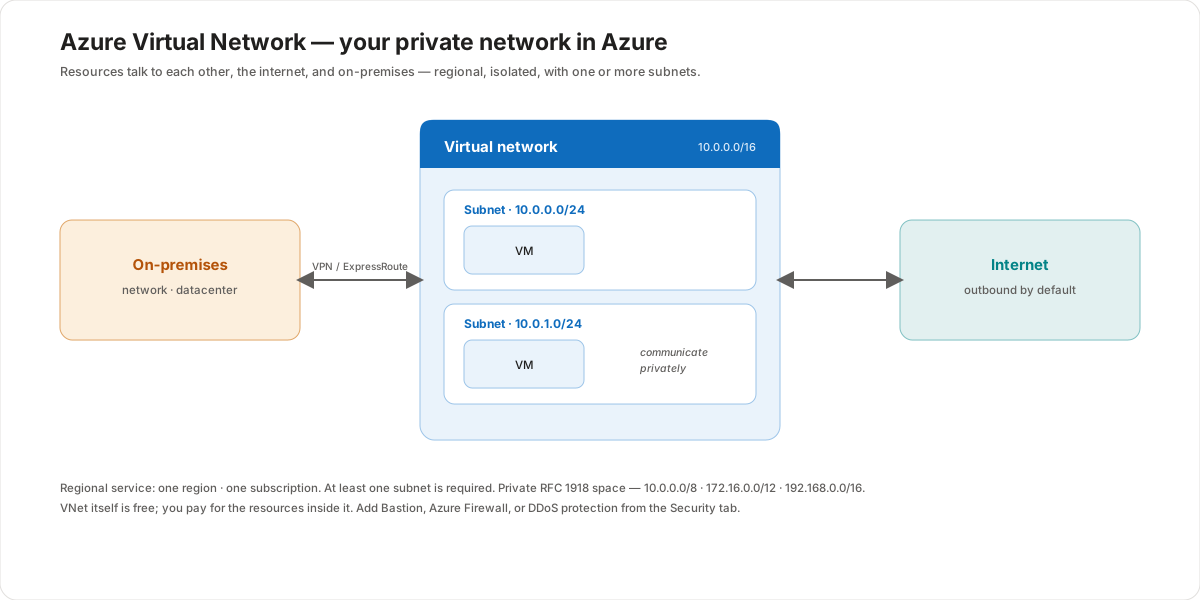
An Azure virtual network (VNet) is your own private, isolated network in Azure — the fundamental building block for everything you connect together. Resources placed inside a VNet can communicate with each other, reach out to the internet, and connect back to your on-premises network. A VNet is a regional service: it lives in one region and one subscription, and it must contain at least one subnet. When you create one you specify a name, a subscription, a resource group, a region, and an address space in CIDR notation (IPv4, and optionally IPv6) drawn from the private RFC 1918 ranges. You then carve that space into subnets, and in every subnet Azure reserves 5 addresses, so a /24 (256 addresses) leaves 251 usable.
What a virtual network gives you
A virtual network is the software-defined equivalent of the network you'd build in a traditional datacenter — but it runs on Azure's infrastructure, so it inherits the scale, availability, and isolation benefits of the platform. It enables three kinds of communication:
- Resources to each other — virtual machines, databases, and other services placed in the VNet talk to one another privately and securely over Azure's backbone, without traffic leaving the network.
- Resources to the internet — every resource in a VNet has outbound connectivity to the internet by default; inbound access is something you grant deliberately.
- VNet to on-premises — you can connect a VNet back to your own datacenter using a VPN gateway (over the public internet) or Azure ExpressRoute (a private connection), so cloud and on-premises resources behave as one network.
What you specify when you create one
Creating a virtual network is a matter of describing where it lives and what address space it owns:
- Subscription — the billing and access-control boundary the VNet belongs to.
- Resource group — the container that holds the VNet alongside related resources that share its lifecycle.
- Name — a name unique within the resource group, for example
multiclouddemovnet. - Region — the Azure region the VNet lives in. A VNet is a regional resource; it cannot span regions.
- Address space — one or more ranges in CIDR notation that the VNet owns, such as
10.0.0.0/16. You can define both IPv4 and IPv6 address space.
The address space should come from the private RFC 1918 ranges — 10.0.0.0/8, 172.16.0.0/12, or 192.168.0.0/16 — so it doesn't collide with public addresses or with the ranges you use on-premises.
Subnets
A virtual network must contain at least one subnet. Subnets divide the VNet's address space into smaller segments so you can organize and secure resources — for instance, putting front-end and back-end tiers in separate subnets and controlling traffic between them.
When you create a VNet in the portal, Azure offers a default subnet automatically, and you add more as you need them. Each subnet takes a slice of the parent VNet's CIDR range — a common pattern is a /16 VNet (10.0.0.0/16) carved into /24 subnets (10.0.0.0/24, 10.0.1.0/24, and so on).
Subnet addressing and the 5 reserved addresses
A subnet's size is set by its CIDR prefix, and Azure reserves 5 addresses in every subnet that you cannot assign to your own resources:
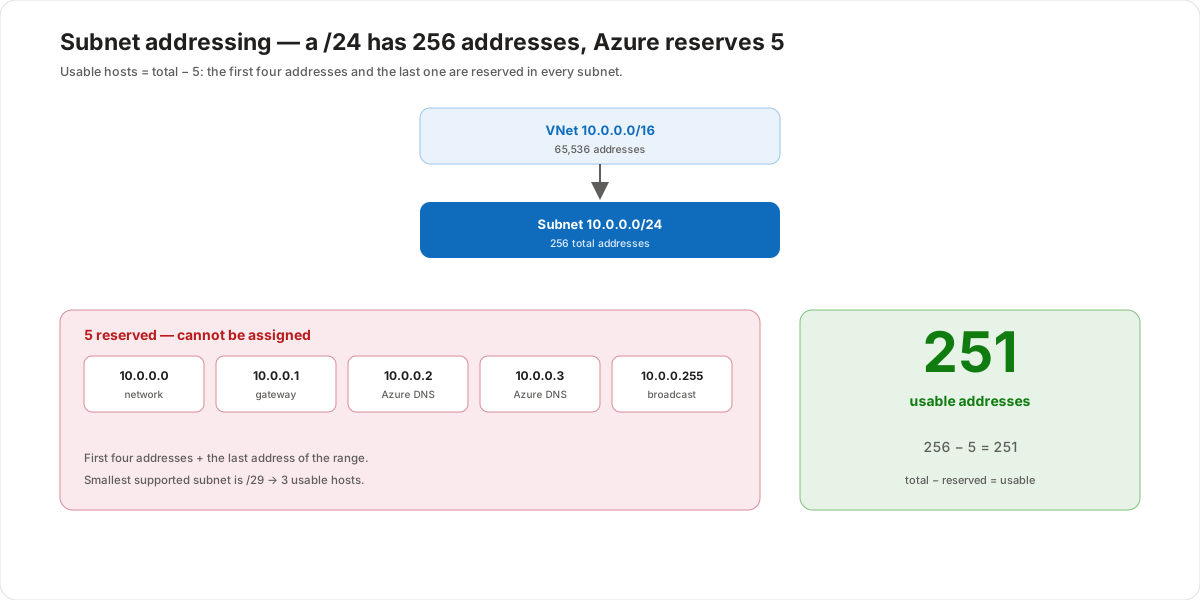
Take a /24 subnet, which has 256 total addresses (10.0.0.0 – 10.0.0.255). Azure reserves the first four and the last address:
| Reserved address | Purpose |
|---|---|
10.0.0.0 | Network address |
10.0.0.1 | Default gateway |
10.0.0.2, 10.0.0.3 | Mapped to the Azure DNS IPs |
10.0.0.255 | Broadcast address |
That leaves 256 − 5 = 251 usable addresses for your resources. The same rule applies to any subnet size, which is why the smallest subnet Azure supports is a /29 — 8 addresses, minus 5 reserved, leaving just 3 usable hosts.
Pricing and the Security tab
A virtual network itself is free — there's no charge for the VNet or its subnets. You pay for the resources you place inside it and for optional network services you add. When you create a VNet, the Security tab lets you enable protective services in one place:
- Azure Bastion — secure RDP/SSH access to VMs without exposing public IP addresses.
- Azure Firewall — a managed, stateful network firewall for the VNet.
- DDoS protection — mitigation against distributed denial-of-service attacks.
These are optional and billed separately when enabled — but having them on the Security tab means you can plan protection at creation time rather than bolting it on later.
Customer value
- Isolation by default — each VNet is a private, isolated network, so workloads are separated from other tenants and from each other unless you deliberately connect them.
- One network across cloud and on-premises — VPN gateway or ExpressRoute lets a VNet extend your datacenter into Azure, so hybrid resources behave as a single network.
- Structure and security through subnets — dividing the address space into subnets lets you group resources by tier and control the traffic between them.
- Predictable addressing — using private RFC 1918 ranges and planning subnet sizes (remembering the 5 reserved addresses) avoids collisions and prevents running out of IPs as you grow.
- No cost to start — the VNet is free, so the network design itself carries no charge; you only pay for what you run inside it.
Risks and constraints to remember
- A VNet is regional — it lives in one region and one subscription and cannot span regions; design connectivity (peering, gateways) when you need to reach across.
- At least one subnet is required — a VNet with no subnet holds no resources; the portal seeds a
defaultsubnet for you. - 5 addresses are always reserved — never size a subnet assuming you get the full count; a
/24gives 251, not 256, and a/29gives only 3. - Use private ranges — address space should come from RFC 1918; overlapping ranges with on-premises or peered networks break connectivity.
- Outbound internet is on by default; inbound is not — plan inbound access deliberately, and pair it with the Security tab services (Bastion, Firewall, DDoS).
- The VNet is free, the services aren't — Bastion, Azure Firewall, DDoS protection, and the resources inside the VNet are all billed separately.
Terms to remember
- Virtual network (VNet) — a private, isolated, regional network in Azure; the fundamental building block that lets resources communicate with each other, the internet, and on-premises.
- Address space — the range(s) of IP addresses a VNet owns, expressed in CIDR notation (IPv4 and optionally IPv6), drawn from the private RFC 1918 ranges.
- Subnet — a segment of a VNet's address space; a VNet needs at least one, and the portal provides a
defaultsubnet to start. - CIDR notation — the
address/prefixform (for example10.0.0.0/16) that defines how many addresses a range contains. - RFC 1918 — the private IPv4 ranges (
10.0.0.0/8,172.16.0.0/12,192.168.0.0/16) used for internal networks. - Reserved addresses — the 5 addresses Azure keeps in every subnet: the first four (network, gateway, two for Azure DNS) and the last (broadcast); usable = total − 5.
- VPN gateway / ExpressRoute — the two ways to connect a VNet to on-premises: a VPN gateway over the public internet, or ExpressRoute over a private connection.
- Security tab — the place during VNet creation to enable Azure Bastion, Azure Firewall, and DDoS protection.
"I describe a virtual network as the customer's own private network inside Azure — the foundation everything else sits on. Resources in it talk to each other privately, reach the internet outbound by default, and connect back to the customer's datacenter through a VPN gateway or ExpressRoute. It's a regional resource — one region, one subscription — and it always has at least one subnet. When we create it we just say where it lives (subscription, resource group, region, a name) and what address space it owns in CIDR, using private RFC 1918 ranges so nothing collides. The detail that catches people out is subnet sizing: Azure reserves 5 addresses in every subnet, so a /24 gives you 251 usable, not 256 — plan for that and you won't run out of IPs. The VNet itself is free; you only pay for what runs inside it, and the Security tab is where we switch on Bastion, Azure Firewall, or DDoS protection."