Encryption & Network Security
For a quick comparison of all security features (TDE vs Always Encrypted vs RLS vs DDM vs Auditing), see the Security Controls Comparison.
Encryption Layers — The Complete Picture
Memorize the three states: At rest → TDE, In transit → TLS, In use → Always Encrypted. This is the most tested encryption framework on DP-300.
Transparent Data Encryption (TDE)
Encrypts data at rest — database files, backups, and transaction logs.
| Aspect | Details |
|---|---|
| Algorithm | AES-256 |
| Enabled by default | ✅ Yes, on Azure SQL Database |
| Performance impact | ~3-5% (minimal) |
| What's encrypted | .mdf, .ndf, .ldf files, and backup .bak files |
| Key management | Service-managed key (default) or BYOK via Key Vault |
| Granularity | Entire database (you can't encrypt selectively) |
TDE Key Hierarchy
Oracle DBA parallel: Azure TDE = Oracle TDE, but simpler. Oracle TDE requires wallet creation, ALTER TABLESPACE ENCRYPT, per-tablespace setup. Azure TDE is always on and encrypts the entire database automatically. The BYOK option maps to Oracle's external keystore.
TDE encrypts backups too! If you restore a TDE-encrypted backup to another server, you need access to the same TDE protector key. With service-managed keys, Azure handles this. With BYOK (Key Vault), the target server must have access to the same Key Vault key.
TDE Setup on SQL Server / SQL on VM (T-SQL Step-by-Step)
On Azure SQL DB / MI, TDE is on by default — you only flip BYOK. On SQL Server on a VM, you build the key chain yourself, in this exact order:
-- 1. Master key in the master database (protects the certificate)
USE master;
-- Use a strong, unique password from your secret store (e.g., Azure Key Vault). Do NOT hard-code.
CREATE MASTER KEY ENCRYPTION BY PASSWORD = '<YOUR-STRONG-PASSWORD>';

-- 2. Certificate protected by the master key
CREATE CERTIFICATE TDECert
  WITH SUBJECT = 'TDE Certificate';

-- 3. Database Encryption Key (DEK) inside the user database
USE MyDb;
CREATE DATABASE ENCRYPTION KEY
  WITH ALGORITHM = AES_256
  ENCRYPTION BY SERVER CERTIFICATE TDECert;

-- 4. Turn TDE on
ALTER DATABASE MyDb SET ENCRYPTION ON;

-- 5. CRITICAL — back up the certificate + private key NOW
BACKUP CERTIFICATE TDECert
  TO FILE = 'C:\Backup\TDECert.cer'
  WITH PRIVATE KEY (
    FILE     = 'C:\Backup\TDECert.pvk',
    ENCRYPTION BY PASSWORD = '<YOUR-BACKUP-PASSWORD>'
  );

-- Verify
SELECT name, is_encrypted FROM sys.databases WHERE name = 'MyDb';
SELECT db_name(database_id), encryption_state
FROM sys.dm_database_encryption_keys;
Order matters: MASTER KEY → CERTIFICATE → DEK → ALTER DATABASE SET ENCRYPTION ON. The exam loves to scramble these or skip step 5 (cert backup). Without the certificate + private key backup, an encrypted backup is unrestorable on any other server.
encryption_state values: 1 = unencrypted, 2 = encryption in progress, 3 = encrypted, 4 = key change in progress, 5 = decryption in progress. State 3 = done.
Azure Key Vault for Database Security
Key Vault is the central store for TDE customer-managed keys, Always Encrypted column master keys, and connection string secrets.
| Feature | Standard SKU | Premium SKU |
|---|---|---|
| Software-protected keys | ✅ | ✅ |
| HSM-protected keys | ❌ | ✅ |
Access control: Use Azure RBAC (recommended) for granular vault/key/secret-level permissions. Access Policies are legacy.
Always Encrypted
Full coverage on the dedicated page — see Always Encrypted with VBS Enclaves for the complete enable sequence, key hierarchy, deterministic vs randomized, enclave queries, and exam traps.
Quick reminder for picking the right control:
TDE vs Always Encrypted — the one-line decision: "Encrypt data at rest / protect from stolen disks or backups" = TDE. "Hide columns from DBAs / cloud operators" = Always Encrypted. "Need range or LIKE on encrypted columns" = Always Encrypted with secure enclaves.
Object-Level Encryption (Symmetric Keys) — Setup Order
Different feature from Always Encrypted. Here the server does the encryption with EncryptByKey/DecryptByKey. Used for legacy apps that need to encrypt selected columns without changing the client driver. The exam tests the key chain order:
EncryptByKey returns NULL if the symmetric key isn't open in the session. Always pair OPEN SYMMETRIC KEY with CLOSE SYMMETRIC KEY (or rely on connection close). Don't confuse this with Always Encrypted — here the server sees plaintext during encryption, AE doesn't.
TDE BYOK (Customer-Managed Key) — Enable Order
If you set the TDE protector before granting the SQL identity Key Vault permissions, the server loses access to the key and the database becomes inaccessible. Always grant access first, set the protector last.
Network Security — Defense in Depth
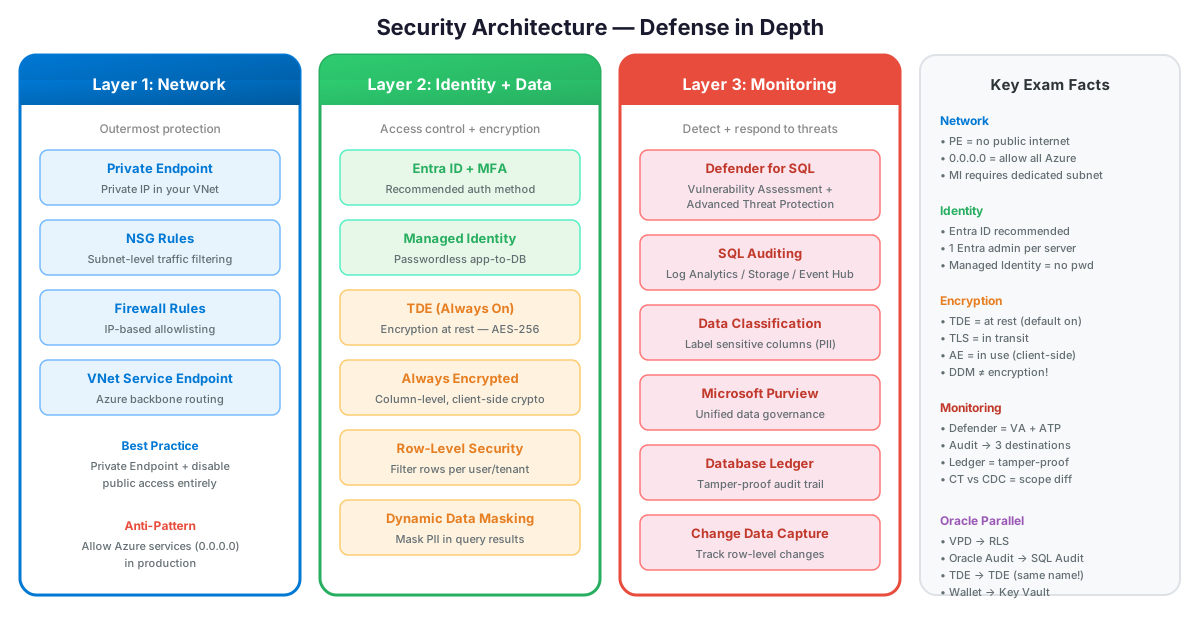
Connectivity Options (Most → Least Secure)
| Option | Traffic Path | Exam Scenario |
|---|---|---|
| Private Endpoint | Private IP in your VNet → Azure backbone | "Most secure" / "no public internet" |
| VNet Service Endpoint | Subnet → Azure backbone (but IP is still public) | "Restrict to specific subnet" |
| Firewall Rules | Public IP allowlist | "Allow specific client IPs" |
| Allow Azure Services (0.0.0.0) | Any Azure service can connect | ⚠️ "Allow Azure services" toggle — overly broad for production |
If the exam says "no data should traverse the public internet" → the answer is Private Endpoint. VNet Service Endpoints still use a public IP (traffic goes over the Azure backbone, but the endpoint is technically public). Private Endpoint assigns a truly private IP inside your VNet.
Private Endpoint Architecture
When using Private Endpoints, also disable public access on the SQL Server. Otherwise, the database is accessible via both private AND public endpoints. Disable public access via the "Public network access" setting = Disabled.
SQL Managed Instance — endpoint types
SQL MI is always vNet-injected (its primary endpoint lives inside your subnet on port 1433). The choice on the exam is which additional endpoint to expose, and how to lock it down.
| Endpoint type | Port | Where it lives | Use case | How to restrict |
|---|---|---|---|---|
| Private (default) | 1433 | NIC inside your delegated subnet | All vNet / peered / VPN / ExpressRoute traffic | Subnet NSG + route table |
| Public endpoint | 3342 | Public IP on the MI | Connectivity from outside the vNet (on-prem without VPN, or other Azure services like Power BI Service) | NSG on the MI subnet allowing only the required service tag (e.g., PowerBI, AzureCloud) on port 3342 |
| Service endpoint | n/a | vNet "service endpoint" toggle on the subnet | Optimize traffic from a vNet to other Azure SQL services (DB, storage). Does not apply to MI itself. | Service endpoint policy |
MI + Power BI Service question: Power BI's cloud service can't reach a private-only MI. Enable the public endpoint on port 3342 and lock the MI subnet NSG down to inbound PowerBI service tag on 3342. Don't open 1433 to the public internet — 1433 is the private endpoint and stays inside the vNet.
The MI public endpoint uses port 3342, not 1433. NSG rules and firewall scripts written for SQL DB (port 1433) will silently fail for MI's public endpoint.
Auditing — Where Do Logs Go?
| Destination | Use Case | Retention |
|---|---|---|
| Log Analytics | KQL queries, Azure Monitor integration, dashboards | Configurable (30-730 days) |
| Storage Account | Long-term archival, compliance | Unlimited |
| Event Hub | Real-time streaming to SIEM (Sentinel, Splunk) | Streaming (no built-in retention) |
Best practice: Send audit logs to Log Analytics for querying + Storage Account for compliance archival. Use Event Hub only if you have a SIEM that needs real-time feed. This mirrors Oracle Unified Audit → Oracle Audit Vault + AVDF pattern.
Microsoft Defender for SQL
| Feature | What It Does |
|---|---|
| Vulnerability Assessment | Scans for misconfigurations (weak passwords, excessive permissions) |
| Advanced Threat Protection | Detects SQL injection, anomalous access, brute force attacks |
| Data Classification | Discovers and labels sensitive data (PII, financial, health) |
Defender for SQL combines all three features. If the exam asks about "detecting SQL injection attempts" → Advanced Threat Protection. "Finding unencrypted sensitive columns" → Data Classification. "Checking for security misconfigurations" → Vulnerability Assessment.
Anti-Patterns
- "TDE = compliance done." TDE encrypts at rest only. A privileged DB user reading the table sees plaintext. For column-level confidentiality use Always Encrypted (with Enclaves for range queries) and pair with DDM + RLS for least-privilege visibility.
- "Service-managed TDE everywhere because BYOK is hard." Right call for most workloads. Wrong when the customer holds the regulator-mandated key custody (FSI, HC, defense). Don't over-engineer BYOK because of perceived sophistication — pick it because the regulator demands it.
- "Force TLS 1.0 'for legacy compatibility.'" Azure SQL MI/DB enforce TLS 1.2+ by default. Re-enabling TLS 1.0 widens attack surface for the entire server. Fix the legacy client driver instead.
- "Public endpoint open with FW rules — fine for prod." FW protects the IP, not the certificate, not the data plane TLS posture, not future driver vulns. Private Endpoint is the production posture; FW is the dev/test fallback.
- "Defender for SQL is too expensive at scale." Per-server pricing. The math changes against the cost of one SQL injection breach. Most enterprises enable it on prod and disable on dev/test as the cost-control move.
- "Auditing-to-storage = audit done." Storage is cheap but un-queryable at scale. Pair with Auditing-to-Log Analytics so SOC can run KQL across the estate. Don't pick storage only.
TDE on SQL VM with BYOK requires AKV Premium tier and HSM-backed key. Standard tier won't satisfy the FIPS 140-2 Level 2 requirement most regulators specify for BYOK. Plan AKV SKU before enabling.
Migration Between Encryption / Network Postures
| From → To | Path | Cost |
|---|---|---|
| Service-managed TDE → BYOK (Customer-managed key) | Configure CMK on logical server / MI / SQL VM via AKV reference | Online rotation; gain key custody; ops cost = key rotation lifecycle |
| BYOK → Service-managed TDE | Switch back via portal / Set-AzSqlServer*Tde* | Online; lose custody benefit |
| TLS 1.0/1.1 → 1.2+ enforced | Set Min TLS Version at server level | Brief client validation; modern drivers fine |
| Public endpoint + FW rule → Private Endpoint | Create PE in app VNet, flip Public Access = Disabled | DNS rework; security posture leap |
| Public endpoint → VNet service endpoint (legacy) | Outdated path; prefer PE | Easier than PE but no on-prem reach |
| Defender free trial → Defender for SQL paid | Toggle plan in Defender for Cloud | Per-server billing; gain VA + ATP + alerts |
| Audit to Storage → Audit to Log Analytics | Add LA destination; keep storage as cheap retention | Adds LA ingest cost; gains KQL query |
| Single-region service-managed TDE → Geo-redundant BYOK | Use AKV with multi-region key replication; dual key management | Significant ops complexity; only for true regulatory cases |
Most expensive moves: adoption of BYOK (key custody lifecycle) and public → Private Endpoint (DNS + hub-spoke).
Real Scenarios
- HIPAA-bound hospital records DB → Service-managed TDE + Always Encrypted (Enclaves) on PII columns + RLS by clinician role + DDM on display + Audit to LA. Driver: defense-in-depth. Trade-off: app-tier driver changes for AE.
- EU-bound regulated workload, key custody mandate → BYOK with AKV Premium HSM in West Europe + service-managed TDE elsewhere. Driver: only the EU instance needs HSM-backed key. Trade-off: AKV Premium pricing + key rotation runbook.
- Internal LOB app, low sensitivity → Default service-managed TDE + Defender free assessment + server FW rules. Driver: cost-effective baseline. Trade-off: not regulator-grade.
- Multi-region SaaS hub-spoke → Private Endpoint on all SQL servers + private DNS zone shared via Azure Private DNS Resolver. Driver: zero public exposure. Trade-off: PE per region per server, DNS automation required.
- Detect SQL injection on legacy app pre-rewrite → Defender for SQL + Auditing to LA + alert rules to Sentinel. Driver: detective control while developers patch. Trade-off: alert fatigue — tune detection rules.