vCore vs DTU Purchasing Models (Deep Dive)
The choice between vCore and DTU is one of the most important decisions when deploying Azure SQL Database. This page breaks down every aspect: architecture, pricing, scaling, migration, and when to use which.
The Core Difference
| Aspect | DTU | vCore |
|---|---|---|
| Philosophy | "Meal deal" — fixed bundle | "A la carte" — pick components |
| CPU | Abstracted (part of DTU) | Explicit vCore count |
| Memory | Abstracted | ~5.1 GB per vCore (Gen5) |
| Storage | Included (size varies by tier) | Independent — pay for what you provision |
| I/O | Abstracted | Independent IOPS/throughput |
| Scaling | Change DTU level (preset tiers) | Change vCores + storage independently |
| Best for | Simpler workloads, predictable usage | Complex workloads, granular control, migration |
DTU Model — Detailed Breakdown
Tiers
| Tier | DTU Range | Max DB Size | Max IOPS | Backup Retention | Use Case |
|---|---|---|---|---|---|
| Basic | 5 DTU | 2 GB | 300 | 7 days | Dev/test, tiny databases |
| Standard | 10–3000 DTU | 1 TB | 6,000 (S12) | 35 days | Web apps, moderate workloads |
| Premium | 125–4000 DTU | 4 TB | 15,000 (P15) | 35 days | OLTP, high-transaction workloads |
What IS a DTU?
A DTU is a blended measure of CPU, data I/O, and transaction log I/O under a standard OLTP benchmark. It's not purely CPU — it's a composite score.
DTU ≈ f(CPU, Data IO, Log IO)
Think of it like: A car's "horsepower" — it tells you general performance but doesn't separate engine power, torque, and fuel efficiency.
When comparing DTU levels: doubling the DTUs roughly doubles performance across all dimensions. A S2 (50 DTU) is roughly 5x a Basic (5 DTU) for blended operations. But you can't get "more CPU with less IO" — they're bundled.
DTU Elastic Pools
Share DTUs across multiple databases — cost-effective when databases have complementary usage patterns.
When to use Elastic Pools:
- Multi-tenant SaaS (database per tenant)
- Databases with spiky, unpredictable usage patterns
- Peak usage times don't overlap across databases
- Rule of thumb: 1.5x eDTUs × number of databases < sum of individual database DTUs
vCore Model — Detailed Breakdown
Service Tiers
| Tier | vCores | Max Storage | Key Feature | Use Case |
|---|---|---|---|---|
| General Purpose | 2–128 | 4 TB (16 TB preview) | Remote storage, balanced price/perf | Most workloads |
| Business Critical | 2–128 | 4 TB | Local SSD, read replica, zone redundant | Mission-critical OLTP |
| Hyperscale | 2–128 | 100 TB | Instant scale, near-instant backup | Very large databases |
Compute Tiers (vCore only)
| Compute Option | Details | Billing | Best For |
|---|---|---|---|
| Provisioned | Fixed vCores, always on | Pay for provisioned vCores/hr | Predictable, steady workloads |
| Serverless | Auto-scales vCores, auto-pauses | Pay for vCores used/sec + storage | Dev/test, intermittent workloads |
Serverless is perfect for dev/test and intermittent workloads. It can auto-pause to $0 compute cost (you still pay for storage). Wake-up time is ~1 minute on the first connection. Configure auto-pause-delay (minimum 60 min of inactivity).
Hyperscale Architecture
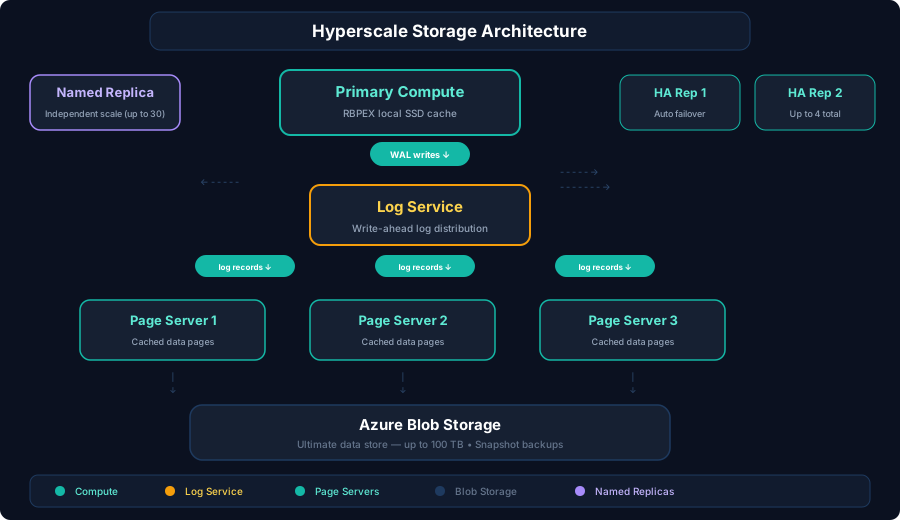
Hyperscale key facts:
- Up to 100 TB database size
- Near-instant backups (snapshot-based)
- Fast restore — minutes, not hours
- Up to 4 HA replicas + up to 30 named replicas (read scale)
- Reverse migration: Now supports moving BACK to General Purpose (up to 1 TB)
Hyperscale is the only tier that supports databases larger than 4 TB. If a question mentions a 10 TB, 50 TB, or 100 TB database, the answer is Hyperscale.
Head-to-Head Comparison
| Feature | DTU | vCore |
|---|---|---|
| CPU control | ❌ Bundled | ✅ Choose exact vCores |
| Storage control | ❌ Included per tier | ✅ Provision independently |
| Serverless | ❌ Not available | ✅ Available |
| Hyperscale | ❌ Not available | ✅ Available |
| Azure Hybrid Benefit | ❌ Not supported | ✅ Save up to 55% with existing SQL licenses |
| Reserved capacity | ❌ Not supported | ✅ 1-year or 3-year reservations |
| Read replicas | ❌ (Premium has read scale) | ✅ Business Critical + Hyperscale |
| Zone redundancy | ❌ (Premium only) | ✅ GP + BC + HS |
| Max DB size | 4 TB (Premium) | 100 TB (Hyperscale) |
| Elastic Pools | ✅ eDTU | ✅ vCore pools |
| MI compatible | ❌ | ✅ (MI uses vCore only) |
| Cost predictability | ✅ Simple pricing | Variable — depends on config |
When to Use Which
Use DTU When:
- ✅ Simple, predictable workloads
- ✅ You don't need granular resource control
- ✅ Small to medium databases (< 1 TB)
- ✅ You want straightforward pricing
- ✅ Dev/test environments (Basic tier is very cheap)
Use vCore When:
- ✅ Migrating from on-premises (easier to size — map CPU cores to vCores)
- ✅ You have SQL Server licenses (Azure Hybrid Benefit saves up to 55%)
- ✅ You need Serverless or Hyperscale
- ✅ You need independent storage scaling
- ✅ Enterprise workloads requiring Business Critical tier features
- ✅ Databases > 4 TB
DP-300 frequently tests: Azure Hybrid Benefit is only available with vCore model. If a question asks about cost savings with existing SQL Server licenses, the answer involves vCore + Azure Hybrid Benefit. Also, SQL Managed Instance only supports vCore (no DTU option).
Sizing: From DTU to vCore
Microsoft provides a mapping guide. Here's the approximate conversion:
| DTU Level | Approximate vCore |
|---|---|
| Basic (5 DTU) | < 1 vCore |
| S0 (10 DTU) | ~0.5 vCore |
| S2 (50 DTU) | ~1 vCore |
| S3 (100 DTU) | ~2 vCores |
| S4 (200 DTU) | ~2-4 vCores |
| S6 (400 DTU) | ~4 vCores |
| S9 (1600 DTU) | ~8 vCores |
| P1 (125 DTU) | ~2 vCores |
| P2 (250 DTU) | ~4 vCores |
| P4 (500 DTU) | ~8 vCores |
| P11 (1750 DTU) | ~16 vCores |
| P15 (4000 DTU) | ~40 vCores |
-- Query to check current DTU usage (run on DTU-based database)
SELECT
    end_time,
    (SELECT MAX(v) FROM (VALUES
        (avg_cpu_percent),
        (avg_data_io_percent),
        (avg_log_write_percent)
    ) AS value(v)) AS max_dtu_percent,
    avg_cpu_percent,
    avg_data_io_percent,
    avg_log_write_percent,
    avg_memory_usage_percent
FROM sys.dm_db_resource_stats
ORDER BY end_time DESC;
Use the Azure SQL Migration extension in VS Code (MSSQL extension) or the DTU Calculator (dtucalc.azurewebsites.net) to capture your on-prem workload and get DTU/vCore recommendations. Don't guess — measure your actual I/O, CPU, and memory patterns.
Azure Hybrid Benefit (vCore Only)
If you have SQL Server licenses with Software Assurance, you can bring them to Azure:
| Benefit | Savings |
|---|---|
| Azure Hybrid Benefit alone | Up to 55% off vCore compute |
| AHB + Reserved Capacity (3yr) | Up to 80% off |
Remember: LicenseType = BasePrice means AHB is enabled. LicenseType = LicenseIncluded means you're paying full price. This applies to SQL DB, MI, and SQL VMs.
Scaling Behavior — Key Exam Facts
| Operation | DTU | vCore |
|---|---|---|
| Scale compute | Change DTU level (e.g., S2 → S4) | Change vCore count |
| Scale storage | Tied to tier (can't scale independently) | Scale independently — no downtime |
| Downtime on compute scale | Brief disconnection (~5-10s) | Brief disconnection (~5-10s) |
| Maintenance window | ✅ Can schedule | ✅ Can schedule |
Scaling compute causes a brief disconnection (~5-10 seconds) at the end of the operation as connections are switched to the new compute tier. Scaling storage in General Purpose is online and has no impact. Use maintenance windows to control when scaling operations complete.
Anti-Patterns
- "Pick DTU because it's simpler." Simpler at provisioning, harder at month 6 when CPU is 95 % and IO is 30 % — you can't add CPU without also paying for IO you don't need. vCore lets you scale the bottleneck only.
- "Pick Serverless for production OLTP." Cold-start on first connection is ~1 minute. End-user-facing apps will see timeouts after the auto-pause window. Serverless is for intermittent workloads (dev/test, internal tools, schedulers), not steady traffic.
- "Map 1 SQL Server core → 1 vCore." Azure vCores are logical (hyper-thread). On-prem physical core ≈ 2 vCores in most benchmarks. Under-sizing by 50 % is the most common migration mistake.
- "Use Hyperscale because the DB might grow large." Hyperscale has no In-Memory OLTP, longer cold-cache reads after a node move, reverse migration only ≤ 1 TB. Stay on GP/BC until the 4 TB ceiling is the actual blocker.
- "Skip Azure Hybrid Benefit because the licenses are paid for already." AHB is opt-in via
LicenseType = BasePrice. Forgetting the flag is silent — you keep paying full vCore price and the on-prem license.
LicenseType = LicenseIncluded is the default for net-new deployments. If your org has SQL Server SA, audit every new SQL DB / MI / SQL VM for BasePrice. The Azure portal does not warn you.
Migration Between Models
| From → To | Path | Cost |
|---|---|---|
| DTU → vCore | Online; pick equivalent vCore tier (use sizing table above) | Brief disconnect (~5–10 s); no data move |
| vCore → DTU | Online (where target supports the size); BC/HS/Serverless → DTU not supported | Same brief disconnect; HS → DTU is impossible |
| GP → BC | Online scale within vCore | ~5–10 s disconnect at swap |
| GP/BC → Hyperscale | One-way for DBs > 1 TB; reverse only if ≤ 1 TB | Online conversion; rebuild needed for In-Memory OLTP objects (not supported on HS) |
| Provisioned → Serverless | Online (GP only) | Compute model swap; no data move |
| Premium DTU → BC vCore | Closest equivalent for high-IOPS OLTP | Online; AHB now applicable |
Cheap exits (DTU↔vCore, GP↔BC, Provisioned↔Serverless) make this a low-stakes decision. The expensive corner is Hyperscale > 1 TB — once you cross that line, the only way back is export/import.
Real Scenarios
- Internal HR app, 200 GB, predictable 9–5 traffic, no SQL Server license → DTU Standard S3 (100 DTU). Driver: simplicity + no AHB to monetize. Trade-off: can't independently boost IO if reports get heavy.
- Migration from on-prem SQL Server 2019, 16 cores SA, mixed OLTP → vCore GP, 8 vCores, AHB enabled. Driver: AHB cuts compute ~55 %. Trade-off: had to add
LicenseType = BasePricein IaC — easy to forget. - Dev/test sandbox, used 2 h/day → vCore Serverless, 1–4 vCores, auto-pause 60 min. Driver: $0 compute cost when idle. Trade-off accepted: 1-min cold start on first morning connection.
- Reporting datamart, 8 TB and growing → vCore Hyperscale, 8 vCores. Driver: > 4 TB ceiling on GP/BC. Trade-off accepted: no In-Memory OLTP, no reverse migration once > 1 TB.
- SaaS, 500 small tenant DBs, peaks staggered by tenant timezone → DTU Elastic Pool, 800 eDTU (vs 500 × 50 DTU = 25 000 individual). Driver: ~95 % cost reduction from staggered peaks. Trade-off: noisy-neighbor risk needs per-DB DTU caps.