SQL Server Storage & Transaction Log Architecture
Understanding how SQL Server organizes data on disk is critical for performance tuning, capacity planning, and disaster recovery.
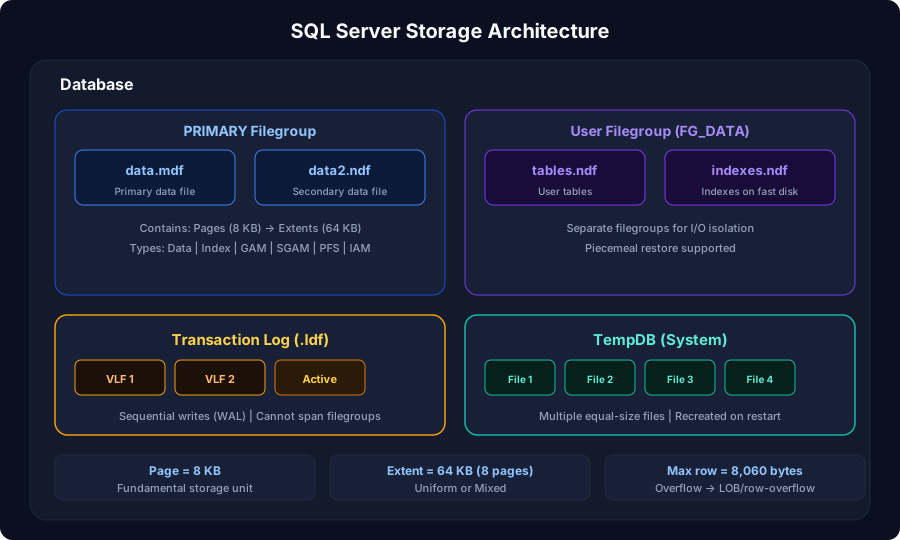
Storage Hierarchy
Pages & Extents
Everything in SQL Server is stored in 8 KB pages - the fundamental unit of storage.
Extent Types
| Type | Size | Usage |
|---|---|---|
| Uniform extent | 8 contiguous pages (64 KB) | All 8 pages belong to one object |
| Mixed extent | 8 contiguous pages (64 KB) | Pages can belong to different objects |
Small tables start on mixed extents (sharing space with other objects). Once a table grows beyond 8 pages, SQL Server allocates uniform extents. This is managed automatically - no DBA action needed. Reference: Microsoft Learn: Pages and Extents Architecture
Transaction Log Architecture
The transaction log is the most critical file for data integrity. It's a sequential, append-only write stream.
Recovery Models
| Recovery Model | Log Truncation | Point-in-Time Restore | Use Case |
|---|---|---|---|
| SIMPLE | At checkpoint (automatic) | No | Dev/test, read-only data, acceptable data loss |
| FULL | At log backup only | Yes - to any point | Production OLTP - full recoverability |
| BULK_LOGGED | At log backup | Limited (not during bulk ops) | Bulk load windows - then switch back to FULL |
The #1 log management mistake: Setting recovery model to FULL but never taking log backups. The log will grow forever because truncation only happens on log backup. Either take regular log backups (every 15-30 min for OLTP) or switch to SIMPLE if you don't need point-in-time recovery.
Oracle parallel: SQL Server's transaction log combines what Oracle splits into redo logs (for crash recovery) and archived redo logs (for point-in-time recovery). FULL recovery model ~= Oracle ARCHIVELOG mode. SIMPLE ~= NOARCHIVELOG mode.
TempDB Architecture
TempDB is a special system database - recreated fresh on every SQL Server restart.
TempDB Best Practices
| Practice | Why |
|---|---|
| Multiple data files | Reduce allocation contention (GAM/SGAM/PFS) |
| Equal size files | Proportional fill ensures even distribution |
| Files = logical CPUs (up to 8) | Then add 4 at a time if contention persists |
| Pre-size files | Avoid autogrowth during production workload |
| Place on fast storage | NVMe/local SSD preferred - TempDB is ephemeral |
| Enable trace flag 1118 (pre-2016) | Force uniform extent allocation (default behavior in SQL Server 2016+ via MIXED_PAGE_ALLOCATION OFF) |
SQL Server 2016+ automatically optimizes TempDB during setup: multiple files, trace flag 1118 behavior by default, and uniform extent allocation. For older versions, these are manual DBA configurations. Reference: Microsoft Learn: TempDB