SQL Server Engine & Memory Architecture
Understanding how SQL Server manages memory, scheduling, and the buffer pool is foundational for performance tuning and troubleshooting.
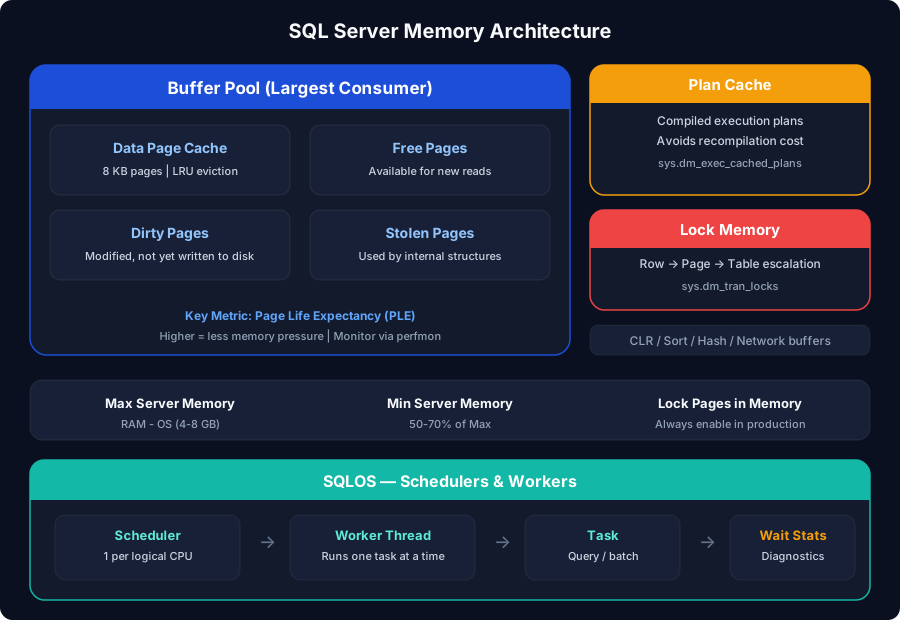
SQLOS - The Operating System Within
SQL Server runs its own lightweight operating system layer called SQLOS (SQL Server Operating System). It sits between the SQL Server engine and Windows, managing:
How scheduling works:
- SQL Server creates one scheduler per logical CPU (visible in
sys.dm_os_schedulers) - Each scheduler runs one worker at a time (cooperative/non-preemptive)
- Workers voluntarily yield the CPU - SQL Server doesn't preempt them
- When a worker needs to wait (I/O, lock, memory), it records a wait type and yields
Oracle parallel: SQLOS schedulers are similar to Oracle's process model with PMON, SMON, etc. - but SQL Server uses threads instead of processes, which is more memory-efficient. Oracle's V$SESSION_WAIT maps conceptually to SQL Server's sys.dm_os_wait_stats.
Memory Architecture
Memory Configuration
| Setting | Purpose | Recommendation |
|---|---|---|
| Max Server Memory | Upper bound for buffer pool | Total RAM - OS - other apps (leave 4-8 GB for OS) |
| Min Server Memory | Lower bound - SQL won't release below this | Set to 50-70% of max in shared environments |
| Lock Pages in Memory | Prevents Windows from paging SQL memory | Always enable on production servers |
Always set Max Server Memory. By default it's 2,147,483,647 MB (~2 TB). SQL Server will consume all available memory and not release it voluntarily. On a 64 GB server, set it to ~56 GB (leaving ~8 GB for OS and other processes). Reference: Microsoft Learn: Server Memory Configuration
Buffer Pool Deep Dive
The buffer pool is where SQL Server caches 8 KB data pages read from disk. Every query reads from the buffer pool - if the page isn't there, SQL Server reads it from disk (a physical read) and caches it.
Key Buffer Pool Metrics
| Metric | What It Tells You | Target |
|---|---|---|
| Page Life Expectancy (PLE) | How long a page stays in buffer pool (seconds) | > 300 (but depends on buffer pool size) |
| Buffer Cache Hit Ratio | % of reads served from memory | > 99% for OLTP |
| Checkpoint Pages/sec | Dirty pages written per second | Steady, not spiking |
| Page Reads/sec | Physical reads from disk | Lower is better |
| Lazy Writes/sec | Evictions due to memory pressure | Should be near 0 |
PLE (Page Life Expectancy) is the most commonly cited metric for buffer pool health. The old rule of thumb was "PLE > 300 seconds." A common community guideline (not official Microsoft documentation) suggests: PLE should be > 300 x (buffer pool size in GB / 4). So for a 32 GB buffer pool, target PLE > 2,400 seconds. Use this as a rough benchmark, not an absolute rule.
Checkpoint & Recovery
SQL Server uses Write-Ahead Logging (WAL) - every change is written to the transaction log before it's written to the data file.
Oracle parallel: SQL Server's checkpoint is similar to Oracle's DBWR (database writer) process. The transaction log is equivalent to Oracle's redo log. SQL Server's recovery process maps to Oracle's instance recovery with redo (roll forward) and undo (roll back) phases.