SQL Server Query Processing & Execution
How SQL Server takes your T-SQL query and turns it into a result set - parsing, optimization, and execution.
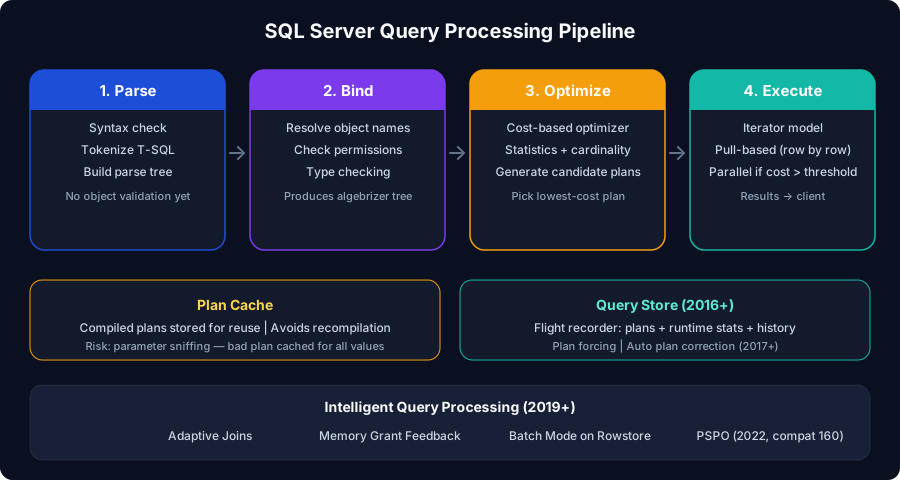
Query Processing Pipeline
The Query Optimizer
SQL Server uses a cost-based optimizer - it estimates the cost of different execution strategies and picks the cheapest one.
Execution Plan Types
| Plan Type | Description | When Used |
|---|---|---|
| Trivial plan | No optimization needed - obvious best plan | Simple queries (single table, no joins) |
| Full optimization | Cost-based search across plan space | Complex queries with joins, subqueries |
| Parallel plan | Multiple threads execute operators | When cost > cost threshold for parallelism (default: 5) |
Read execution plans right-to-left, top-to-bottom. Data flows from right to left. Look for: thick arrows (many rows), Key Lookups (missing index), Sort operators (memory grant), and warnings (yellow triangles). Reference: Microsoft Learn: Execution Plan Guide
Parameter Sniffing
One of the most common performance problems in SQL Server.
Solutions for bad parameter sniffing:
| Approach | How | Trade-off |
|---|---|---|
| OPTION (RECOMPILE) | Force new plan each execution | CPU cost of recompilation |
| OPTION (OPTIMIZE FOR UNKNOWN) | Use average stats instead of sniffed value | May not be optimal for any value |
| Plan guides | Force a specific plan | Maintenance overhead |
| Query Store plan forcing | Pin a known-good plan | Requires Query Store enabled |
Oracle parallel: Parameter sniffing is equivalent to Oracle's adaptive cursor sharing problem. Oracle 11g+ has Adaptive Cursor Sharing to handle this automatically. SQL Server has no automatic equivalent - you must diagnose and fix it manually or use Query Store.
Query Store
Query Store is SQL Server's built-in flight recorder for query performance. Available since SQL Server 2016.
Query Store is the recommended replacement for plan guides, trace flags, and manual plan cache analysis. It persists through restarts (stored in the database), provides historical data, and enables automatic plan regression correction (SQL Server 2017+). Reference: Microsoft Learn: Query Store
Intelligent Query Processing (IQP)
Starting with SQL Server 2019, the engine includes automatic performance improvements:
| Feature | What It Does | Version |
|---|---|---|
| Adaptive Joins | Switch between nested loop and hash at runtime | 2017+ |
| Memory Grant Feedback | Adjust memory grants based on actual usage | 2017+ (batch), 2019+ (row) |
| Table Variable Deferred Compilation | Better cardinality for table variables | 2019+ |
| Batch Mode on Rowstore | Use batch processing without columnstore | 2019+ |
| Approximate Count Distinct | APPROX_COUNT_DISTINCT - fast, ~2% error | 2019+ |
| Parameter Sensitive Plan Optimization (PSPO) | Multiple plans for different parameter ranges | 2022+ (compat level 160) |
To get IQP features, set database compatibility level to 150 (SQL 2019) or 160 (SQL 2022). You don't need to upgrade the engine - just the compat level. But test thoroughly - some query behaviors change with newer compat levels. Reference: Microsoft Learn: IQP