1 · Migration Methods & Zero Downtime Migration
These are original revision notes for migrating an Oracle database into Oracle Database@Azure (OD@A). They explain — in our own words — the methods you can choose, the physical-versus-logical and offline-versus-online distinctions that drive that choice, and how Oracle Zero Downtime Migration (ZDM) automates the move.
Core message
Migrating into OD@A uses the same Oracle tools you already know — the decision is which one fits your downtime and compatibility needs. Every method is either physical (move the datafiles as-is, with RMAN or Data Guard) or logical (extract schema and data, with Data Pump or GoldenGate). It is also either offline (a one-time copy while the app is down) or online (an initial copy plus change-data capture, so the app stays up until cutover). Oracle Zero Downtime Migration (ZDM) sits on top and orchestrates whichever path you pick — physical or logical — over an ExpressRoute or VPN connection into a delegated subnet in your Azure virtual network. The target matters too: ExaDB-D takes physical or logical, while Autonomous Database takes logical only.
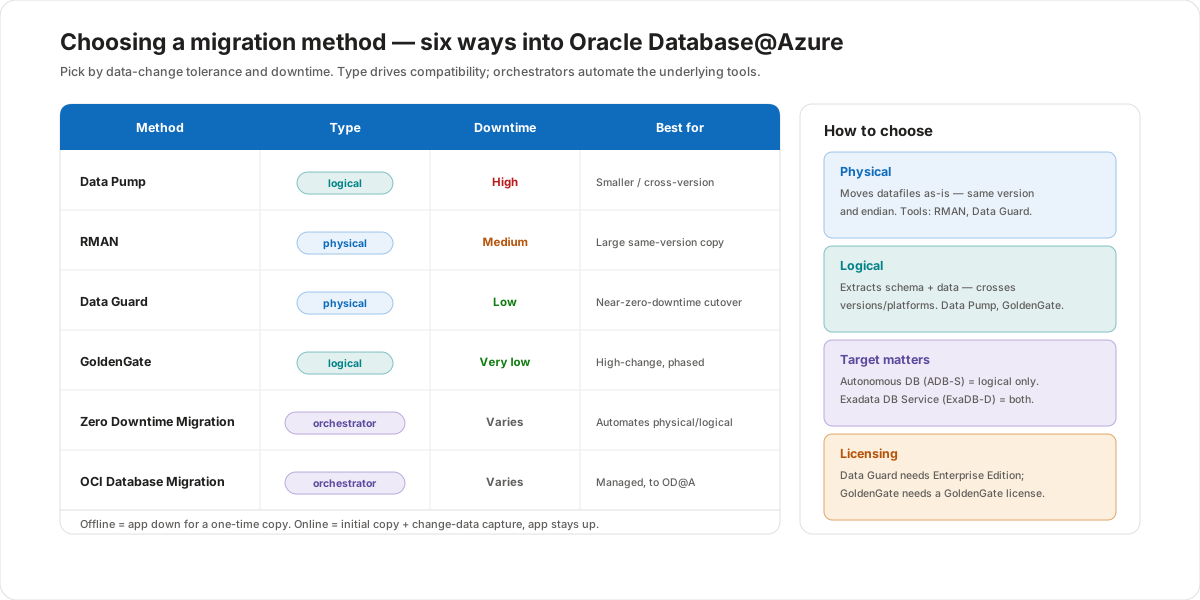
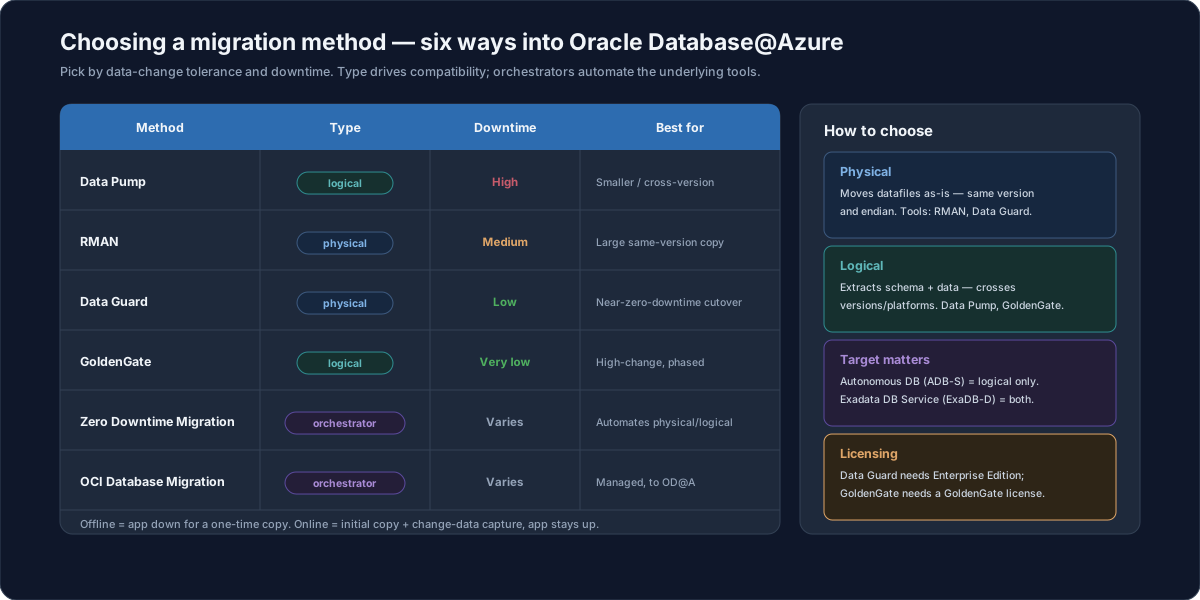
The migration methods
There are six options, and the first four are the Oracle tools the orchestrators drive under the covers:
- Data Pump — a logical export/import (
expdp/impdp). Familiar and flexible, but downtime grows with data size. Good for smaller databases or moves across versions or platforms. - RMAN — a physical backup-and-restore. Moves the database as-is at the datafile level. Suits large, same-version copies.
- Data Guard — a physical standby you switch over to. Gives a near-zero-downtime Oracle-to-Oracle cutover, and requires Oracle Database Enterprise Edition.
- GoldenGate — a logical change-data-capture replication. The lowest-downtime option for high-change workloads and phased cutovers; it requires a GoldenGate license.
- Zero Downtime Migration (ZDM) — an Oracle orchestrator that automates a physical or logical migration end to end.
- OCI Database Migration — a managed Oracle service that runs the move for you (covered in Lesson 2).
Physical vs logical
This is the first fork, and it is about compatibility:
- Physical migration moves the entire database as-is at the storage or datafile level — the structure is unchanged. It is ideal when the source and target share the same database version and a compatible (little-endian) architecture. Tools: RMAN, Data Guard.
- Logical migration extracts data and schema, then loads them into the target. Because it rebuilds objects rather than copying blocks, it can cross versions, platforms, and architectures. Tools: Data Pump, GoldenGate.
Endian matters. Azure runs little-endian only. A big-endian source (Oracle Solaris SPARC, IBM AIX, HP-UX) can't use Data Guard or a raw file copy — you migrate it with an endian-aware logical method such as Data Pump, cross-platform transportable tablespaces (XTTS), or GoldenGate.
Offline vs online
This is the second fork, and it is about downtime:
| Offline | Online | |
|---|---|---|
| What it is | A one-time, direct copy of the database. | An initial copy followed by change-data capture during the migration. |
| The app | Must be offline during the move. | Stays online until cutover. |
| Tools | Data Box, Data Pump, RMAN | Data Guard, RMAN, GoldenGate |
Offline is simpler but the application is down for the whole copy, so it doesn't suit large databases with tight downtime windows. Online keeps the source serving users while changes replicate, then you cut over in minutes.
Zero Downtime Migration (ZDM)
For most OD@A migrations, Microsoft and Oracle recommend automating the move with Oracle Zero Downtime Migration. ZDM doesn't replace the tools above — it orchestrates them:
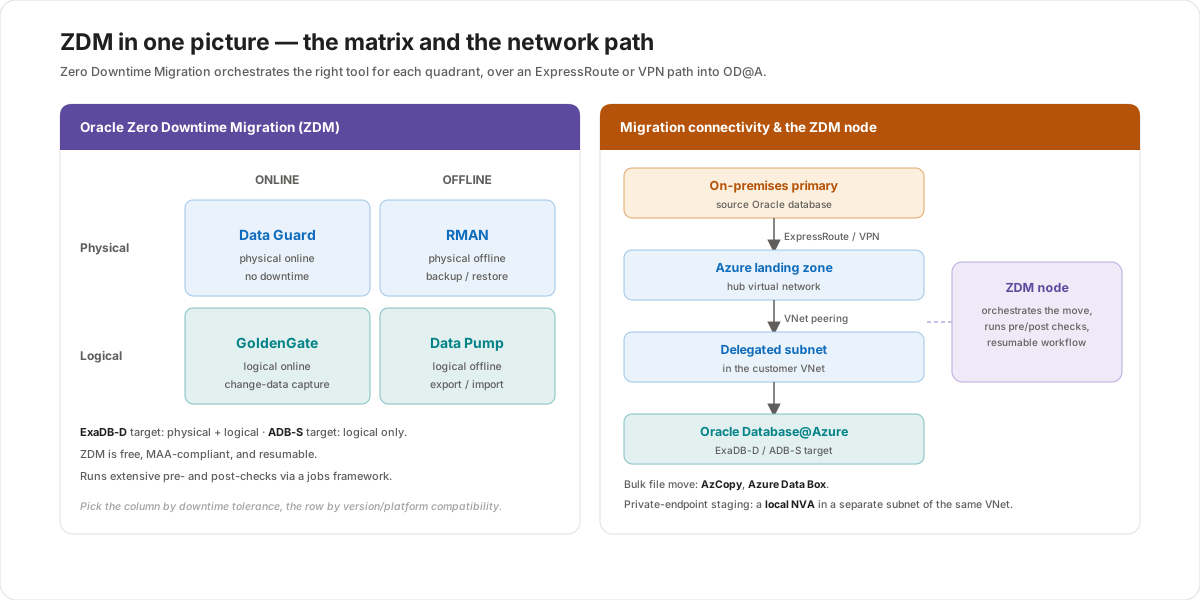
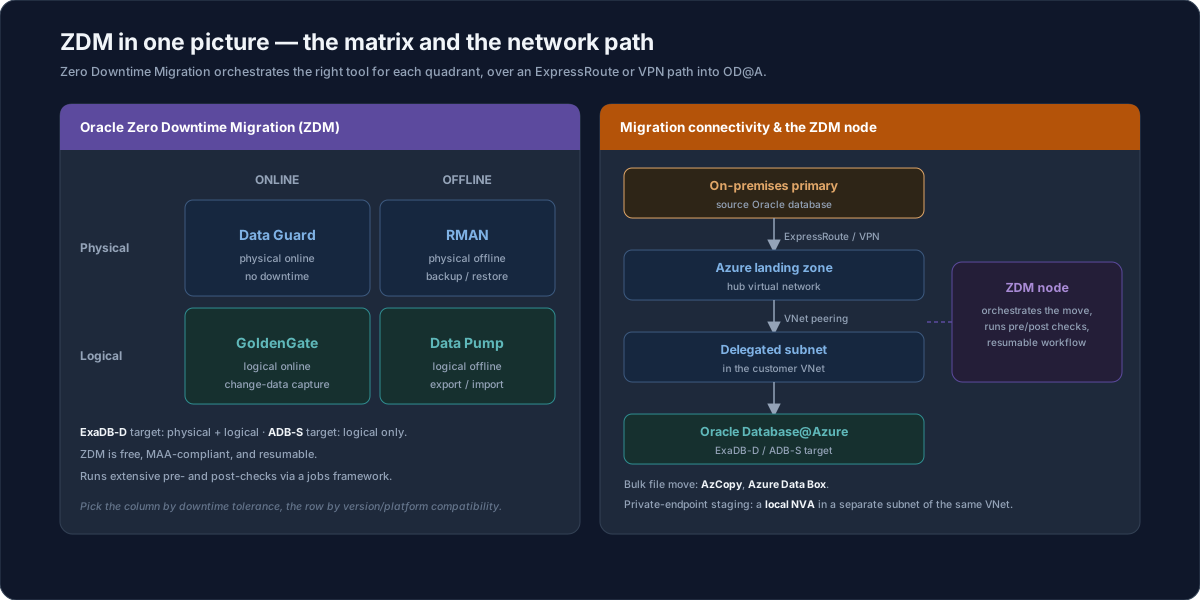
- A physical ZDM migration is built on Data Guard (online) or RMAN (offline).
- A logical ZDM migration is built on Data Pump (offline) or GoldenGate (online).
- ZDM is free, follows Oracle Maximum Availability Architecture (MAA), is resumable, and runs extensive pre- and post-checks through a jobs framework. A physical online migration is performed with no downtime and encrypts the target automatically.
This is the same engine behind hybrid Data Guard in the OD@A high-availability lesson — there, ZDM stands up an Azure standby for an on-premises primary as a DR target.
Connectivity for the migration
The data has to travel from the source into the OD@A delegated subnet:
- ExpressRoute or a VPN gateway connects on-premises to Azure; ExpressRoute is preferred for bandwidth and predictability.
- For bulk file movement, AzCopy copies dump files to Azure storage, and Azure Data Box ships a physical device when the data is too large for the network.
- If you stage through a private endpoint (for example, Blob storage or an NFS share), deploy a local network virtual appliance (NVA) in a separate subnet of the same virtual network as OD@A.
Cutover
However you replicate, the migration ends with a cutover: you stop the source, flush the last few transactions to the target, and open the target as the new database. With an online method this takes only a few minutes; in parallel you repoint application services — connection strings, TNS entries, and related configuration — at the new database and validate them.
Customer value
- Reuse what you know — the migration uses standard Oracle tools, so existing runbooks and skills carry over; only the target and network change.
- Right-size downtime — pick offline for simplicity or online (Data Guard / GoldenGate) when the business can't take an outage.
- Automation reduces risk — ZDM standardizes the steps, runs pre/post checks, and is resumable, which cuts the chance of a failed cutover.
- A clear target rule — ExaDB-D for full flexibility (physical or logical), ADB-S when a managed, logical-only move fits.
Risks and constraints to remember
- The target limits the method — ADB-S is logical only; you can't do a physical RMAN or Data Guard move into Autonomous Database.
- Licensing — Data Guard needs Enterprise Edition; GoldenGate needs a GoldenGate license (not included in a private offer).
- Endian — big-endian sources can't use Data Guard or file copy; use Data Pump, XTTS, or GoldenGate.
- Offline downtime scales with size — Data Pump on a large database can mean a long outage; prefer an online method when the window is tight.
- Network is the bottleneck — size ExpressRoute bandwidth against the data volume, or use Data Box for the initial bulk move.
Terms to remember
- Physical migration — moves datafiles as-is (RMAN, Data Guard); needs the same version and little-endian architecture.
- Logical migration — extracts and reloads schema and data (Data Pump, GoldenGate); can cross versions and platforms.
- Offline / online — offline = app down for a one-time copy; online = initial copy plus change-data capture, app stays up.
- Zero Downtime Migration (ZDM) — Oracle's free orchestrator for physical or logical migrations; MAA-compliant, resumable, with pre/post checks.
- Cutover — stop the source, flush the last transactions, open the target as the new database.
- Delegated subnet — the subnet in your Azure VNet that the OD@A service connects through.
"I frame an OD@A migration as two questions, then a tool. First, physical or logical? — physical (RMAN, Data Guard) if we're staying on the same version and architecture, logical (Data Pump, GoldenGate) if we're crossing versions, platforms, or going to Autonomous Database. Second, can the app take downtime? — offline for a simple one-time copy, online (Data Guard or GoldenGate) when it has to stay up. Then we usually let Zero Downtime Migration drive it: it's free, it runs the pre- and post-checks, it's resumable, and a physical online run cuts over with no downtime and encrypts the target for us. The data rides in over ExpressRoute into the delegated subnet — and for a really big initial load we'll seed it with Azure Data Box. The one rule I always state up front: Autonomous Database is logical-only, so if that's the target, physical methods are off the table."