Azure Networking for DBAs
The Network Architecture You Need to Know
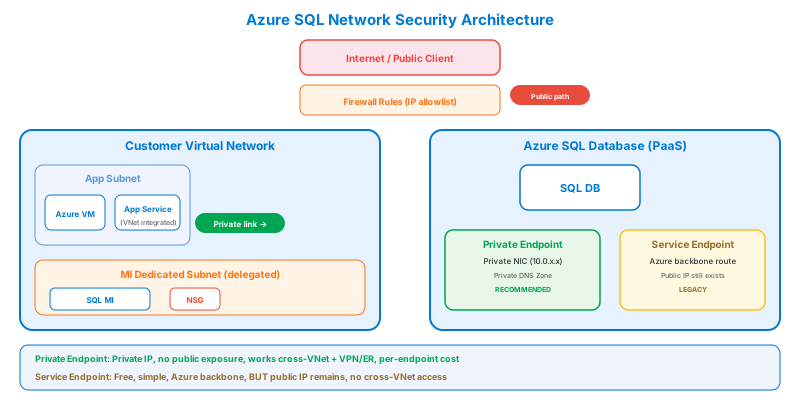
Connectivity Options for Azure SQL
| Method | Security Level | How It Works | When to Use |
|---|---|---|---|
| Private Endpoint | Highest | Private IP in your VNet | Production — no public exposure |
| VNet Service Endpoint | High | Subnet-level trust, public IP | Legacy — prefer Private Endpoint |
| Firewall Rules | Medium | IP allowlisting | Dev/test, admin access from specific IPs |
| Allow Azure Services | Low | Any Azure service can connect | ⚠️ Avoid in production |
Private Endpoint vs Service Endpoint
The critical difference: Service Endpoints route traffic via Azure backbone but the SQL server still has a public IP. Private Endpoints give you a private IP inside your VNet — the SQL server's public endpoint can be disabled entirely. Exam answer for "no public internet" = Private Endpoint.
Network Security Groups (NSGs)
Filter traffic at the subnet or NIC level.
Essential Rules for Database Subnets
| Priority | Direction | Source | Dest Port | Action | Purpose |
|---|---|---|---|---|---|
| 100 | Inbound | App Subnet | 1433 | ✅ Allow | SQL from app tier |
| 200 | Inbound | Mgmt Subnet | 3389/22 | ✅ Allow | Admin RDP/SSH |
| 300 | Inbound | Any | 1433 | ❌ Deny | Block all other SQL |
| 65000 | Inbound | VNet | Any | ✅ Allow | Default VNet rule |
| 65500 | Inbound | Any | Any | ❌ Deny | Default deny-all |
NSG rules are evaluated by priority number (lowest = first). The first matching rule wins. Default rules (65000+) allow VNet-to-VNet and deny everything else. You CANNOT delete default rules, but you can override them with lower-priority rules.
DNS Resolution with Private Endpoints
Private Endpoints require DNS configuration so that server.database.windows.net resolves to the private IP instead of the public IP.
When you create a Private Endpoint in the portal, Azure offers to create a Private DNS Zone automatically. Always accept this — it configures DNS so VNet-integrated apps automatically resolve to the private IP. On-premises clients need conditional DNS forwarding to the Azure Private DNS zone.
Managed Instance Networking
MI has unique networking requirements:
| Requirement | Detail |
|---|---|
| Dedicated subnet | No other resources allowed |
| Minimum size | /27 (32 IPs), recommend /26 |
| Delegation | Microsoft.Sql/managedInstances |
| NSG | Auto-created, you can add rules |
| Route Table | Auto-created with mandatory management routes |
Never delete or modify the auto-managed routes in the MI route table. These are required for Azure to manage the MI instance (patching, HA, backups). You CAN add additional routes (e.g., for on-premises connectivity via VPN gateway).
ExpressRoute vs VPN Gateway
For connecting on-premises Oracle databases to Azure during migration:
| VPN Gateway | ExpressRoute | |
|---|---|---|
| Connection | Over public internet (encrypted) | Private dedicated circuit |
| Bandwidth | Up to ~1.25 Gbps | Up to 100 Gbps |
| Latency | Variable | Predictable, low |
| Cost | Lower | Higher |
| Setup | Hours | Days/weeks (requires telco) |
| Use case | Dev/test, small migrations | Production, large data transfers |