Azure Monitor & Log Analytics
The Monitoring Architecture
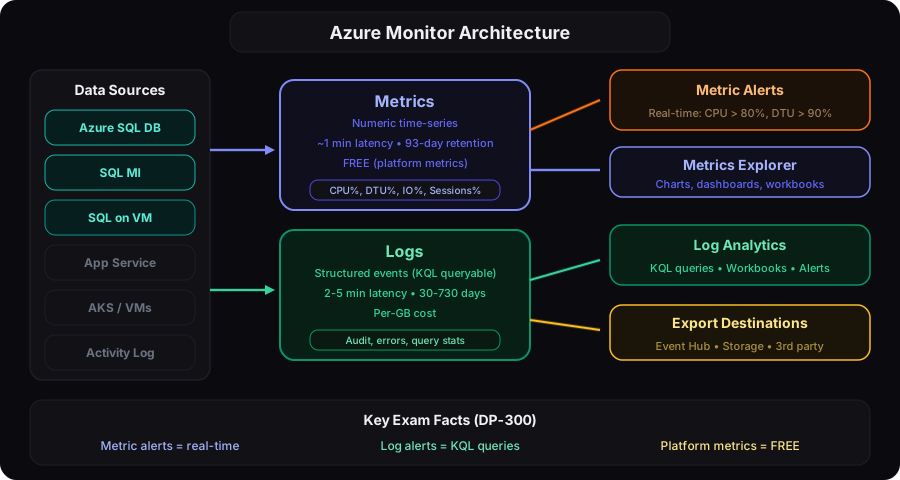
Metrics vs Logs
| Metrics | Logs | |
|---|---|---|
| What | Numeric time-series data | Structured event records |
| Latency | Near real-time (~1 min) | 2-5 minutes ingestion |
| Retention | 93 days (standard) | 30-730 days (configurable) |
| Query | Metrics Explorer (charts) | KQL (Kusto Query Language) |
| Cost | Free (platform metrics) | Per GB ingested |
| Examples | CPU %, DTU %, sessions | Audit logs, query stats, errors |
Key SQL Database Metrics
| Metric | What It Means | Alert Threshold |
|---|---|---|
cpu_percent | CPU utilization | > 80% sustained |
dtu_consumption_percent | DTU usage (DTU model) | > 80% |
physical_data_read_percent | Data I/O utilization | > 80% |
log_write_percent | Log I/O utilization | > 80% |
sessions_percent | Active sessions vs limit | > 80% |
workers_percent | Active workers vs limit | > 70% |
deadlock | Deadlock count | > 0 |
storage_percent | Database size vs max | > 85% |
connection_failed | Failed connection count | > 10/min |
Metrics alerts are near real-time — perfect for "alert me when CPU > 80%". Log alerts use KQL queries — perfect for "alert me when a specific error appears" or "when a query takes > 5 seconds". Know when to use which.
Log Analytics — KQL Essentials
KQL (Kusto Query Language) is the query language for Log Analytics. Think of it as SQL for logs.
KQL vs SQL Comparison
| SQL | KQL Equivalent |
|---|---|
SELECT * FROM table WHERE col = 'x' | Table | where col == "x" |
SELECT TOP 10 * FROM table | Table | take 10 |
SELECT col, COUNT(*) GROUP BY col | Table | summarize count() by col |
ORDER BY col DESC | | sort by col desc |
DISTINCT col | | distinct col |
Key KQL for Database Monitoring
// Top 10 slowest queries (from diagnostics)
AzureDiagnostics
| where Category == "QueryStoreRuntimeStatistics"
| summarize avg(duration_d) by query_id_d
| top 10 by avg_duration_d desc

// Failed connections in last hour
AzureDiagnostics
| where Category == "SQLSecurityAuditEvents"
| where action_name_s == "DATABASE AUTHENTICATION FAILED"
| where TimeGenerated > ago(1h)
| summarize count() by client_ip_s
| sort by count_ desc

// DTU usage over time
AzureMetrics
| where MetricName == "dtu_consumption_percent"
| summarize avg(Average) by bin(TimeGenerated, 5m)
| render timechart
Oracle DBA parallel: KQL is to Log Analytics what SQL is to Oracle's Unified Audit trail, but more powerful. You can query across multiple Azure services in one workspace — imagine querying SQL audit logs, App Service logs, and Key Vault logs in one query.
Alert Architecture
Alert Types
| Type | Signal | Example | Latency |
|---|---|---|---|
| Metric alert | Numeric metric | CPU > 80% for 5 min | ~1 minute |
| Log alert | KQL query result | Deadlocks > 5 in 10 min | ~5 minutes |
| Activity log alert | Control plane event | Database deleted | ~1 minute |
| Smart detection | ML anomaly | Unusual query duration spike | Minutes |
Action Groups are reusable — one action group can be attached to multiple alert rules. This is the Azure pattern for "notify the DBA team" — create one action group with email + SMS + Teams webhook, then attach it to all your alert rules.
Diagnostic Settings
To get logs into Log Analytics, you must configure Diagnostic Settings on each resource:
Available SQL Diagnostic Categories
| Category | What It Contains |
|---|---|
| SQLInsights | Intelligent Insights analysis |
| AutomaticTuning | Auto-tuning recommendations and actions |
| QueryStoreRuntimeStatistics | Query performance data |
| QueryStoreWaitStatistics | Wait stats per query |
| Errors | Database errors |
| DatabaseWaitStatistics | Aggregate wait stats |
| Timeouts | Query timeouts |
| Blocks | Blocking events |
| Deadlocks | Deadlock graphs |