2 · Exadata Database Service Overview

These are original revision notes for the Exadata Database Service Overview lesson. They describe what the service is, how it is deployed and managed, how it is licensed and billed, how high availability is built into the platform, and how the infrastructure is put together inside, in our own words rather than reproducing the recording.

Core message

Exadata Database Service puts the Exadata Database Machine in the cloud as a subscription. You get a complete Oracle Database — every Enterprise Edition feature, management pack, and option — running on the Exadata platform, but you no longer buy or run the hardware. It is a co-managed service: Oracle Operations runs the infrastructure, and you run the database through cloud automation (web wizards and REST APIs). You pay a monthly subscription based on the infrastructure shape and the number of enabled cores, with no capital cost. On Oracle Database@Azure, this is the exact service you consume — the co-managed Exadata Database Service on dedicated Exadata Cloud Infrastructure.
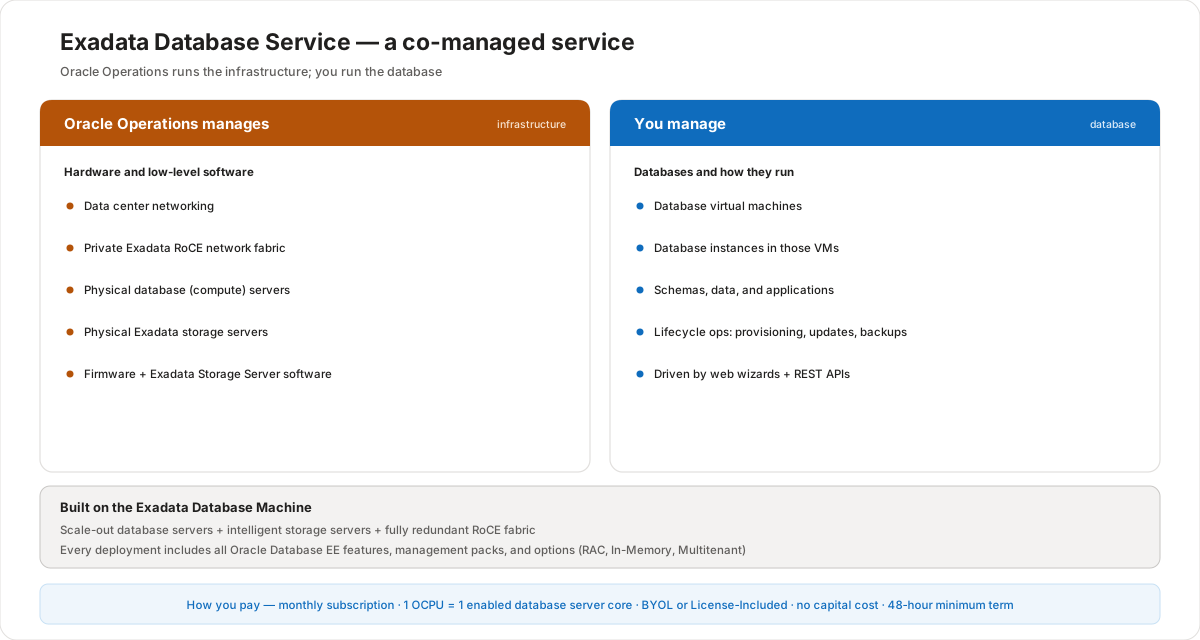
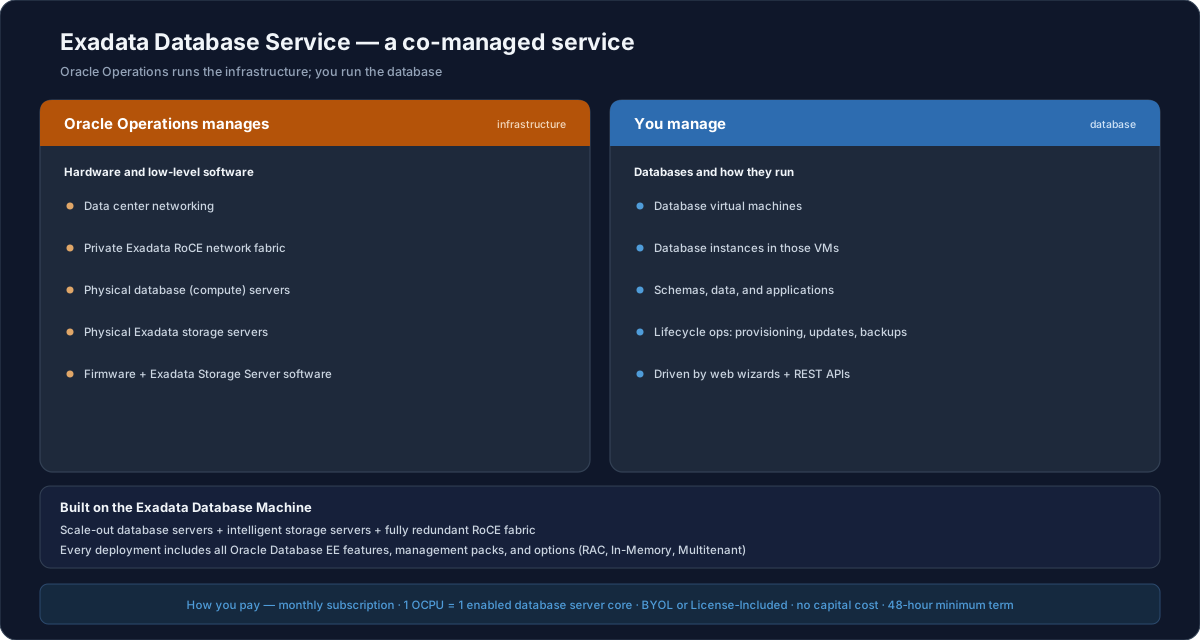
Exadata Database Service is a co-managed Oracle Database cloud service, shown as two responsibility panels above a shared foundation. The left panel is what the Oracle Operations team manages: the infrastructure. It includes data center networking, the private Exadata RDMA over Converged Ethernet (RoCE) network fabric, the physical database compute servers, the physical Exadata storage servers, and the firmware and Exadata Storage Server software. The right panel is what you manage: the database. It includes the database virtual machines, the database instances running in those virtual machines, and your schemas, data, and applications, together with lifecycle operations such as provisioning, updates, and backups, all driven through web-based wizards and REST APIs. Both panels sit on a shared foundation, the Exadata Database Machine, which is built from scale-out database servers and intelligent storage servers joined by a fully redundant RoCE fabric; every deployment is provisioned with a complete Oracle Database that includes all Enterprise Edition features, all database management packs, and all options such as Real Application Clusters, Oracle Database In-Memory, and Oracle Multitenant. You pay a monthly subscription based on the infrastructure shape, configuration, and the number of enabled Oracle CPUs, where one OCPU equals one enabled database server CPU core; there is no initial capital cost, you can choose Bring Your Own License or License-Included, and the service has a short 48-hour minimum term.Exadata Database Service is a co-managed Oracle Database cloud service, shown as two responsibility panels above a shared foundation. The left panel is what the Oracle Operations team manages: the infrastructure. It includes data center networking, the private Exadata RDMA over Converged Ethernet (RoCE) network fabric, the physical database compute servers, the physical Exadata storage servers, and the firmware and Exadata Storage Server software. The right panel is what you manage: the database. It includes the database virtual machines, the database instances running in those virtual machines, and your schemas, data, and applications, together with lifecycle operations such as provisioning, updates, and backups, all driven through web-based wizards and REST APIs. Both panels sit on a shared foundation, the Exadata Database Machine, which is built from scale-out database servers and intelligent storage servers joined by a fully redundant RoCE fabric; every deployment is provisioned with a complete Oracle Database that includes all Enterprise Edition features, all database management packs, and all options such as Real Application Clusters, Oracle Database In-Memory, and Oracle Multitenant. You pay a monthly subscription based on the infrastructure shape, configuration, and the number of enabled Oracle CPUs, where one OCPU equals one enabled database server CPU core; there is no initial capital cost, you can choose Bring Your Own License or License-Included, and the service has a short 48-hour minimum term.

What you get: a full Oracle Database

Every deployment is provisioned with a complete Oracle Database installation — nothing is held back:

  • All Oracle Database Enterprise Edition features.
  • All Database Enterprise management packs.
  • All Enterprise Edition options, including Oracle Real Application Clusters (RAC), Oracle Database In-Memory, and Oracle Multitenant.

Because the feature set is identical to on-premises Exadata, the service is 100% compatible with existing Oracle databases and applications — moving a workload in does not mean giving anything up. The same consistency across deployment models is what makes a database easy to move between on-premises and cloud in either direction.

Built on the Exadata Database Machine

The foundation is the same Exadata Database Machine that is already deployed at thousands of sites:

  • Scale-out database servers and scale-out intelligent storage servers.
  • A fully redundant, high-performance RoCE (RDMA over Converged Ethernet) network fabric.
  • All the advanced Exadata capabilities — SQL offload to storage, Smart Flash Cache, Storage Indexes, and Hybrid Columnar Compression.

This is why Exadata is described as the highest-performing, most available platform for running an Oracle Database, and why it is well suited to a cloud service. Combining all the Oracle Database innovations with all the Exadata Database Machine innovations is what makes this the most complete database service available.

Inherent high availability

Exadata is engineered so a single component failure does not take the database down — high availability is built into both the hardware and the Oracle software, not bolted on afterwards.

  • Platform hardware redundancy — redundant RoCE network switches, power distribution units (PDUs), database servers, and storage servers, so there is no single point of failure. Real Application Clusters (RAC) spreads a database across multiple servers, so it keeps running if one fails.
  • Oracle software HAAutomatic Storage Management (ASM) keeps three-way mirrored copies of data; RMAN and Flashback protect against logical errors; Database In-Memory stays fault-tolerant; and Online DDL avoids planned downtime.
  • Built for mission-critical uptime — every deployment follows Oracle's Maximum Availability Architecture (MAA) best practices, which is why the platform runs the systems of banks, airlines, telecoms, stock exchanges, governments, and e-commerce.
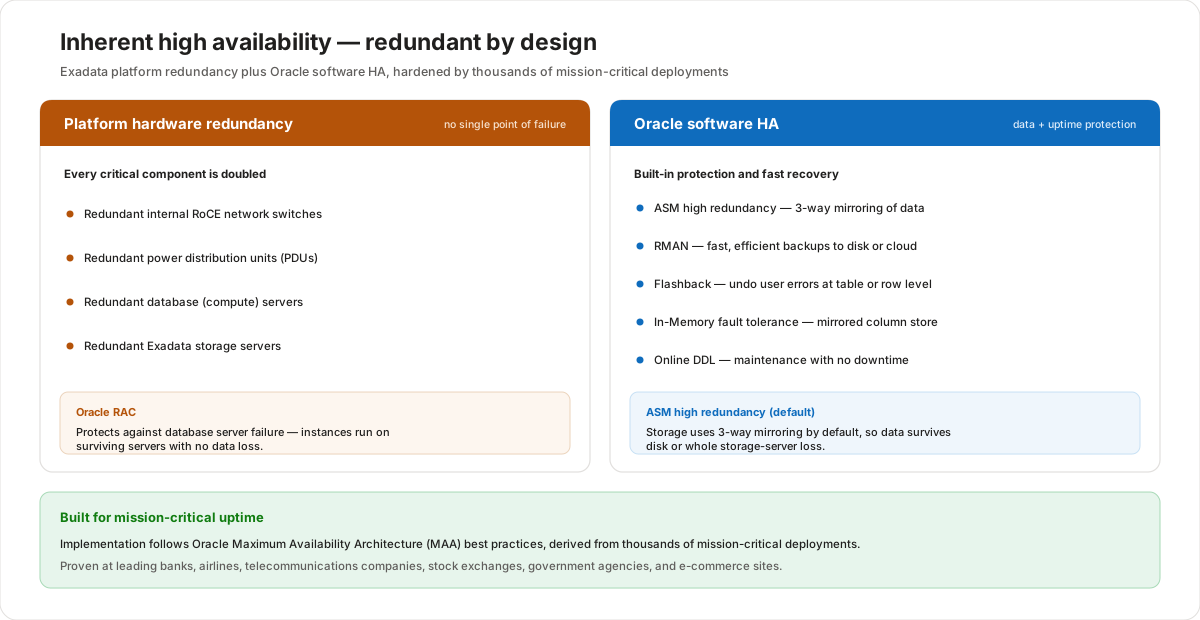
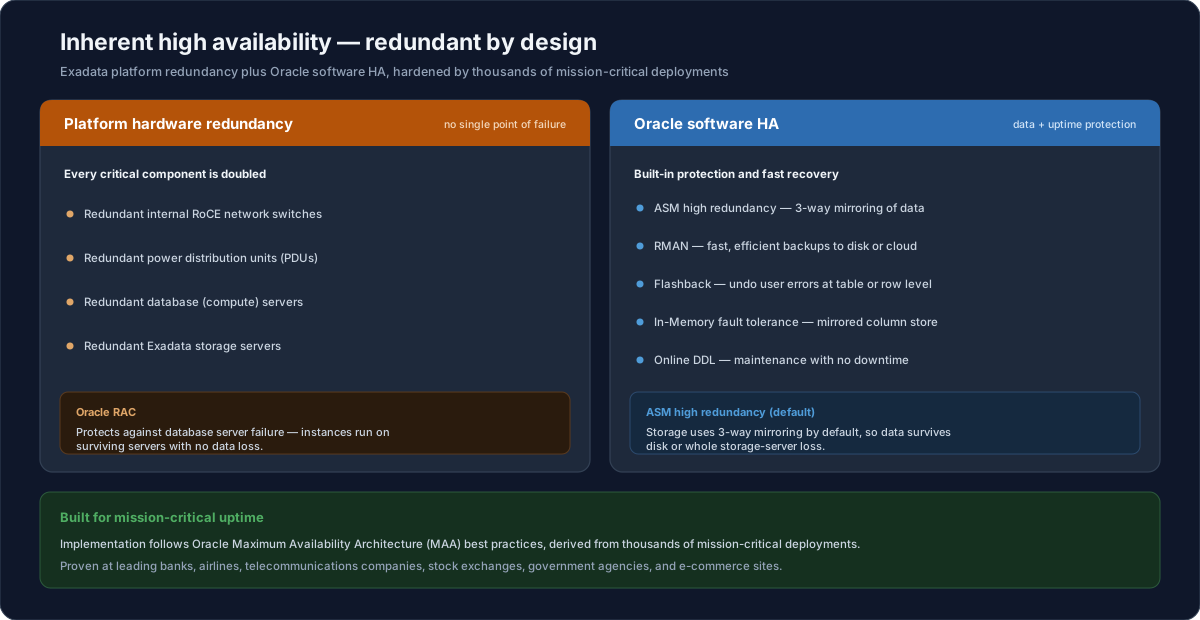
Exadata Database Service has high availability built into two layers. The first layer is platform hardware redundancy provided by the Exadata Database Machine: redundant RoCE network switches, redundant power distribution units, redundant database servers, and redundant storage servers mean there is no single point of failure, and Real Application Clusters spread a database across multiple servers so it keeps running if one server fails. The second layer is Oracle software high availability: Automatic Storage Management keeps three-way mirrored copies of data, RMAN and Flashback protect against logical errors and human mistakes, Database In-Memory remains fault tolerant, and Online DDL allows schema changes without downtime. Together these layers follow Oracle's Maximum Availability Architecture best practices, which is why the platform is trusted to run mission-critical systems for banks, airlines, telecoms, stock exchanges, governments, and e-commerce.Exadata Database Service has high availability built into two layers. The first layer is platform hardware redundancy provided by the Exadata Database Machine: redundant RoCE network switches, redundant power distribution units, redundant database servers, and redundant storage servers mean there is no single point of failure, and Real Application Clusters spread a database across multiple servers so it keeps running if one server fails. The second layer is Oracle software high availability: Automatic Storage Management keeps three-way mirrored copies of data, RMAN and Flashback protect against logical errors and human mistakes, Database In-Memory remains fault tolerant, and Online DDL allows schema changes without downtime. Together these layers follow Oracle's Maximum Availability Architecture best practices, which is why the platform is trusted to run mission-critical systems for banks, airlines, telecoms, stock exchanges, governments, and e-commerce.
Who manages what

Exadata Database Service is jointly managed — that split is the defining characteristic of the service:

  • Oracle Operations manages the infrastructure — data center networking, the private Exadata RoCE network, the physical database and storage servers, firmware, and the Exadata Storage Server software.
  • You manage the database — the database virtual machines and the database instances inside them.

To make that practical, the service includes sophisticated cloud automation: web-based wizards and programmable APIs drive lifecycle operations such as provisioning, updates, and backups. Because the infrastructure is dedicated and never over-provisioned, response times and throughput stay predictable for critical workloads — unlike delivery models that silently over-provision shared hardware.

How you pay

The commercial model is pay-for-what-you-use:

  • A monthly subscription priced on the shape of the Exadata Cloud Infrastructure, the configuration, and the number of enabled OCPUs.
  • One OCPU = one enabled database server CPU core. You only license the cores your VMs actually use, and you can scale those VMs up and down at will.
  • No initial capital cost and no extra data center charges.
  • Two licensing models: Bring Your Own License (BYOL) or License-Included.
  • A short 48-hour minimum term, so there is virtually no financial commitment to a deployment.

Dollar figures, OCPU counts, and shapes shown in any portal screenshots are illustrative placeholders — confirm current pricing and shapes in the Azure portal and Oracle pricing pages.

Elastic scaling: pay only for what you use

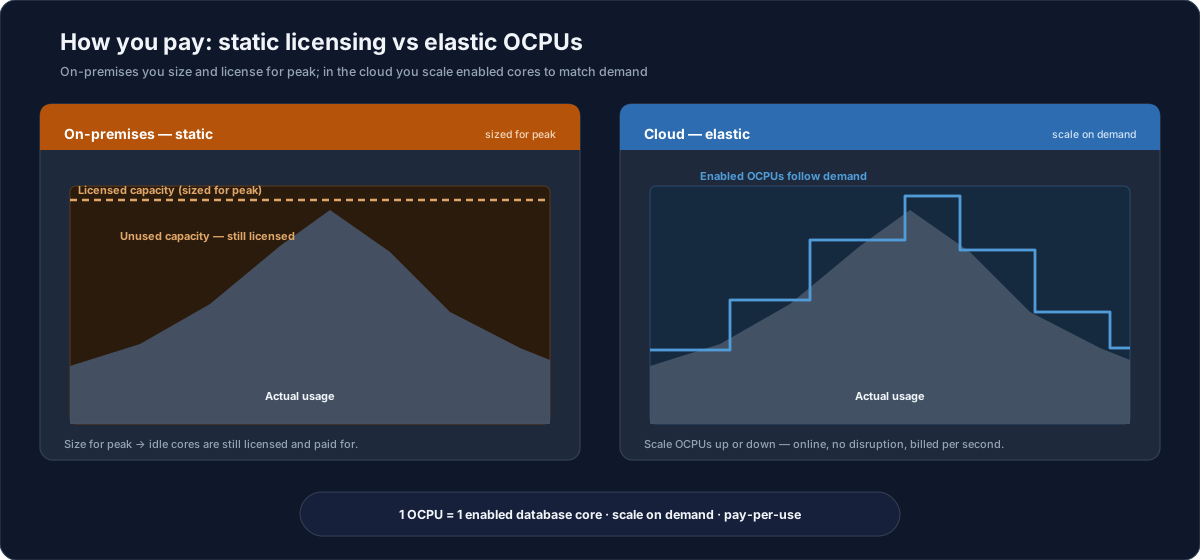
The biggest commercial difference from on-premises is that you size compute to demand instead of to peak. On-premises you license enough cores for your busiest hour and keep paying for them even when they sit idle; in the cloud you enable and pay for OCPUs only as you need them.

  • On-premises — static — capacity is fixed and licensed for peak, so cores sit idle (but still paid for) most of the time.
  • Cloud — elastic — enable more OCPUs when load rises and release them when it falls, all online with no disruption, and billed per second.
  • One OCPU = one enabled database core, scaled on demand — the same unit described under How you pay.
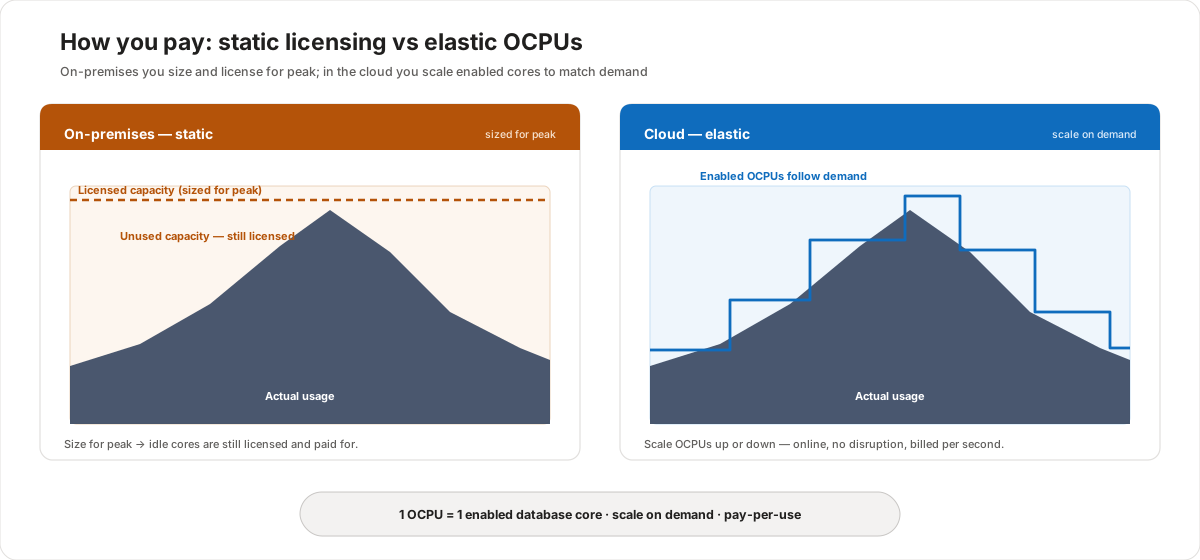
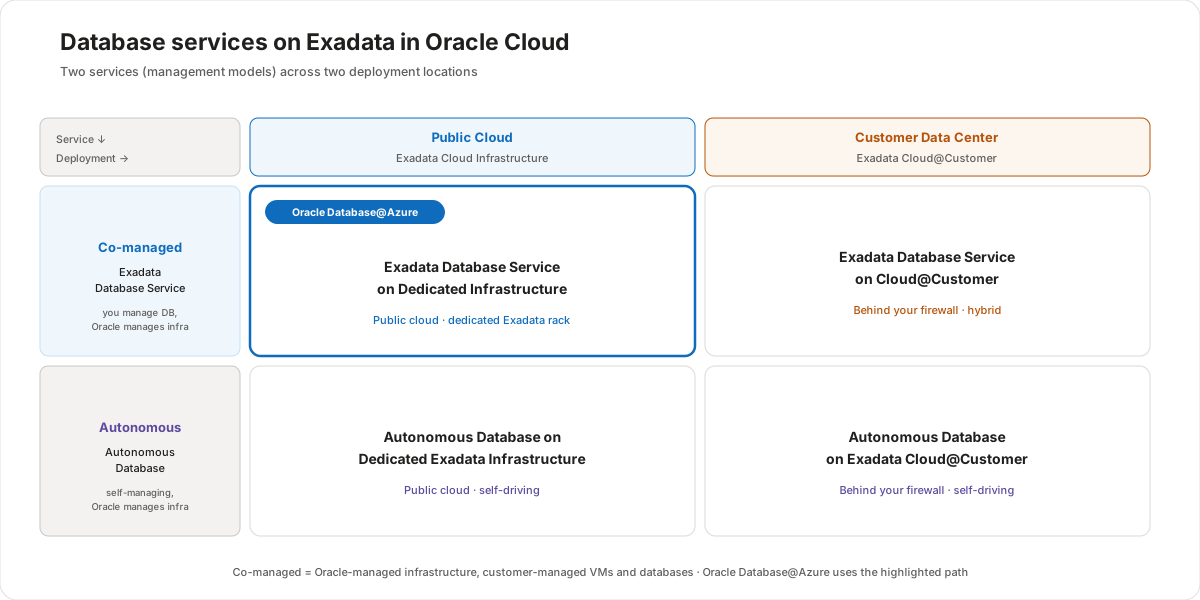
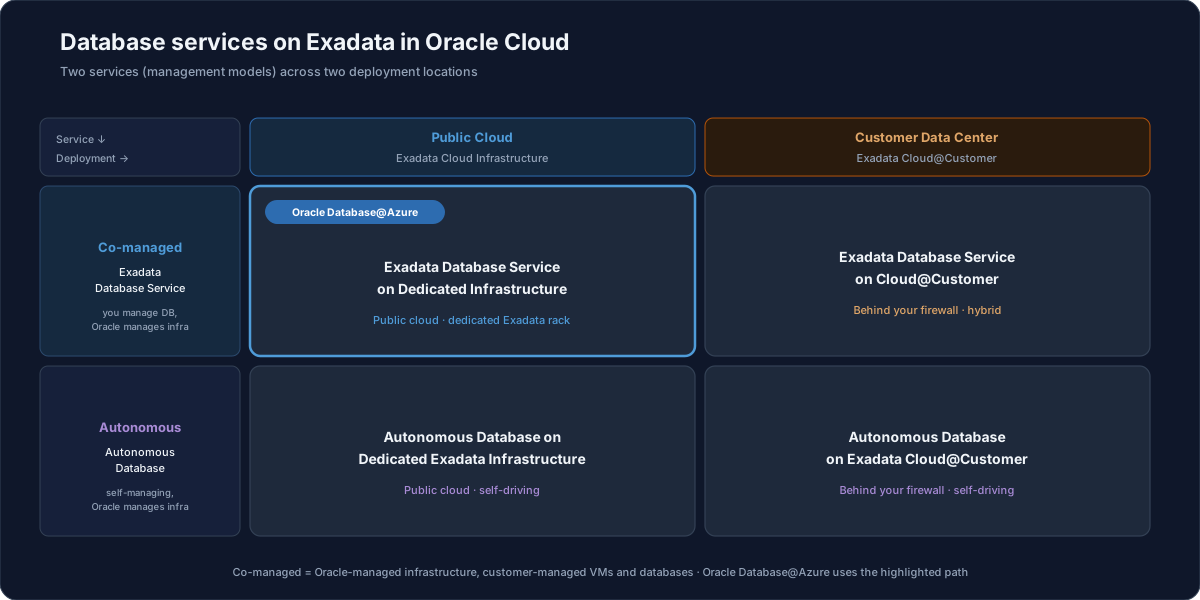
Two charts compare paying for compute on premises versus in the Exadata Database Service cloud. The left chart, on-premises and static, shows a flat licensed-capacity ceiling sized for peak demand with actual usage drawn as a mountain well below the ceiling most of the time; the large gap between usage and ceiling is unused capacity that is still licensed and paid for, because you must size for peak and idle cores are still paid. The right chart, cloud and elastic, shows the same usage mountain but with a stepped enabled-OCPU line that closely follows demand, rising and falling with usage so almost no capacity is wasted; you scale OCPUs up or down to match load, online and with no disruption, billed per second. One OCPU equals one enabled database core, scaled on demand, pay-per-use.Two charts compare paying for compute on premises versus in the Exadata Database Service cloud. The left chart, on-premises and static, shows a flat licensed-capacity ceiling sized for peak demand with actual usage drawn as a mountain well below the ceiling most of the time; the large gap between usage and ceiling is unused capacity that is still licensed and paid for, because you must size for peak and idle cores are still paid. The right chart, cloud and elastic, shows the same usage mountain but with a stepped enabled-OCPU line that closely follows demand, rising and falling with usage so almost no capacity is wasted; you scale OCPUs up or down to match load, online and with no disruption, billed per second. One OCPU equals one enabled database core, scaled on demand, pay-per-use. Two Oracle database services run on Exadata in Oracle Cloud, shown as a two-by-two matrix. The two rows are the management models. The first row is the co-managed model, called Exadata Database Service, where you manage the database and Oracle manages the infrastructure. The second row is the autonomous model, called Autonomous Database, which is self-managing while Oracle manages the infrastructure. The two columns are the deployment locations. The first column is the public cloud, on Exadata Cloud Infrastructure. The second column is the customer's own data center, on Exadata Cloud at Customer. The four resulting services are: Exadata Database Service on Dedicated Infrastructure in the public cloud; Exadata Database Service on Cloud at Customer in the customer data center; Autonomous Database on Dedicated Exadata Infrastructure in the public cloud; and Autonomous Database on Exadata Cloud at Customer in the customer data center. Co-managed means Oracle manages the infrastructure while the customer manages the virtual machines and databases. Oracle Database at Azure uses the highlighted path: the Exadata Database Service running on dedicated Exadata Cloud Infrastructure in the public cloud.Two Oracle database services run on Exadata in Oracle Cloud, shown as a two-by-two matrix. The two rows are the management models. The first row is the co-managed model, called Exadata Database Service, where you manage the database and Oracle manages the infrastructure. The second row is the autonomous model, called Autonomous Database, which is self-managing while Oracle manages the infrastructure. The two columns are the deployment locations. The first column is the public cloud, on Exadata Cloud Infrastructure. The second column is the customer's own data center, on Exadata Cloud at Customer. The four resulting services are: Exadata Database Service on Dedicated Infrastructure in the public cloud; Exadata Database Service on Cloud at Customer in the customer data center; Autonomous Database on Dedicated Exadata Infrastructure in the public cloud; and Autonomous Database on Exadata Cloud at Customer in the customer data center. Co-managed means Oracle manages the infrastructure while the customer manages the virtual machines and databases. Oracle Database at Azure uses the highlighted path: the Exadata Database Service running on dedicated Exadata Cloud Infrastructure in the public cloud.

Two services, two management models

Two database services run on Exadata in the cloud, and the only real difference is the management model:

  • Exadata Database Serviceco-managed. Oracle manages the infrastructure; you manage the database using the provided cloud automation. This is the focus of this lesson, and it gives you the most control over your cloud database.
  • Autonomous Databaseself-managing. The database manages itself; Oracle still manages the infrastructure.

Both services are available in the public cloud (on Exadata Cloud Infrastructure) and on-premises (on Exadata Cloud@Customer). Whichever you choose, all deployments incorporate Oracle's Maximum Availability Architecture (MAA) best practices, and you can start small and scale.

Two places to deploy

Exadata Database Service can run in either location, with the same management model, automation, APIs, and subscription economics:

Dedicated Infrastructure (public cloud)Cloud@Customer (your data center)
Where data livesOracle Cloud / Azure data centerYour own data center
Runs onExadata Cloud InfrastructureExadata Cloud on premises
Control planePublic cloud regionDeployed on the chosen public cloud (OCI) region
Best forEnterprise databases as a service in the cloudData residency, latency, single-tenant control
Minimum commitment48-hour minimum term4-year minimum infrastructure subscription

Illustrative summary — exact terms depend on the chosen configuration and region.

Dedicated Infrastructure (public cloud)

This is the ideal model for teams that can run in the public cloud:

  • All the power and functionality of Oracle Database, plus the performance, availability, scale, and security of Exadata, plus the simplicity of the cloud.
  • The Exadata Cloud Infrastructure is dedicated to you, yet Oracle still manages it and you still get full cloud automation and pay-per-use economics.
  • You manage only the database VMs and the instances in them; you license only the cores those VMs use and scale them on demand — add CPU and storage online, with no database or workload too large.

On Oracle Database@Azure, this is the path you use: you provision Exadata Infrastructure and an Exadata VM Cluster from the Azure portal, choose License-Included or BYOL per VM cluster, and only the Exadata X9M shape is offered.

Inside the dedicated cloud architecture

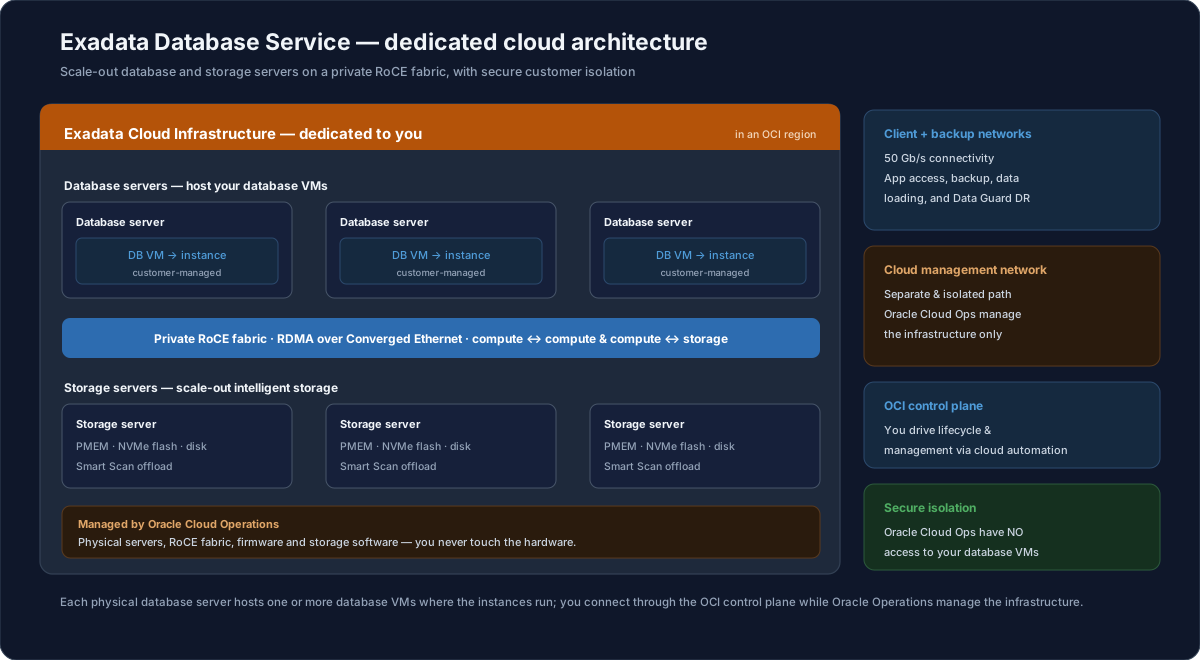
On dedicated infrastructure the whole Exadata rack is reserved for you, yet Oracle still runs the hardware. The compute and storage tiers are joined by the private RoCE fabric, and several isolated networks keep your traffic separate from Oracle's management path.

  • Compute + storage tiers — your database VMs run on the database servers; the intelligent storage servers hold the data; the redundant RoCE fabric joins them.
  • Separate networks — high-speed client and backup networks (50 Gb/s) carry your traffic, while an isolated cloud management network is used only by Oracle.
  • Secure isolation — Oracle Cloud Operations manage the infrastructure but have no access to your database VMs or your data.
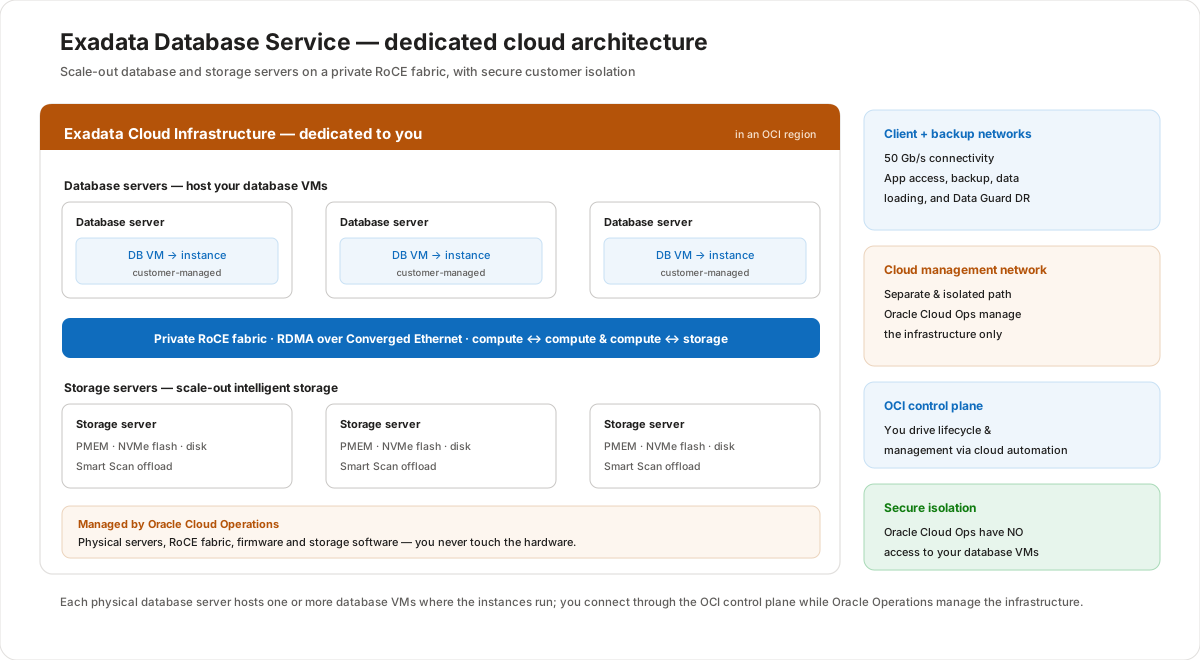
Architecture of Exadata Database Service on dedicated cloud infrastructure. A container labelled Exadata Cloud Infrastructure dedicated to you holds three database servers, each running a database VM with a database instance, connected through a redundant RoCE network fabric to three Exadata storage servers; the whole container is managed by Oracle Cloud Operations. A right-hand column lists four supporting elements: high-speed client and backup networks at 50 gigabits per second that carry customer traffic; a separate, isolated cloud management network used only by Oracle; the OCI control plane that automates provisioning and lifecycle; and a secure-isolation note stating that Cloud Operations have no access to the customer's database VMs or data. The rack is dedicated to one customer while Oracle still manages the underlying hardware.Architecture of Exadata Database Service on dedicated cloud infrastructure. A container labelled Exadata Cloud Infrastructure dedicated to you holds three database servers, each running a database VM with a database instance, connected through a redundant RoCE network fabric to three Exadata storage servers; the whole container is managed by Oracle Cloud Operations. A right-hand column lists four supporting elements: high-speed client and backup networks at 50 gigabits per second that carry customer traffic; a separate, isolated cloud management network used only by Oracle; the OCI control plane that automates provisioning and lifecycle; and a secure-isolation note stating that Cloud Operations have no access to the customer's database VMs or data. The rack is dedicated to one customer while Oracle still manages the underlying hardware.

Inside a database server: Dom0 and DomU

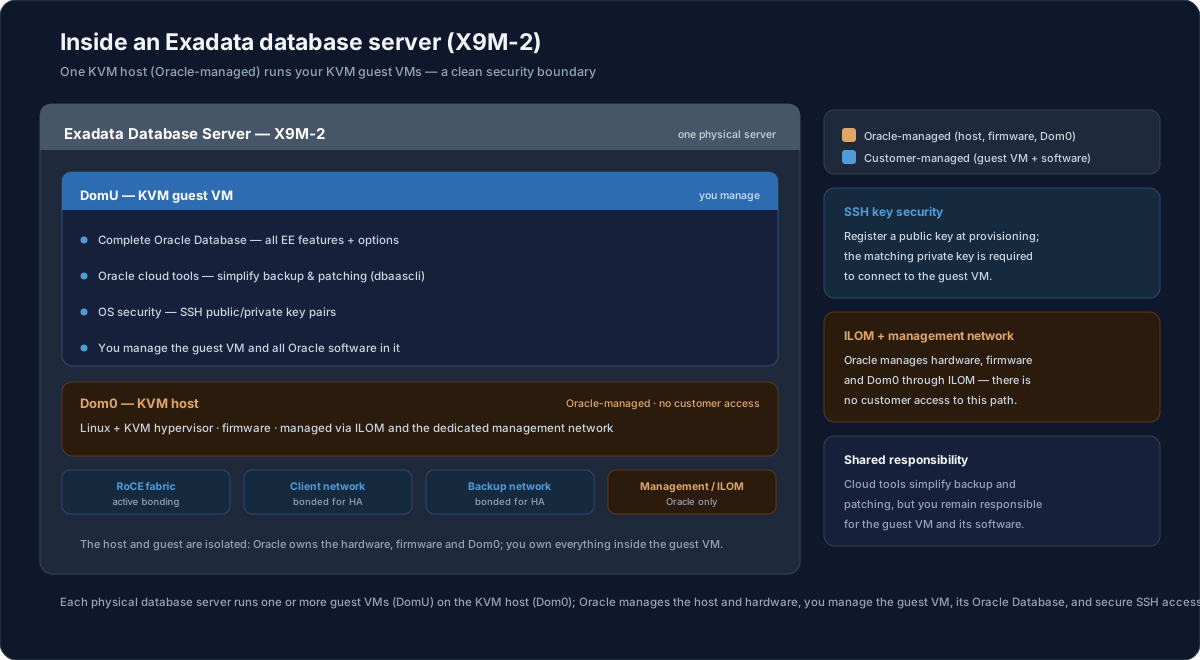
Each physical database server is split into a host and one or more guest VMs, and that split is the security boundary between Oracle and you. Oracle manages the host; you manage the guest.

  • Dom0 — the KVM host (Oracle-managed) — runs Linux and the KVM hypervisor, owns firmware, and is managed through ILOM and a dedicated management network, with no customer access.
  • DomU — the guest VM (customer-managed) — holds the complete Oracle Database (all EE features and options), the Oracle cloud tools that simplify backup and patching (such as dbaascli), and OS security based on SSH public/private key pairs; you manage the VM and everything in it.
  • SSH key security — you register a public key when the VM is provisioned, and the matching private key is required to connect.
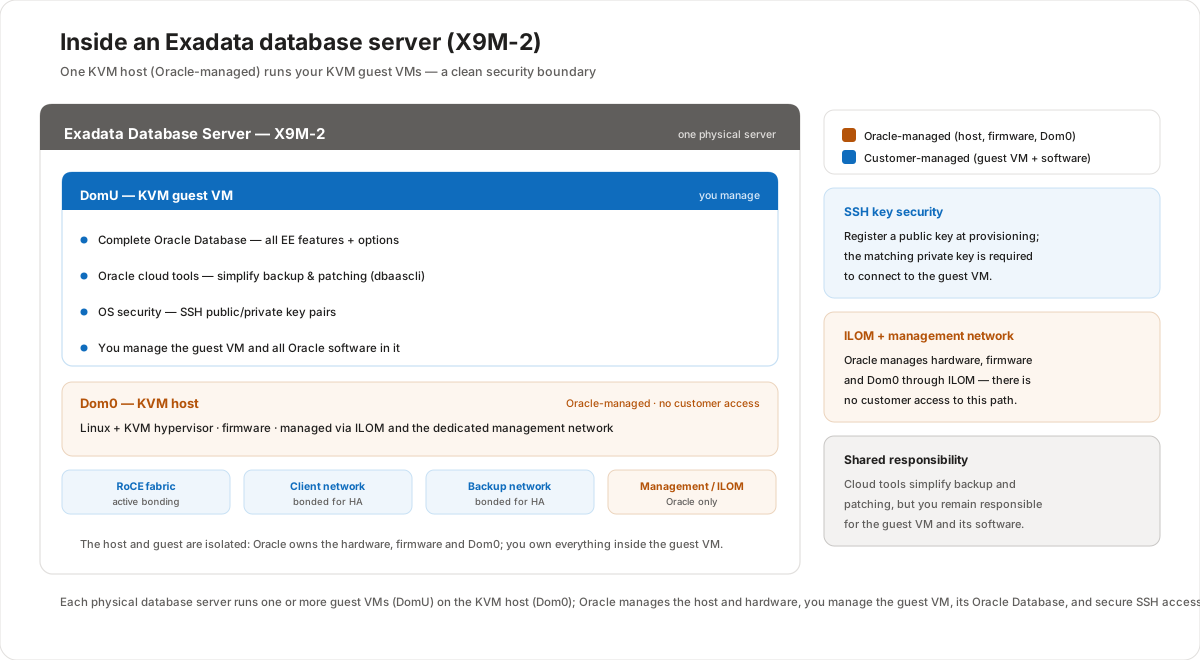
Inside an Exadata X9M-2 database server, shown as a single server with two layers separated by a clean security boundary. The lower layer is Dom0, the KVM host, managed by Oracle: it runs Linux and the KVM hypervisor, owns firmware, and is managed through the Integrated Lights Out Manager and a dedicated management network with no customer access. The upper layer is one or more DomU KVM guest virtual machines, managed by the customer: each guest holds a complete Oracle Database with all Enterprise Edition features and options, Oracle cloud tools that simplify backup and patching such as the dbaascli utility, and operating-system security based on SSH public and private key pairs; the customer manages the guest VM and all the Oracle software inside it. A network rail lists the connections: the internal RoCE fabric with active bonding, the client and backup networks both bonded for high availability, and the management and ILOM path used only by Oracle. Side panels add that SSH security requires registering a public key at provisioning while the private key is needed to connect, that ILOM and the management network are Oracle-only, and that although cloud tools simplify backup and patching the customer remains responsible for the guest VM and its software.Inside an Exadata X9M-2 database server, shown as a single server with two layers separated by a clean security boundary. The lower layer is Dom0, the KVM host, managed by Oracle: it runs Linux and the KVM hypervisor, owns firmware, and is managed through the Integrated Lights Out Manager and a dedicated management network with no customer access. The upper layer is one or more DomU KVM guest virtual machines, managed by the customer: each guest holds a complete Oracle Database with all Enterprise Edition features and options, Oracle cloud tools that simplify backup and patching such as the dbaascli utility, and operating-system security based on SSH public and private key pairs; the customer manages the guest VM and all the Oracle software inside it. A network rail lists the connections: the internal RoCE fabric with active bonding, the client and backup networks both bonded for high availability, and the management and ILOM path used only by Oracle. Side panels add that SSH security requires registering a public key at provisioning while the private key is needed to connect, that ILOM and the management network are Oracle-only, and that although cloud tools simplify backup and patching the customer remains responsible for the guest VM and its software.

Cloud@Customer (hybrid, behind your firewall)

The same service, but the hardware sits in your data center:

  • Databases are provisioned and subscribed to as a service; Oracle manages the Exadata infrastructure; the control plane runs in the chosen public cloud (OCI) region for the best performance with other cloud services.
  • You get a consistent public-cloud experience — the same UI, API-driven provisioning and management, and the same financial model (subscribe to infrastructure and compute cores, pay per use).
  • It is one of the most efficient cloud-adoption strategies: leverage existing data center investment, keep data next to applications, and meet data residency and security requirements without a disruptive migration.

Cloud@Customer suits data residency mandates (sensitive data or intellectual property cannot leave the premises), latency-sensitive high-volume or legacy applications tied to on-premises systems, and single-tenant security and control with a step-wise path to the public cloud.

How Cloud@Customer connects

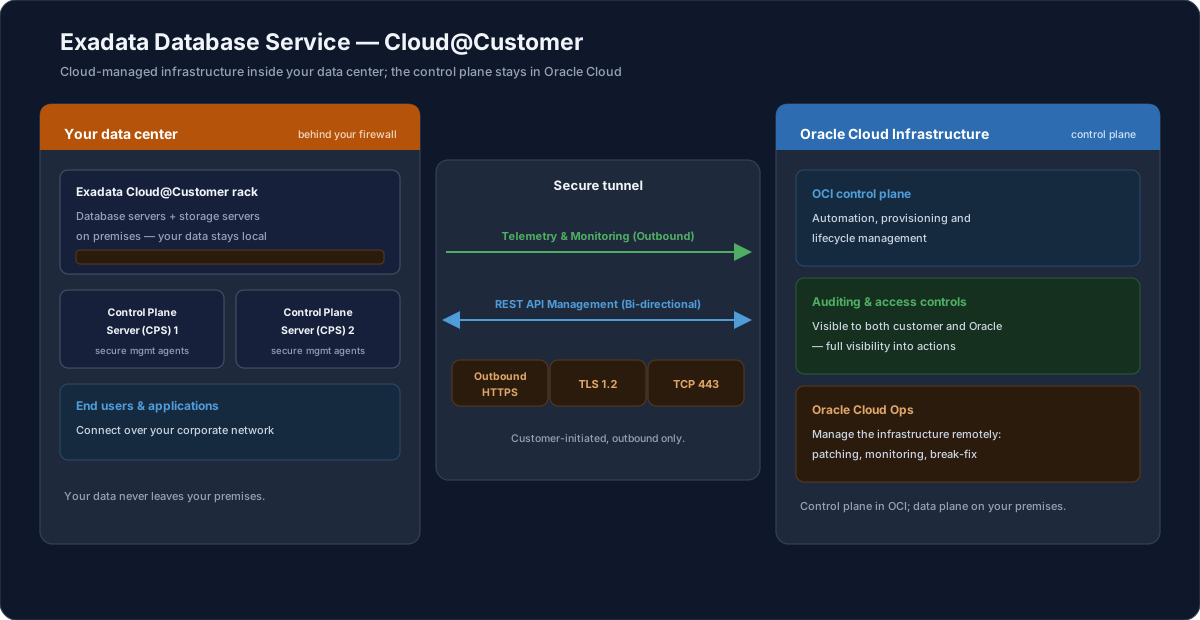
Cloud@Customer keeps your data on-premises while the control plane stays in Oracle Cloud, linked by a secure, outbound-only tunnel. Nothing inbound is opened through your firewall.

  • In your data center — the Exadata rack and two local Control Plane Servers (CPS) run the management agents; end users and applications reach the databases over your corporate network, and the data never leaves the premises.
  • Secure tunnel — telemetry flows outbound to Oracle and management arrives as REST API calls over an outbound HTTPS channel (TLS 1.2, TCP 443), always initiated from your side.
  • In Oracle Cloud — the OCI control plane automates provisioning and lifecycle, auditing and access controls are visible to both you and Oracle, and Cloud Operations manage the infrastructure remotely.
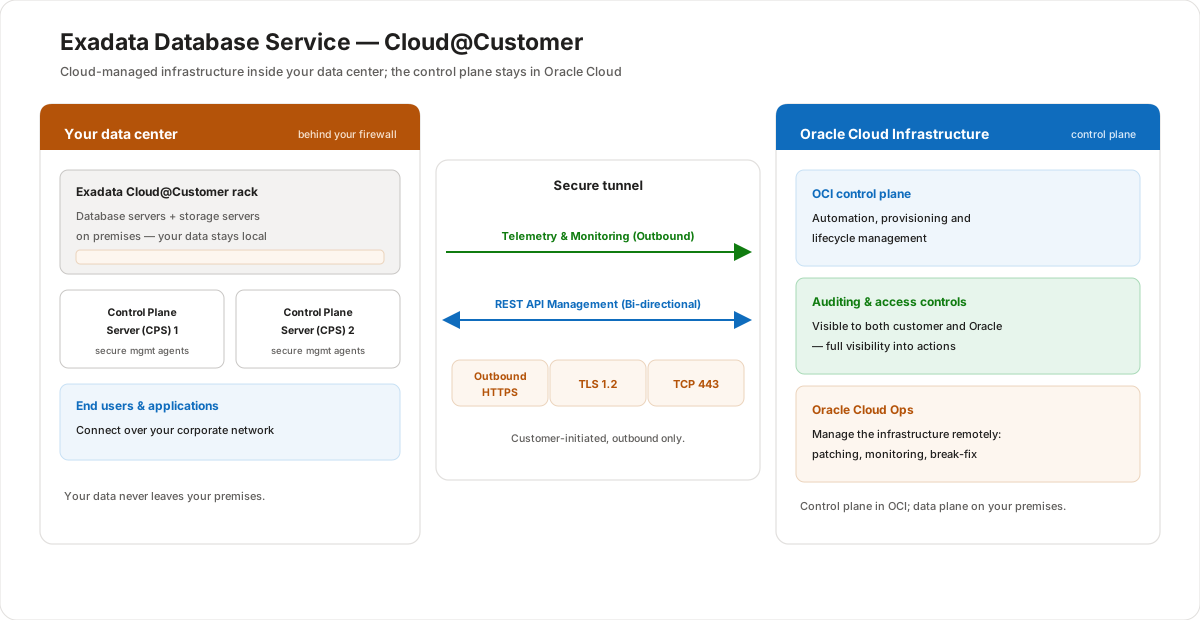
Exadata Database Service Cloud at Customer places cloud-managed infrastructure inside the customer's own data center while the control plane stays in Oracle Cloud. The left zone is your data center: it contains the Exadata Cloud at Customer rack with database and storage servers on premises, two local Control Plane Servers running secure management agents, and end users and applications that connect over the corporate network; the data never leaves the premises. The middle zone is a secure tunnel: telemetry and monitoring flow outbound from the rack to Oracle, and management instructions return as REST API calls, over an outbound HTTPS channel using TLS 1.2 over TCP port 443, always initiated from the customer side. The right zone is Oracle Cloud Infrastructure: it holds the OCI control plane that handles automation, provisioning and lifecycle; auditing and access controls visible to both customer and Oracle; and Oracle Cloud Operations who manage the infrastructure remotely with patching, monitoring and break-fix. The control plane lives in OCI while the data plane runs on the customer's premises behind their firewall.Exadata Database Service Cloud at Customer places cloud-managed infrastructure inside the customer's own data center while the control plane stays in Oracle Cloud. The left zone is your data center: it contains the Exadata Cloud at Customer rack with database and storage servers on premises, two local Control Plane Servers running secure management agents, and end users and applications that connect over the corporate network; the data never leaves the premises. The middle zone is a secure tunnel: telemetry and monitoring flow outbound from the rack to Oracle, and management instructions return as REST API calls, over an outbound HTTPS channel using TLS 1.2 over TCP port 443, always initiated from the customer side. The right zone is Oracle Cloud Infrastructure: it holds the OCI control plane that handles automation, provisioning and lifecycle; auditing and access controls visible to both customer and Oracle; and Oracle Cloud Operations who manage the infrastructure remotely with patching, monitoring and break-fix. The control plane lives in OCI while the data plane runs on the customer's premises behind their firewall.

Customer value

  • No hardware to buy or run — Oracle Operations owns the infrastructure end to end.
  • Full Oracle Database, nothing removed — every EE feature, pack, and option, so existing apps move without rework.
  • Predictable performance — dedicated, never over-provisioned, on the Exadata platform.
  • Elastic economics — scale cores up and down, pay only for what you use, BYOL or License-Included.
  • Deploy where you must — public cloud for simplicity, Cloud@Customer for residency and latency.

Risks and constraints to remember

  • Co-managed means shared responsibility. Oracle owns the infrastructure, but database patching, backup strategy, and instance management are yours — through the automation, not by hand on the hardware.
  • Supported releases are bounded. The lesson scopes the service to releases up to 19c; confirm the exact versions available for a given deployment and Grid Infrastructure version.
  • On Oracle Database@Azure specifically: only the Exadata X9M shape is offered, you consume the dedicated public-cloud co-managed model (not Cloud@Customer, and not the Autonomous service), and you create Exadata Infrastructure + an Exadata VM Cluster from the Azure portal while databases (CDBs/PDBs) are managed through OCI. License type (License-Included or BYOL) is chosen per VM cluster and affects billing, and each VM has a minimum of 2 OCPUs and 30 GB of memory. (See the Microsoft Learn sources for this page.)
  • Minimum commitments differ by model: a 48-hour minimum term on dedicated infrastructure versus a multi-year infrastructure subscription on Cloud@Customer.

Terms to remember

  • Exadata Database Service — a co-managed cloud service that runs a full Oracle Database on the Exadata platform; Oracle manages infrastructure, you manage the database.
  • Co-managed — Oracle-managed infrastructure, customer-managed virtual machines and databases.
  • Autonomous Database — the self-managing alternative service on the same Exadata platform.
  • Exadata Cloud Infrastructure — the dedicated Exadata hardware the service runs on in the public cloud.
  • Exadata Cloud@Customer — the same service delivered on Exadata hardware located in the customer's own data center.
  • OCPU (Oracle CPU) — the billing unit; one OCPU equals one enabled database server CPU core.
  • BYOL — Bring Your Own License; reuse existing Oracle licenses instead of License-Included.
  • VM Cluster — the customer-managed virtual machines (and their database instances) provisioned on the Exadata infrastructure.
🏢 Customer-ready explanation

"Think of Exadata Database Service as renting the full Exadata engine instead of buying it. You get the complete Oracle Database — RAC, In-Memory, Multitenant, everything — running on dedicated Exadata hardware, but Oracle Operations runs the boxes, the networking, and the storage software for you. Your team only looks after the database VMs and the databases themselves, all through a portal and APIs. You pay monthly by the core — one OCPU is one enabled database core — and you can dial cores up or down as workloads change, with no upfront hardware spend. On Oracle Database@Azure it's the same service on the X9M shape: you create the infrastructure and a VM cluster from the Azure portal, pick License-Included or Bring Your Own License, and you're running an enterprise Oracle database without owning a single rack."

Check your understanding

Q1/9
0 correct
What Oracle Database software does each Exadata Database Service deployment include?